h264ify (V3) icon

h264ify (V3) Chrome Extension Analysis

Automation & Workflow Efficiency

Chrome extension ID: cahkoilpkmfhmjeejjkldgkfccjnogam

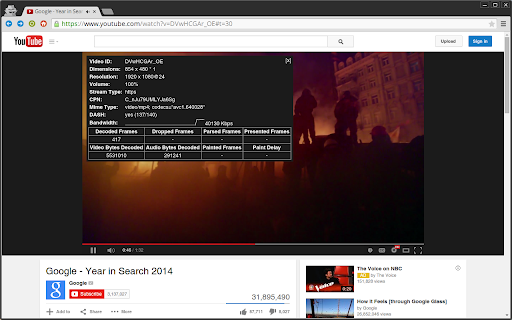
h264ify (V3) is a browser extension that forces YouTube to deliver video streams encoded in H.264 instead of VP8 or VP9. This allows older or lower-spec devices to utilize hardware-accelerated decoding via their GPUs, resulting in smoother playback and lower resource consumption. The extension runs automatically in the background without requiring user configuration.

Developer:Master Tools
Version:3.0.0
Size:25.0KiB
Last updated:

Overview

Installs

988

Rating

4.0

4 reviews

Languages

2 locales

Includes English, čeština

Market analysis

Review-backed positioning, friction, and market signals for this Chrome extension.

Backed by review samples

Macro category

Automation & Workflow Efficiency

Pricing friction

Low review signal

Complaint intensity

Low review signal

Listing & review signals
Observed signals from store listing text and review samples.

Listing positioning

The store listing positions h264ify (V3) as a simple, automated solution to improve YouTube performance on less powerful computers. It highlights how forcing YouTube to stream in H.264 format rather than the default VP8/VP9 codecs enables GPU hardware acceleration. This technical shift is marketed as a direct cure for video stuttering, high CPU usage, overheated laptops, and rapid battery drain.

Inferred product pattern

Background browser optimization utility that intercepts media requests to select efficient codecs.

Review-backed pain points

No review-backed pain points are available in the current sample, as all provided reviews are highly positive.

Observed feature gaps

No feature gaps were identified based on the available listing information and limited positive review samples.

Tags
Video OptimizerHardware AccelerationYouTube UtilityPerformance Enhancer
Target users

- Users with older or low-spec computers

- Laptop users experiencing high battery drain during video playback

- YouTube viewers troubled by choppy, stuttering video feeds

Primary use cases

- Lowering CPU utilization while streaming YouTube videos

- Enabling hardware acceleration on legacy graphics cards

- Reducing laptop heat and fan noise during media playback

Positive themes

- Smoother video playback with eliminated stuttering

- Successful forcing of the H.264 codec over alternative streams

Negative themes

No negative theme data.

Observed friction

- No pricing friction was observed; the extension is positioned and reviewed as a free utility.

Evidence boundary: The analysis is drawn from the official store description detailing the extension's codec-switching mechanism, supported by high-rating user reviews confirming stutter-free playback and effective codec substitution. The review-backed findings are constrained by a very small sample size of only two highly positive user reviews, leaving potential edge-case bugs or negative feedback unrepresented.
Complaint summaries
Review-backed complaint signals grouped by operational area.

Support

No complaints regarding customer support, account management, or refunds were found in the available review sample.

Reliability

No performance or reliability complaints were observed; reviews indicate the tool works perfectly to smooth out playback.

Privacy

No privacy or security concerns were raised in the provided user feedback.

Access & pricing

- Free usage observed

- No account requirement observed

- Free plan or free usage claimed

Store listing facts

Listing assets

- Screenshots: 2

- Videos: 0

- Languages: 2

Trust signals

- Privacy policy

- Developer contact

Store metadata

- Version: 3.0.0

- Size: 25.0KiB

- Last updated:

Store description excerpt
Short excerpt from the public Chrome Web Store listing; full copy is available on the official store page.
Try h264ify if YouTube videos stutter, take up too much CPU, eat battery life, or make your laptop hot. By default, YouTube streams VP8/VP9 encoded video. However, this can cause problems with less powerful machines because VP8/VP9 is not typically hardware accelerated. In contrast, H.264 is commonly hardware accelerated by GPUs, which usually means smoother video playback and reduced CPU usage. h264ify makes YouTube stream H.264 videos instead of VP8/VP9 videos.

Listing SEO keywords

Search intent keywords
Keyword signals for evaluating how users may discover, compare, or search for this extension category.

Core discovery

force youtube h264 extensionreduce chrome cpu youtubeyoutube hardware acceleration tool

Comparison

h264 vs vp9 chromeh264ify vs enhanced-h264ify

Problem

youtube stuttering chromeyoutube high cpu battery drainlaptop gets hot watching youtube

Alternative

enhanced-h264ifyyoutube codec blocker

Similar extensions

Jump to related discovery paths:

FAQ

What is h264ify (V3) mainly used for?
h264ify (V3) is a browser extension that forces YouTube to deliver video streams encoded in H.264 instead of VP8 or VP9. This allows older or lower-spec devices to utilize hardware-accelerated decoding via their GPUs, resulting in smoother playback and lower resource consumption. The extension runs automatically in the background without requiring user configuration.
What market signals stand out?
Early or small audience with limited review base. Last known update: 08/07/2024.
What should builders compare before entering this space?
Compare install concentration, rating quality, update recency, screenshots, developer portfolio, listing claims, and review-backed friction signals.
Is this page review-backed?
Backed by review samples. This page combines store metadata with selected review signals, while raw store metrics remain visible for comparison.

Screenshots

h264ify (V3) screenshot

Links

Recommended Chrome extensions

Related listings from the same category, trending peers, and the same publisher portfolio.

Browse workflow
Proxy SwitchyOmega (V3) icon

Proxy SwitchyOmega (V3)

Master Tools

Manage and switch between multiple proxies quickly & easily.

Installs

100K+

Rating

3.4

Tetrys (V3) icon

Tetrys (V3)

Master Tools

A fun game in a popup

Installs

60K+

Rating

3.0

Mendeley Web Importer icon

Mendeley Web Importer

Mendeley

Fast, convenient import of references and PDFs to your Mendeley Reference Manager library.

Installs

3.0M+

Rating

2.3

Enable local file links icon

Enable local file links

Takashi Sugimoto (tksugimoto)

Make it possible to open by click a link to a local file that is disabled by Chrome.

Installs

3.0M+

Rating

3.9

Pop up blocker for Chrome™ - Poper Blocker icon

Pop up blocker for Chrome™ - Poper Blocker

dingosolutions

Block popups, ads, cookie requests, trackers, notifications, ads on social media & more. A clean browsing experience starts today.

Installs

2.0M+

Rating

4.8

Momentum icon

Momentum

Momentum

Transform your browser into a beautifully designed tab that helps you feel calm, keep focus, and stay energized.

Installs

2.0M+

Rating

4.5

Google Scholar PDF Reader icon

Google Scholar PDF Reader

scholar-chrome-extensions

Supercharge your paper reading: follow references, skim outline, jump to figures, cite and save.

Installs

2.0M+

Rating

4.1

Keeper® Password Manager & Digital Vault icon

Keeper® Password Manager & Digital Vault

Keeper Security

Generate strong passwords, autofill and protect your confidential info with zero-knowledge encryption.

Installs

2.0M+

Rating

4.8

AI Grammar Checker & Paraphraser – LanguageTool icon

AI Grammar Checker & Paraphraser – LanguageTool

lt-extension-publisher

Instantly Enhance Your Texts with LanguageTool’s Grammar Checker and Paraphrasing Tool

Installs

2.0M+

Rating

4.7

Snow Web Application Metering icon

Snow Web Application Metering

snow_chrome_extensions

This extension tracks web application use for the purpose of license compliance and cost optimization. www.snowsoftware.com/browser

Installs

2.0M+

Rating

1.3