ChatGPT to PDF by PDFCrowd icon

ChatGPT to PDF by PDFCrowd Chrome Extension Analysis

AI & Writing Assistants

Chrome extension ID: ccjfggejcoobknjolglgmfhoeneafhhm

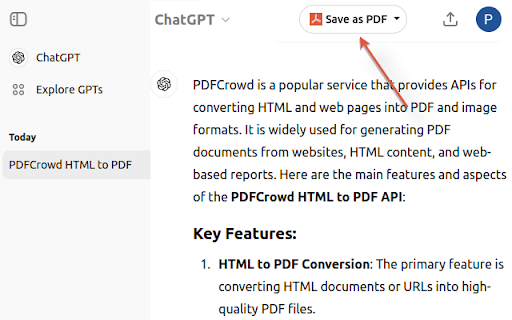
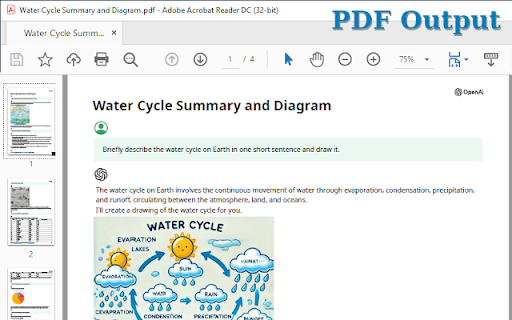
A Chrome extension that adds an export button to the ChatGPT interface, allowing users to generate PDF versions of their chats. It utilizes the PDFCrowd API to handle the conversion and provides settings for page size, orientation, and visual styling.

Developer:Pdfcrowd Team
Version:3.9
Size:38.95KiB
Last updated:

Overview

Installs

100K+

Rating

4.7

370 reviews

Languages

1 locales

Includes English

Market analysis

Review-backed positioning, friction, and market signals for this Chrome extension.

Backed by review samples

Macro category

AI & Writing Assistants

Pricing friction

Low review signal

Complaint intensity

Moderate review signal

Listing & review signals
Observed signals from store listing text and review samples.

Listing positioning

The product is positioned as a simple, one-click solution to convert ChatGPT conversations into neatly formatted PDF files. It emphasizes customization options for layout, themes, and content selection to make interactions easier to save and share.

Inferred product pattern

Single-purpose utility extension acting as a frontend for a third-party conversion API.

Review-backed pain points

Users report frequent failures when exporting medium-to-long conversations, citing 'conversion time exceeded' and 'message length exceeded' errors.

Observed feature gaps

Inability to process very large chat histories and the presence of a non-removable branding banner on all generated PDFs.

Tags
PDF ExportChatGPT UtilityDocument FormatterAI Archiving
Target users

- ChatGPT power users

- Students

- Researchers

- Professionals documenting AI workflows

Primary use cases

- Archiving AI chat history

- Sharing structured AI transcripts

- Creating PDF reports from AI-generated content

Positive themes

- High-quality visual output

- Preservation of original image sizes

- Simplicity of export functionality

Negative themes

- Conversion timeouts on long conversations

- Network errors and API connection failures

- Broken selection functionality

- UI buttons failing to appear

Observed friction

- Performance complaints detected

- No direct pricing complaints found in reviews, though the store listing explicitly states the PDF banner cannot be removed even with a paid license.

Evidence boundary: Data extracted from store listing and 15 sampled reviews ranging from 1 to 5 stars. Recent review samples show a spike in technical errors which may not reflect the experience of the entire user base.
Complaint summaries
Review-backed complaint signals grouped by operational area.

Support

Users have expressed frustration over bugs and requested fixes, but no specific complaints regarding support response quality were observed.

Reliability

Significant reliability issues reported, including 'Failed to fetch' network errors, timeouts on larger files, and the extension button disappearing from the UI.

Privacy

No privacy or security complaints observed in the provided samples.

Access & pricing

- Free entry with paid features

- No account requirement observed

- Limited free usage observed

Store listing facts

Listing assets

- Screenshots: 2

- Videos: 0

- Languages: 1

Trust signals

- Developer contact

- Official website

- Support link

Store metadata

- Version: 3.9

- Size: 38.95KiB

- Last updated:

Store description excerpt
Short excerpt from the public Chrome Web Store listing; full copy is available on the official store page.
The add-on adds a button to the ChatGPT webpage and with just a quick click, you can turn your chats into neatly formatted PDF files. It's super easy to use - perfect for keeping or sharing your interactions. The add-on uses the PDFCrowd API to create PDF. Features: - PDF page size and orientation - Color theme selection - Print selected sections only - Option to exclude prompts from PDF - Adjustable font size - Customizable page margins Important: All generated PDFs include a banner at the bottom which cannot be removed. Purchasing a PDFCrowd license does not remove the banner. Install/Upgrade: To enable the button, open a tab with ChatGPT, click the puzzle icon in the toolbar, then click the three dots next to the plugin icon and confirm the permissions.

Listing SEO keywords

Search intent keywords
Keyword signals for evaluating how users may discover, compare, or search for this extension category.

Core discovery

ChatGPT to PDFSave ChatGPT chatExport ChatGPT to PDF

Comparison

best ChatGPT PDF exportChatGPT to PDF vs screenshot

Problem

save long ChatGPT conversationChatGPT PDF conversion error

Alternative

ChatGPT export alternativessave AI chat as PDF

Similar extensions

Jump to related discovery paths:

FAQ

What is ChatGPT to PDF by PDFCrowd mainly used for?
A Chrome extension that adds an export button to the ChatGPT interface, allowing users to generate PDF versions of their chats. It utilizes the PDFCrowd API to handle the conversion and provides settings for page size, orientation, and visual styling.
What market signals stand out?
Established adoption with moderate review base. Last known update: 05/18/2026.
What should builders compare before entering this space?
Compare install concentration, rating quality, update recency, screenshots, developer portfolio, listing claims, and review-backed friction signals.
Is this page review-backed?
Backed by review samples. This page combines store metadata with selected review signals, while raw store metrics remain visible for comparison.

Screenshots

ChatGPT to PDF by PDFCrowd screenshot

Links

Recommended Chrome extensions

Related listings from the same category, trending peers, and the same publisher portfolio.

Browse tools
Save as PDF icon

Save as PDF

Pdfcrowd Team

Download web pages as PDF in one click.

Installs

300K+

Rating

3.2

Microsoft Bing Homepage & Search for Chrome icon

Microsoft Bing Homepage & Search for Chrome

Microsoft Corporation

Set Microsoft Bing as your default homepage and default search engine

Installs

4.0M+

Rating

3.8

Monica: All-In-One AI Assist & Smartest  AI Agent icon

Monica: All-In-One AI Assist & Smartest AI Agent

Monica Team

One stop AI Assistant with GPT, Claude, Gemini: Chat, Write, Translate, Search, Summarize, image generator, video generation

Installs

3.0M+

Rating

4.9

Immersive Translate: AI Web, PDF & Video Translator icon

Immersive Translate: AI Web, PDF & Video Translator

Immersive Translate

Free Translate Website, Translate PDF & Epub eBook, Translate Video Subtitles in Bilingual

Installs

3.0M+

Rating

4.0

BetterTTV icon

BetterTTV

NightDev, LLC

BetterTTV enhances Twitch and YouTube with new features, emotes, and more.

Installs

3.0M+

Rating

4.6

Ad Blocker: Stands AdBlocker icon

Ad Blocker: Stands AdBlocker

Stands

Stands AdBlocker – it's a free ad blocker for YouTube, Twitch, Pop-Ups, Video Ads, and websites. Block ads everywhere with Stands!

Installs

3.0M+

Rating

4.8

Google Input Tools icon

Google Input Tools

cloud-input-team

Input Tools lets you type in the language of your choice.

Installs

3.0M+

Rating

4.0

Microsoft Bing Search with Rewards icon

Microsoft Bing Search with Rewards

Microsoft Corporation

Use the Microsoft Rewards extension to find new ways to earn every day, easily track your points and set your default search to Bing

Installs

3.0M+

Rating

4.4

Google Scholar Button icon

Google Scholar Button

scholar-chrome-extensions

Lookup scholarly articles as you browse the web.

Installs

3.0M+

Rating

4.6

ЮБуст - VPN для YouTube. Обход блокировки Ютуб без ВПН. VPN для браузера icon

ЮБуст - VPN для YouTube. Обход блокировки Ютуб без ВПН. VPN для браузера

Uboost

Ускоритель Ютуб без ВПН, VPN для браузера Яндекс, Chrome, Opera, Edge. Обход замедления Ютуба.

Installs

2.0M+

Rating

4.2