Audio Equalizer for Youtube™ Chrome Extension Analysis
Niche Lifestyle & Gaming HacksChrome extension ID: dcjnokfichnijppmkbgpafmdjghibike
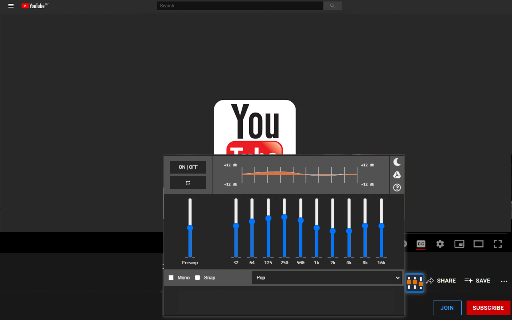
A Chrome extension that provides an 8-band audio equalizer for YouTube videos. It allows users to modify sound frequencies to their liking or use pre-defined presets to enhance audio quality.
Overview
Installs
40K+
Rating
★ 4.7
425 reviews
Languages
41 locales
Includes Deutsch, English, English (United States), Filipino...
Market analysis
Review-backed positioning, friction, and market signals for this Chrome extension.
Macro category
Niche Lifestyle & Gaming Hacks
Pricing friction
Low review signal
Complaint intensity
Moderate review signal
Listing positioning
The product is positioned as a stylish and accessible audio equalizer specifically designed for YouTube. It emphasizes ease of use through a dedicated button placed directly on the YouTube interface and offers over 10 default settings.
Inferred product pattern
Single-feature utility extension targeting a specific high-traffic platform to provide a niche functional enhancement.
Review-backed pain points
Users are consistently frustrated that they cannot save custom equalizer settings, requiring them to manually readjust frequencies every time they open the browser or start a new video.
Observed feature gaps
Lack of a 'save' button for user-defined presets and the absence of an auto-start or persistence feature for settings across different videos.
- YouTube viewers
- Music listeners
- Casual audiophiles
- Customizing audio frequencies for YouTube videos
- Applying preset audio profiles for different music genres
- Smoothing out sound quality on web videos
- Effective audio modification
- Value of the free price point
- Convenient taskbar/UI access
- Inability to save custom presets
- Installation or activation failures
- Inconsistent audio effects
- Performance complaints detected
- No pricing friction observed; users explicitly highlight that the tool is free.
Support
A small number of users reported that the extension did not work for them and felt a lack of support from the developer.
Reliability
Some users report that the equalizer button does not appear on the YouTube page or that the audio effect is not audible on some videos.
Privacy
No privacy or security complaints observed in the provided data.
- Free usage observed
- No account requirement observed
- Free plan or free usage claimed
Store listing facts
- Screenshots: 1
- Videos: 0
- Languages: 41
- Developer contact
- Official website
- Version: 3.0.2
- Size: 335KiB
- Last updated:
Listing SEO keywords
Core discovery
Comparison
Problem
Alternative
Similar extensions
Jump to related discovery paths:
FAQ
Screenshots