Quick Find for Google Chrome™ icon

Quick Find for Google Chrome™ Chrome Extension Analysis

Automation & Workflow Efficiency

Chrome extension ID: dejblhmebonldngnmeidliaifgiagcjj

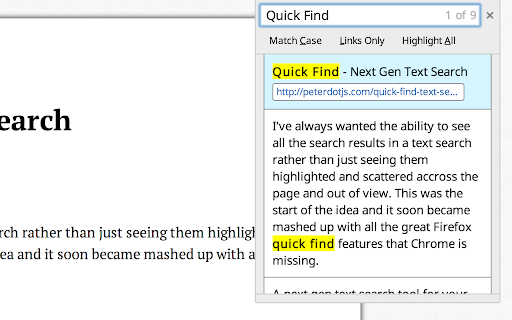
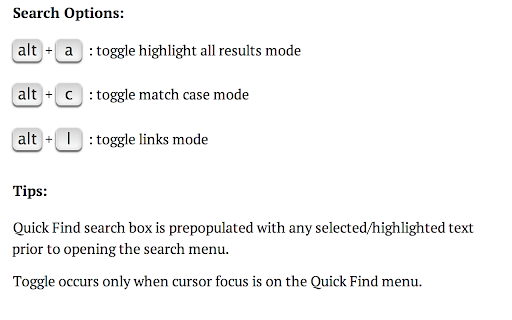
Quick Find is a text search tool that aggregates all matches on a webpage into a single menu. It provides advanced search options including case-sensitive matching and a 'links only' mode to speed up site navigation.

Developer:Peter Shin
Version:0.0.14
Size:260KiB
Last updated:

Overview

Installs

4K+

Rating

4.1

135 reviews

Languages

1 locales

Includes English (United States)

Market analysis

Review-backed positioning, friction, and market signals for this Chrome extension.

Backed by review samples

Macro category

Automation & Workflow Efficiency

Pricing friction

Low review signal

Complaint intensity

Moderate review signal

Listing & review signals
Observed signals from store listing text and review samples.

Listing positioning

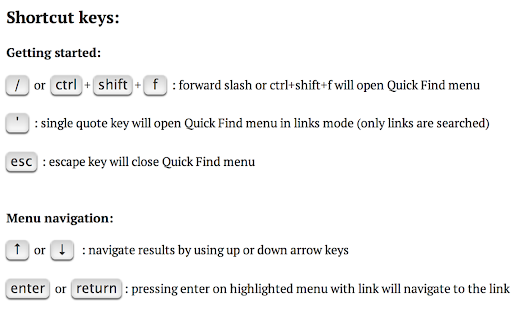
The product is positioned as a powerful upgrade to Chrome's default find-in-page functionality, porting features from Firefox. It emphasizes efficiency through centralized search results and keyboard-driven navigation.

Inferred product pattern

Open-source utility port designed to replicate legacy browser features for power users.

Review-backed pain points

Users report the extension is often non-functional ('simply doesnt work') or spotty, particularly on pages with iframes, dynamic content, or specific Google services. One user reported a redirect to an advertising domain upon installation.

Observed feature gaps

Lack of support for iframes/frames, inability to search PDF files, and absence of a search keyword history list.

Tags
Text SearchNavigation UtilityProductivity ToolKeyboard Shortcuts
Target users

- Power users

- Researchers

- Users transitioning from Firefox

Primary use cases

- Rapidly locating specific text across a long page

- Navigating to specific links via keyword search

- Performing case-sensitive text searches on web pages

Positive themes

- Appreciation for the core concept and intended functionality

Negative themes

- General failure to function

- Incompatibility with iframes and frames

- Broken functionality on Google apps (Gmail, Drive)

- Suspicious post-installation redirects

Observed friction

- Performance complaints detected

- Privacy complaints detected

- No pricing friction observed as the tool is presented as free.

Evidence boundary: Extracted from store listing and 12 provided review samples. The review samples provided are skewed toward low ratings, meaning positive themes are underrepresented compared to the overall 4.1 star score.
Complaint summaries
Review-backed complaint signals grouped by operational area.

Support

No direct support complaints, though users express frustration over the lack of updates to fix reported bugs.

Reliability

Significant reliability issues reported, with multiple users stating the tool no longer works or fails on specific website architectures.

Privacy

One user reported that the extension attempted to open a redirect to an advertiser's page (click.bounceads.net) immediately after installation.

Access & pricing

- Free usage observed

- No account requirement observed

- Free plan or free usage claimed

Store listing facts

Listing assets

- Screenshots: 4

- Videos: 1

- Languages: 1

Trust signals

- Privacy policy

- Developer contact

- Support link

Store metadata

- Version: 0.0.14

- Size: 260KiB

- Last updated:

Store description excerpt
Short excerpt from the public Chrome Web Store listing; full copy is available on the official store page.
For a more easily readable description please visit: https://github.com/peterdotjs/quick-find **** Change Log: 0.0.14 - Manifest v3 support 0.0.13 - Updated reference url 0.0.12 - Added ability to change default shortcut keys 0.0.11 - Fixed issue where search is broken in Chrome 40. Motivation -------------------- I’ve always wanted the ability to see all the search results in a text search rather than just seeing them highlighted and scattered across the page and out of view. This was the start of the idea and it soon became mashed up with all the great Firefox quick find features that Chrome is missing. If you like it please rate it and if you have any feature requests, questions or bugs you file it here: https://github.com/peterdotjs/quick-find/issues Demo ------------ https://www.youtube.com/watch?v=x2PEyTyJ6iM Description -------------------- Next generation text search. A new text…

Listing SEO keywords

Search intent keywords
Keyword signals for evaluating how users may discover, compare, or search for this extension category.

Core discovery

Chrome text searchQuick Find ChromeFirefox style search Chromecase sensitive find Chrome

Comparison

Chrome find vs Quick FindFirefox Quick Find Chrome alternative

Problem

Chrome search not case sensitivefind links on page quickly

Alternative

Chrome find alternativebetter Ctrl+F for Chrome

Similar extensions

Jump to related discovery paths:

FAQ

What is Quick Find for Google Chrome™ mainly used for?
Quick Find is a text search tool that aggregates all matches on a webpage into a single menu. It provides advanced search options including case-sensitive matching and a 'links only' mode to speed up site navigation.
What market signals stand out?
Early or small audience with moderate review base. Last known update: 06/10/2024.
What should builders compare before entering this space?
Compare install concentration, rating quality, update recency, screenshots, developer portfolio, listing claims, and review-backed friction signals.
Is this page review-backed?
Backed by review samples. This page combines store metadata with selected review signals, while raw store metrics remain visible for comparison.

Screenshots

Quick Find for Google Chrome™ screenshot

Links

Recommended Chrome extensions

Related listings from the same category, trending peers, and the same publisher portfolio.

Browse tools
Tab Resize - split screen layouts icon

Tab Resize - split screen layouts

Peter Shin

The ORIGINAL Tab Resize. Split Screen made easy. Resize the CURRENT tab and tabs to the RIGHT into layouts on separate windows.

Installs

1.0M+

Rating

4.3

CSFloat Market Checker icon

CSFloat Market Checker

CSFloat Inc.

Shows the float value, paint seed, and more of Counter-Strike (CS:GO & CS2) items on the Steam Market or Inventories

Installs

1.0M+

Rating

3.9

Video Downloader Plus icon

Video Downloader Plus

Video Downloader Plus

Download and save videos from any website instantly. A fast, simple video downloader that just works.

Installs

1.0M+

Rating

4.5

Wordtune: AI Paraphrasing and Grammar Tool icon

Wordtune: AI Paraphrasing and Grammar Tool

Wordtune

Unlock your potential with Wordtune's free AI writer – paraphrase, rewrite, translate, fix grammar, and more.

Installs

1.0M+

Rating

4.6

Dark Mode icon

Dark Mode

Grephy

A global dark theme for the web.

Installs

1.0M+

Rating

3.6

AIPRM for ChatGPT icon

AIPRM for ChatGPT

AIPRM

AIPRM is your cheat code for ChatGPT. Adds a list of curated prompt templates and advanced features. Try today.

Installs

1.0M+

Rating

3.9

Enhancer for YouTube™ icon

Enhancer for YouTube™

Max RF

Take control of YouTube and boost your user experience!

Installs

1.0M+

Rating

4.7

Поиск Яндексa icon

Поиск Яндексa

Yandex

Вводите запросы в адресную строку и получайте ответы от Яндекса

Installs

1.0M+

Rating

3.3

Bing Search and Homepage icon

Bing Search and Homepage

Microsoft Corporation

Set Microsoft Bing as your default homepage and default search engine

Installs

1.0M+

Rating

1.8

uberAgent icon

uberAgent

Cloud Software Group, Inc.

Enables uberAgent to collect web app usage and performance data (e.g., foreground tab, page load duration) from Chrome.

Installs

1.0M+

Rating

5.0