Tab Resize - split screen layouts icon

Tab Resize Chrome Extension Analysis

Tab & Bookmark Productivity

Store listing title: Tab Resize - split screen layouts

Chrome extension ID: bkpenclhmiealbebdopglffmfdiilejc

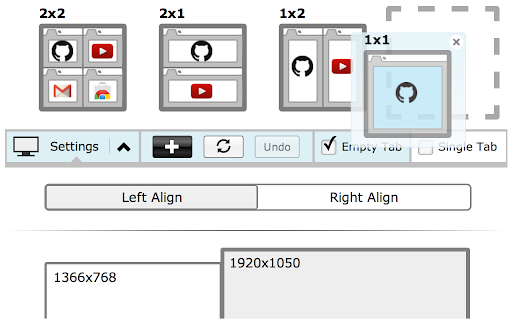
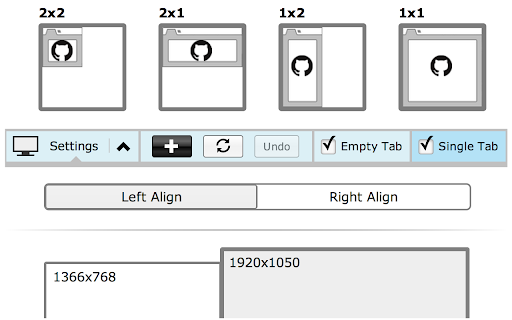
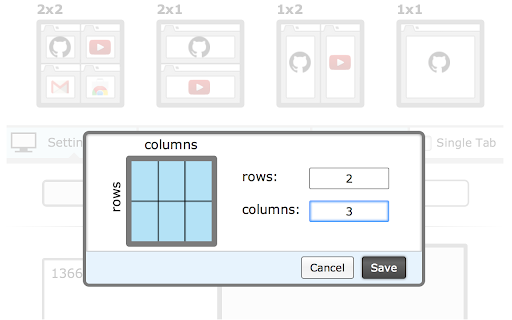
A productivity extension designed to automate window resizing and tab splitting into various layouts. It supports multiple monitors and custom layout configurations to assist with side-by-side comparisons.

Developer:Peter Shin
Version:3.0.1
Size:267KiB
Last updated:

Overview

Installs

1.0M+

Rating

4.3

1,133 reviews

Languages

1 locales

Includes English (United States)

Market analysis

Review-backed positioning, friction, and market signals for this Chrome extension.

Backed by review samples

Macro category

Tab & Bookmark Productivity

Pricing friction

Low review signal

Complaint intensity

High review signal

Listing & review signals
Observed signals from store listing text and review samples.

Listing positioning

The product positions itself as the original tool for easy split-screen layouts using separate windows. It claims to avoid the security limitations of single-pane extensions by splitting tabs into distinct browser windows.

Inferred product pattern

A window-management utility that converts tab sets into multiple separate browser windows to achieve split-screen layouts.

Review-backed pain points

Users report that the extension destroys existing tab groups, creates a 'mess' of multiple windows instead of single-window panes, and consumes excessive memory by opening empty tabs.

Observed feature gaps

Lack of support for vertical (top/bottom) window splitting and inability to maintain tabs within a single browser window.

Tags
Tab ManagementSplit ScreenWindow ResizingProductivity Tool
Target users

- Power users with large monitors

- Multi-taskers

- Researchers

Primary use cases

- Side-by-side tab comparisons

- Organizing multiple windows across monitors

- Automated window layout management

Positive themes

- Review-backed positive themes are not available in the provided sample.

Negative themes

- Destruction of tab groups and hierarchies

- Inefficient screen usage with gaps

- Creation of unnecessary empty windows and tabs

- Buggy window splitting behavior

Observed friction

- Performance complaints detected

- No pricing information provided in the listing or reviews.

Evidence boundary: Extracted from store description and a sample of 1-star reviews highlighting workflow disruption and layout issues. The review sample provided contains only low-rating reviews, which may not represent the full sentiment of the 1M+ users.
Complaint summaries
Review-backed complaint signals grouped by operational area.

Support

No support-specific complaints observed in the provided samples.

Reliability

Users report bugs where windows do not split correctly or fail to fill the available screen estate.

Privacy

No privacy complaints observed; the developer explicitly addresses permission usage in the description.

Access & pricing

- No clear monetization signal

- No account requirement observed

- No clear pricing signal

Store listing facts

Listing assets

- Screenshots: 4

- Videos: 1

- Languages: 1

Trust signals

- Privacy policy

- Developer contact

- Support link

Store metadata

- Version: 3.0.1

- Size: 267KiB

- Last updated:

Store description excerpt
Short excerpt from the public Chrome Web Store listing; full copy is available on the official store page.
For a more easily readable description please visit: https://github.com/peterdotjs/tab-resize ***** Version 3.0.0 -------------------------- Manifest V3 support added. Major extension overhaul to support manifest guidelines with minimum product changes. Version 2.3.0 -------------------------- Added default shortcut keys for: Ctrl + Shift + Z: Undo Last Resize Ctrl + Shift + 1: 1x1 Resize Ctrl + Shift + 2: 1x2 Resize Ctrl + Shift + 4: 2x2 Resize Can still be changed through shortcut key menu. Version 2.2.0 -------------------------- Added support for shortcut keys and scaled split screen layouts. Version 2.1.1 -------------------------- HIGHLIGHTED TABS NOW CAN BE RESIZED (not only tabs to the right) - when 2 or more tabs are highlighted, only these tabs will be considered for resize. In Chrome, you can select multiple tabs by clicking on tabs while holding down the Ctrl (Command for Ma…

Listing SEO keywords

Search intent keywords
Keyword signals for evaluating how users may discover, compare, or search for this extension category.

Core discovery

split screen tabsresize windows chrometab organizermulti window layout

Comparison

Tab ScissorsSplit Screen for Google Chrome

Problem

break tab groupswaste memorymessy windowstab management frustration

Alternative

manual tab draggingbuilt-in Windows snapping

Similar extensions

Jump to related discovery paths:

FAQ

What is Tab Resize mainly used for?
A productivity extension designed to automate window resizing and tab splitting into various layouts. It supports multiple monitors and custom layout configurations to assist with side-by-side comparisons.
What market signals stand out?
Large installed base with substantial review base. Last known update: 06/11/2024.
What should builders compare before entering this space?
Compare install concentration, rating quality, update recency, screenshots, developer portfolio, listing claims, and review-backed friction signals.
Is this page review-backed?
Backed by review samples. This page combines store metadata with selected review signals, while raw store metrics remain visible for comparison.

Screenshots

Tab Resize - split screen layouts screenshot

Links

Recommended Chrome extensions

Related listings from the same category, trending peers, and the same publisher portfolio.

Browse workflow
Quick Find for Google Chrome™ icon

Quick Find for Google Chrome™

Peter Shin

Port of Firefox Quick Find features + awesome new ones. Search results in one location. Navigate to links in just a few keystrokes.

Installs

4K+

Rating

4.1

AI Grammar Checker & Paraphraser – LanguageTool icon

AI Grammar Checker & Paraphraser – LanguageTool

lt-extension-publisher

Instantly Enhance Your Texts with LanguageTool’s Grammar Checker and Paraphrasing Tool

Installs

2.0M+

Rating

4.7

Snow Web Application Metering icon

Snow Web Application Metering

snow_chrome_extensions

This extension tracks web application use for the purpose of license compliance and cost optimization. www.snowsoftware.com/browser

Installs

2.0M+

Rating

1.3

Sound Booster - increase volume up icon

Sound Booster - increase volume up

Sound-ultimate.com

Volume Booster helps boost sound video or music on any tab! Increase volume and bass booster, equalizer. Volume control.

Installs

2.0M+

Rating

4.5

Evernote Web Clipper icon

Evernote Web Clipper

Evernote

Use the Evernote extension to save things you see on the web into your Evernote account.

Installs

2.0M+

Rating

4.7

Microsoft Defender Browser Protection icon

Microsoft Defender Browser Protection

Microsoft Corporation

Protect yourself against online threats, like phishing and malicious websites, with real-time protection from Microsoft.

Installs

2.0M+

Rating

4.1

Визуальные закладки icon

Визуальные закладки

Yandex

Визуальные закладки – это страница, на которой собраны ваши любимые сайты

Installs

2.0M+

Rating

3.4

Web Signer icon

Web Signer

Softplan Websigner Developers

Extensão para assinatura digital no browser

Installs

2.0M+

Rating

2.9

Screen Recorder icon

Screen Recorder

Erich Behrens

Record a video from the camera or capture it from the screen (desktop, specific application window or browser tab)

Installs

2.0M+

Rating

3.8

Адаптер Рутокен Плагин icon

Адаптер Рутокен Плагин

АО "Актив-Софт"

Позволяет использовать Рутокен Плагин

Installs

2.0M+

Rating

2.5