Disable Autoplay for YouTube™ icon

Disable Autoplay for YouTube™ Chrome Extension Analysis

Automation & Workflow Efficiency

Chrome extension ID: dinkeiniijmpjehejhedbciaedblhnnk

This browser extension provides users with manual control over YouTube's default autoplay behavior. It includes configurations to manage playback state, support for embedded videos, and optional settings for handling video behavior when tabs are switched or focused.

Developer:Lynn
Version:0.1.4
Size:37.86KiB
Last updated:

Overview

Installs

20K+

Rating

3.1

215 reviews

Languages

1 locales

Includes English

Market analysis

Review-backed positioning, friction, and market signals for this Chrome extension.

Backed by review samples

Macro category

Automation & Workflow Efficiency

Pricing friction

Low review signal

Complaint intensity

High review signal

Listing & review signals
Observed signals from store listing text and review samples.

Listing positioning

The extension is positioned as a lightweight tool to prevent YouTube videos from automatically playing upon opening. It provides an ON/OFF toggle and specific options to either stop loading entirely or pause playback, with additional settings for tab-focused behavior.

Inferred product pattern

Single-utility browser automation tool for media content control.

Review-backed pain points

Users frequently report that the extension stops working randomly after installation, fails to load videos correctly when the block is toggled, and conflicts with existing YouTube features like specific timestamped URLs.

Observed feature gaps

Lack of reliable compatibility with modern YouTube updates, potential conflicts with ad blockers, and issues with the extension's UI not always successfully unblocking a paused video.

Tags
YouTubeAutoplay BlockerVideo ControlBrowser Utility
Target users

- YouTube users

- Browser power users

- Students and researchers

Primary use cases

- Preventing YouTube video auto-playback

- Managing video buffering on page load

- Controlling video state based on tab focus

Positive themes

- Initial effectiveness at blocking autoplay

- Simple toggle interface

Negative themes

- Inconsistent performance

- Interference with YouTube share links (time stamps)

- Breaking standard YouTube functionality

- Incompatibility with other extensions

Observed friction

- Performance complaints detected

- No pricing friction; the extension is presented as a free tool.

Evidence boundary: Analysis based on 213 comments and 11 specific user reviews highlighting technical instability and functional regressions. Review data is focused on negative experiences, which may not represent the total user base, though the high number of complaints suggests common technical degradation.
Complaint summaries
Review-backed complaint signals grouped by operational area.

Support

Users express frustration regarding the lack of effectiveness and perceived abandonment of updates, though no specific support request failure is detailed.

Reliability

High incidence of reliability complaints; users report the extension frequently breaks YouTube functionality or simply ceases to perform its primary function.

Privacy

No specific privacy or security concerns identified in the review sample.

Access & pricing

- Free usage observed

- No account requirement observed

- Free plan or free usage claimed

Store listing facts

Listing assets

- Screenshots: 2

- Videos: 0

- Languages: 1

Trust signals

- Developer contact

- Official website

Store metadata

- Version: 0.1.4

- Size: 37.86KiB

- Last updated:

Store description excerpt
Short excerpt from the public Chrome Web Store listing; full copy is available on the official store page.
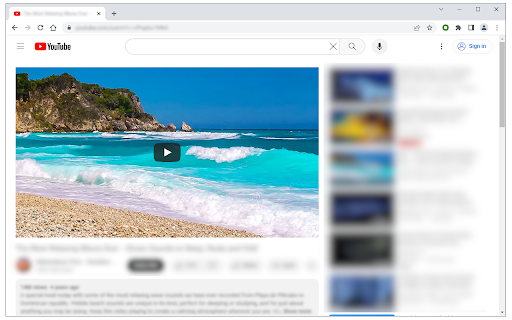
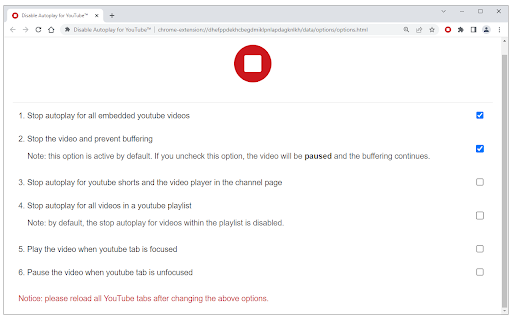
Disable Autoplay for YouTube™ is a lite extension that lets you easily stop/pause YouTube videos from auto-playing. The toolbar button serves as an ON|OFF switch for this addon (the icon will change color accordingly). The red color shows an active state and the dark grey color shows a disabled state. To work with this addon, please add this addon to your browser and then start browsing YouTube. When the addon is active, videos are stopped automatically from playing when you open one. When videos are stopped, the buffering does not continue. You can change this behavior from the options page and let the videos "pause" instead of "stop". This way, the buffering continues but the video won't play. There is another option on the settings page to play or pause videos when a tab is focused or hidden (unfocused). These two options are not active by default. This addon works for all YouTube vi…

Listing SEO keywords

Search intent keywords
Keyword signals for evaluating how users may discover, compare, or search for this extension category.

Core discovery

stop youtube autoplaydisable youtube auto play chromeprevent youtube video loadingyoutube browser extension

Comparison

best youtube autoplay blockeralternatives to disable autoplay

Problem

youtube autoplay not workingstop youtube from playing automatically

Alternative

youtube player settingsbrowser video control extension

Similar extensions

Jump to related discovery paths:

FAQ

What is Disable Autoplay for YouTube™ mainly used for?
This browser extension provides users with manual control over YouTube's default autoplay behavior. It includes configurations to manage playback state, support for embedded videos, and optional settings for handling video behavior when tabs are switched or focused.
What market signals stand out?
Visible niche traction with moderate review base. Last known update: 09/14/2025.
What should builders compare before entering this space?
Compare install concentration, rating quality, update recency, screenshots, developer portfolio, listing claims, and review-backed friction signals.
Is this page review-backed?
Backed by review samples. This page combines store metadata with selected review signals, while raw store metrics remain visible for comparison.

Screenshots

Disable Autoplay for YouTube™ screenshot

Links

Recommended Chrome extensions

Related listings from the same category, trending peers, and the same publisher portfolio.

Browse tools
Open in PDF Viewer icon

Open in PDF Viewer

Lynn

Easily open desired links in a PDF viewer.

Installs

100K+

Rating

3.2

Proxy Switcher icon

Proxy Switcher

Lynn

Easily switch between multiple proxies via toolbar popup.

Installs

40K+

Rating

3.8

Google Input Tools icon

Google Input Tools

cloud-input-team

Input Tools lets you type in the language of your choice.

Installs

3.0M+

Rating

4.0

Microsoft Bing Search with Rewards icon

Microsoft Bing Search with Rewards

Microsoft Corporation

Use the Microsoft Rewards extension to find new ways to earn every day, easily track your points and set your default search to Bing

Installs

3.0M+

Rating

4.4

Google Scholar Button icon

Google Scholar Button

scholar-chrome-extensions

Lookup scholarly articles as you browse the web.

Installs

3.0M+

Rating

4.6

ЮБуст - VPN для YouTube. Обход блокировки Ютуб без ВПН. VPN для браузера icon

ЮБуст - VPN для YouTube. Обход блокировки Ютуб без ВПН. VPN для браузера

Uboost

Ускоритель Ютуб без ВПН, VPN для браузера Яндекс, Chrome, Opera, Edge. Обход замедления Ютуба.

Installs

2.0M+

Rating

4.2

Pie Adblock - A Powerful Free Ad Blocker icon

Pie Adblock - A Powerful Free Ad Blocker

Pie Extensions

Pie Adblock blocks ads & pop-ups, plus YouTube & Twitch video ads. You can customize your ad experience with Pie!

Installs

2.0M+

Rating

4.9

Smallpdf—Edit, Convert, Compress, & AI Summarize PDF icon

Smallpdf—Edit, Convert, Compress, & AI Summarize PDF

Smallpdf AG

Easy-to-use PDF tools to compress, convert, merge, chat to, split, e-sign, and edit PDF files in your browser.

Installs

2.0M+

Rating

4.6

Google Dictionary (by Google) icon

Google Dictionary (by Google)

dictionary-extension-dev

View definitions easily as you browse the web.

Installs

2.0M+

Rating

4.4

AI Chat for Search icon

AI Chat for Search

AI Chat for Search Team

Display AI Chat response alongside search engine results

Installs

2.0M+

Rating

4.6