Sumopaint - Online Image Editor icon

Sumopaint Chrome Extension Analysis

Developer & Designer Tools

Store listing title: Sumopaint - Online Image Editor

Chrome extension ID: dpgjihldbpodlmnjolekemlfbcajnmod

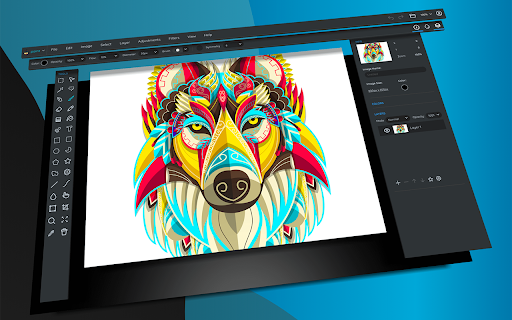
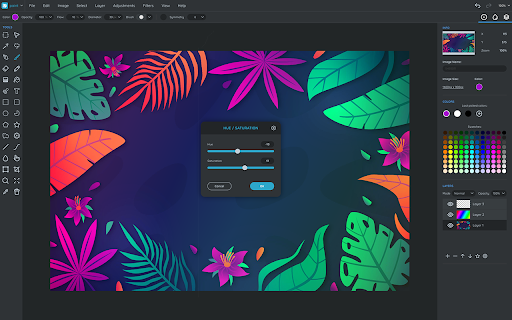
An online-based creative suite for digital painting and photo manipulation. It provides users with selection tools, image enhancement features, and various artistic effects directly within the browser.

Developer:Sumo Apps Ltd
Version:12.4
Size:23.83KiB
Last updated:

Overview

Installs

200K+

Rating

3.5

1,923 reviews

Languages

1 locales

Includes English

Market analysis

Review-backed positioning, friction, and market signals for this Chrome extension.

Backed by review samples

Macro category

Developer & Designer Tools

Pricing friction

Moderate review signal

Complaint intensity

High review signal

Listing & review signals
Observed signals from store listing text and review samples.

Listing positioning

Sumopaint positions itself as a full-featured online painting and image editing application. It emphasizes professional-grade tools such as layers, blending modes, and a diverse array of brushes and filters.

Inferred product pattern

A legacy creative tool that has transitioned to a restrictive freemium model, resulting in significant technical instability and user backlash.

Review-backed pain points

Users report significant frustration due to work loss caused by crashes, the removal of previously free essential tools, and technical issues that make the extension difficult to remove from Chrome.

Observed feature gaps

Users report the loss of essential tools in newer updates and the inability to save layers or files locally without paying.

Tags
Online Image EditorDigital PaintingPhoto Editing
Target users

- Digital Artists

- Casual Photo Editors

- Content Creators

Primary use cases

- Digital painting

- Photo retouching

- Image enhancement

Positive themes

- Previously highly valued by long-term users

- Diverse set of features and brushes

Negative themes

- Frequent software instability and crashes

- Paywalling of essential tools

- Difficulties with uninstallation

- Unresponsive customer support

Observed friction

- Free-tier complaints detected

- Performance complaints detected

- High friction due to users feeling 'lured' by free tools that are later locked behind a subscription or pro account.

Evidence boundary: Evidence derived from store listing features and multiple high-impact user reviews detailing stability, pricing, and uninstallation issues. Reviewer sentiment is heavily skewed toward negative experiences; some feedback pertains to older versions of the software.
Complaint summaries
Review-backed complaint signals grouped by operational area.

Support

Users report that the developer is unresponsive to support inquiries and emails.

Reliability

Severe reliability issues reported, including frequent crashes, glitches, and loss of unsaved work.

Privacy

No direct privacy breaches reported, though some users expressed extreme concern regarding the extension's inability to be uninstalled.

Access & pricing

- Free entry with paid features

- Login needed for core features

- Limited free usage observed

Store listing facts

Listing assets

- Screenshots: 2

- Videos: 1

- Languages: 1

Trust signals

- Privacy policy

- Developer contact

- Official website

- Support link

Store metadata

- Version: 12.4

- Size: 23.83KiB

- Last updated:

Store description excerpt
Short excerpt from the public Chrome Web Store listing; full copy is available on the official store page.
Features: Layers with undo support - 11 blending modes - Duplicate, merge and flatten layers - Rotate and flip - Zoom and pan Layers with classic layer effects - Drop Shadow - Inner Shadow - Outer Glow - Inner Glow - Bevel - Color Overlay - Stroke - Gradient Bevel - Gradient Glow 20 filters and effects in the following categories - Blur - Distort - Noise - Pixelate - Sharpen - Posterize - Threshold Professional painting tools - Over 300 brushes - Advanced options like gravity and auto orient - Real time bezier-curve smoothing - Animated brushes - Smudge, blur, sharpen, dodge, burn and saturation tools Selection tools with full undo support - Lasso - Rectangular lasso - Magic wand - Rectangular and elliptical selections - Border, feather, expand and contract selection Image enhancement tools including - Unsharp mask - Levels - Brightness / contrast - Hue / saturation - Color balance - Co…

Listing SEO keywords

Search intent keywords
Keyword signals for evaluating how users may discover, compare, or search for this extension category.

Core discovery

online image editordigital painting softwarebrowser photo editoronline painting tool

Comparison

Photoshop alternativeMicrosoft Paint alternative

Problem

image editor crashescannot uninstall chrome extensionphoto editor losing work

Alternative

PhotopeaPixlrCanva

Similar extensions

Jump to related discovery paths:

FAQ

What is Sumopaint mainly used for?
An online-based creative suite for digital painting and photo manipulation. It provides users with selection tools, image enhancement features, and various artistic effects directly within the browser.
What market signals stand out?
Established adoption with substantial review base. Last known update: 10/13/2022.
What should builders compare before entering this space?
Compare install concentration, rating quality, update recency, screenshots, developer portfolio, listing claims, and review-backed friction signals.
Is this page review-backed?
Backed by review samples. This page combines store metadata with selected review signals, while raw store metrics remain visible for comparison.

Screenshots

Sumopaint - Online Image Editor screenshot

Links

Website: sumo.app

Privacy policy: https://sumo.app/privacy

Support links: https://sumo.app/support/

Videos: Watch

Recommended Chrome extensions

Related listings from the same category, trending peers, and the same publisher portfolio.

Browse art