Microsoft Power Automate icon

Microsoft Power Automate Chrome Extension Analysis

Automation & Workflow Efficiency

Chrome extension ID: ljglajjnnkapghbckkcmodicjhacbfhk

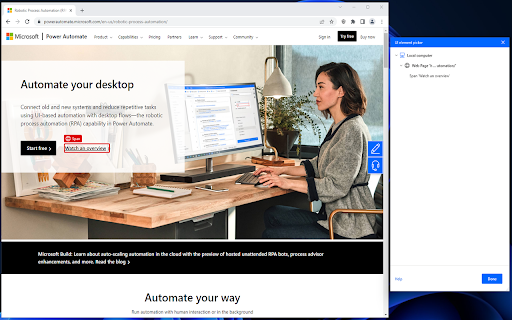
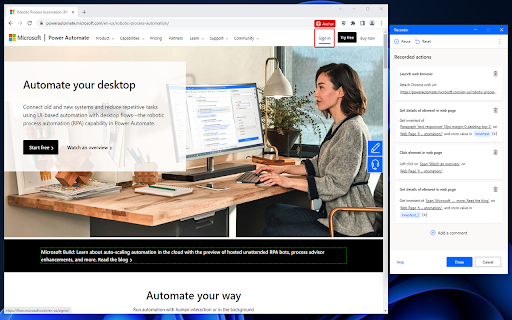
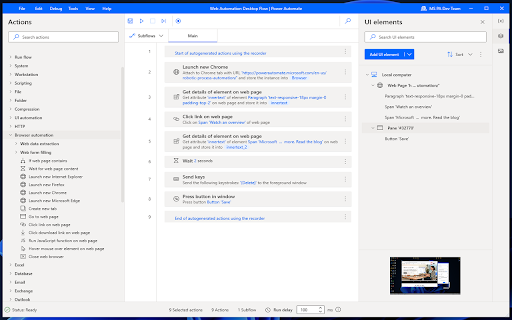
This browser extension acts as a companion interface for Microsoft Power Automate Desktop. It captures web interactions, allowing users to build flows for automating repetitive browser-based tasks like data collection or form submission.

Version:2.70.0.35
Size:738KiB
Last updated:

Overview

Installs

10.0M+

Rating

2.0

181 reviews

Languages

34 locales

Includes Deutsch, English, Indonesia, Melayu...

Market analysis

Review-backed positioning, friction, and market signals for this Chrome extension.

Backed by review samples

Macro category

Automation & Workflow Efficiency

Pricing friction

Low review signal

Complaint intensity

High review signal

Listing & review signals
Observed signals from store listing text and review samples.

Listing positioning

Microsoft positions this extension as a necessary bridge for the Power Automate desktop application to perform web-based tasks. It highlights its ability to record workflows for scripting, data extraction, and form-filling to enable enterprise-grade process automation.

Inferred product pattern

A functional browser-based bridge required for a heavy desktop RPA software ecosystem, suffering from integration fragility.

Review-backed pain points

Users struggle with constant maintenance to keep the desktop client and extension version-synced, frequent compatibility breaks after Chrome/Edge updates, and complex troubleshooting for UI element detection.

Observed feature gaps

The product lacks seamless automated synchronization between the desktop client and extension, and fails to handle browser version updates gracefully.

Tags
Browser AutomationDesktop IntegrationWorkflow EfficiencyTask Recorder
Target users

- RPA Developers

- Business Process Analysts

- Power Users

Primary use cases

- Web browser automation

- Form filling

- Data extraction

- Workflow recording

Positive themes

- None available; current reviews are overwhelmingly critical of technical stability.

Negative themes

- Frequent breakage following browser updates

- Version mismatch issues between desktop software and browser extension

- Installation and detection errors

- General unreliability for business workflows

Observed friction

- Performance complaints detected

- Privacy complaints detected

- No direct pricing friction reported; the extension is free but requires a separate Microsoft software installation.

Evidence boundary: Analysis based on 179 reviews, showing consistent reports of breakage after browser updates and deep dissatisfaction with the synchronization between desktop and browser components. Reviews are heavily skewed toward negative technical reports; user sentiment may be biased by high expectations for enterprise-grade stability.
Complaint summaries
Review-backed complaint signals grouped by operational area.

Support

Users report excessive technical hurdles, including needing to manage browser command-line arguments and manual registry/process configurations to keep the tool functional.

Reliability

Very high; users consistently report that updates break existing flows, with specific grievances regarding element detection, WebDriver incompatibilities, and startup failures.

Privacy

Some users express concern over telemetry and data collection policies inherent in Microsoft's legal documentation.

Access & pricing

- Free usage observed

- Account required for core usage

- Free plan or free usage claimed

Store listing facts

Listing assets

- Screenshots: 3

- Videos: 0

- Languages: 34

Trust signals

- Privacy policy

- Developer contact

Store metadata

- Version: 2.70.0.35

- Size: 738KiB

- Last updated:

Store description excerpt
Short excerpt from the public Chrome Web Store listing; full copy is available on the official store page.
Microsoft Power Automate extension Microsoft Power Automate lets you automate manual processes and tasks on your computer. Install the extension to automate things on the web like scripting, data extraction, testing, filling out forms and more. The Power Automate recorder utility will convert your steps to a flow. Just browse through your favorite parts of the web application and collect data, fill forms, download files – do all the things you usually do and see a flow getting developed. This browser extension requires additional software to perform properly. Make sure that you've downloaded and installed Power Automate to your device before continuing. Note: After a specific date that will be announced officially by the browser group, the browser will no longer support web extensions created by Manifest V2. The specific web extension has embraced the new Manifest V3 and it is compatibl…

Listing SEO keywords

Search intent keywords
Keyword signals for evaluating how users may discover, compare, or search for this extension category.

Core discovery

browser automationPower Automate extensionweb recording toolRPA browser integration

Comparison

Power Automate alternativesweb automation softwareChrome automation

Problem

extension not workingPower Automate troubleshootingbrowser automation error

Alternative

UiPath automationSelenium alternativesbrowser workflow automation

Similar extensions

Jump to related discovery paths:

FAQ

What is Microsoft Power Automate mainly used for?
This browser extension acts as a companion interface for Microsoft Power Automate Desktop. It captures web interactions, allowing users to build flows for automating repetitive browser-based tasks like data collection or form submission.
What market signals stand out?
Large installed base with moderate review base. Last known update: 06/26/2026.
What should builders compare before entering this space?
Compare install concentration, rating quality, update recency, screenshots, developer portfolio, listing claims, and review-backed friction signals.
Is this page review-backed?
Backed by review samples. This page combines store metadata with selected review signals, while raw store metrics remain visible for comparison.

Screenshots

Microsoft Power Automate screenshot

Links

Recommended Chrome extensions

Related listings from the same category, trending peers, and the same publisher portfolio.

Browse workflow