

Endpoint Verification Chrome Extension Analysis
Privacy, Security & Ad BlockersChrome extension ID: callobklhcbilhphinckomhgkigmfocg
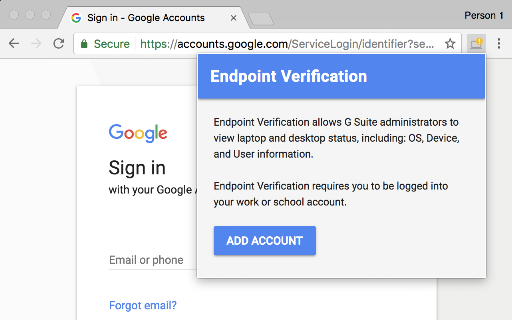
Endpoint Verification is a Chrome extension designed for Google Workspace environments. It allows administrators to monitor and gather diagnostic information about the devices used by their organization's members.
Overview
Installs
8.0M+
Rating
★ 3.3
79 reviews
Languages
1 locales
Includes English
Market analysis
Review-backed positioning, friction, and market signals for this Chrome extension.
Macro category
Privacy, Security & Ad Blockers
Pricing friction
Low review signal
Complaint intensity
High review signal
Listing positioning
The store listing positions Endpoint Verification as a tool for Google Workspace administrators. Its primary function is to provide visibility into the status of managed laptops and desktops, including operating system, device, and user-specific information.
Inferred product pattern
A core component of Google Workspace's enterprise device management and security suite, requiring a Google Workspace subscription for its administrative functionality.
Review-backed pain points
Users consistently report that the extension fails to work or sync correctly, particularly on various Linux operating systems. A significant pain point is the extension randomly blocking access to other Google services like Google Meet, leading to extreme user frustration.
Observed feature gaps
Review data suggests a clear feature gap in robust and consistent cross-platform compatibility, specifically with different Linux distributions beyond Debian-based systems. There are also indications of a lack of clear communication or functionality regarding its operational status and how it impacts user access.
- Google Workspace Administrators
- IT Administrators
- Enterprise Security Teams
- Monitoring device status for compliance
- Gathering OS and device information
- Ensuring endpoint security and access control
No positive theme data.
- Extension does not function as expected or fails to sync
- Frequent and random blocking of access to services
- Poor compatibility and lack of support for specific Linux distributions (e.g., Ubuntu, Fedora, RedHat)
- Confusing or incorrect status indicators (e.g., red '!' icon instead of green check)
- Account blocking complaints detected
- Performance complaints detected
- Review-backed data on pricing friction is not available.
Support
Review-backed data on direct support complaints is not available, though extensive functionality issues imply a need for support.
Reliability
Users frequently complain about the extension's unreliability, citing issues where it 'doesn't do anything,' fails to sync, doesn't properly detect OS information, and randomly blocks access to applications.
Privacy
One user expressed concern about the extension's access to profile picture data, ChromeOS build/version data, and client certificates and keys, suggesting potential privacy transparency concerns.
- Enterprise pricing observed
- Account required for core usage
- Paid-only usage observed
Store listing facts
- Screenshots: 1
- Videos: 0
- Languages: 1
- Privacy policy
- Developer contact
- Official website
- Version: 1.140.0
- Size: 1.31MiB
- Last updated:
Listing SEO keywords
Core discovery
Comparison
Problem
Alternative
Similar extensions
Jump to related discovery paths:
FAQ
Screenshots
Links
Website: google.com
Privacy policy: https://policies.google.com/privacy







