Kami for Google Chrome™ icon

Kami for Google Chrome™ Chrome Extension Analysis

Automation & Workflow Efficiency

Chrome extension ID: ecnphlgnajanjnkcmbpancdjoidceilk

Kami is an interactive document annotation tool and learning platform designed for the education sector. It integrates with major LMS providers like Google Classroom and Canvas to facilitate digital feedback and instruction.

Developer:Kami
Version:2.0.24552
Size:7.69MiB
Last updated:

Overview

Installs

5.0M+

Rating

4.6

8,409 reviews

Languages

7 locales

Includes Deutsch, English, Nederlands, español...

Market analysis

Review-backed positioning, friction, and market signals for this Chrome extension.

Backed by review samples

Macro category

Automation & Workflow Efficiency

Pricing friction

High review signal

Complaint intensity

High review signal

Listing & review signals
Observed signals from store listing text and review samples.

Listing positioning

Kami positions itself as a game-changing interactive learning platform that turns any resource into an accessible experience. It focuses on empowering students and saving teachers significant time on grading and lesson planning.

Inferred product pattern

A large-scale EdTech platform providing document interaction and LMS integration, utilizing a freemium model that transitions to paid subscriptions for educators.

Review-backed pain points

Users report significant frustration with application stability, specifically regarding crashes that lead to lost work. There are also complaints about difficulty saving annotations directly back to Google Drive and unexpected subscription costs for educators.

Observed feature gaps

Users noted issues with the ability to save annotations back to the original Google Drive files and inconsistencies in text selection/highlighting tools.

Tags
PDF AnnotationInteractive LearningEducation ToolDigital Classroom
Target users

- Students

- Teachers

- School Leaders

- Educators

Primary use cases

- Annotating PDF documents

- Digital assignment feedback

- Interactive lesson planning

- Remote learning assessment

Positive themes

- Incredibly helpful when functioning correctly

- Powerful annotation capabilities

Negative themes

- Frequent application crashes

- Loss of work due to connectivity or saving issues

- High system resource consumption

- Lack of pricing transparency

- Poor customer support responsiveness

Observed friction

- Payment required for meaningful usage

- Free-tier complaints detected

- Account blocking complaints detected

- Performance complaints detected

- Privacy complaints detected

- Users expressed frustration over a lack of upfront transparency regarding annual subscription fees for teachers.

Evidence boundary: Analysis based on store listing claims and a sample of user reviews highlighting technical stability and pricing issues. Review data provided is heavily weighted toward low-rating samples, which may disproportionately reflect technical failures and user frustration.
Complaint summaries
Review-backed complaint signals grouped by operational area.

Support

Complaints highlight slow or non-existent responses from customer service and difficulty locating contact information for support.

Reliability

Significant reliability issues reported, including application crashes, inability to save work, and high CPU/RAM consumption.

Privacy

Users have expressed concerns regarding the clarity of the privacy policy and the necessity of granting broad Google account access.

Access & pricing

- Subscription model observed

- Login needed for core features

- Trial or limited free usage before paid plan

Store listing facts

Listing assets

- Screenshots: 5

- Videos: 0

- Languages: 7

Trust signals

- Privacy policy

- Developer contact

- Official website

- Support link

Store metadata

- Version: 2.0.24552

- Size: 7.69MiB

- Last updated:

Store description excerpt
Short excerpt from the public Chrome Web Store listing; full copy is available on the official store page.
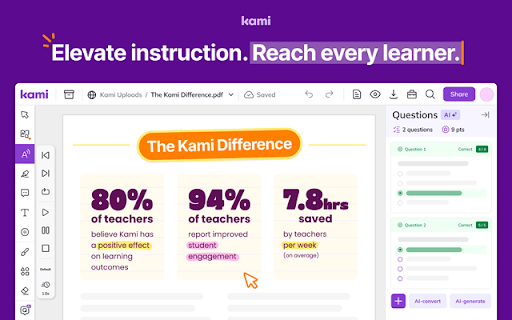
Elevate instruction. Reach every learner. Kami’s game-changing learning platform turns any resource into interactive, accessible experiences that spark curiosity and success. Trusted by over 50+ million users, it brings learning to life—engaging every student, including English language learners with built-in tools to help them thrive. Teachers save hours every week on teaching, grading, and planning lessons. School leaders gain a powerful, cost-effective solution that drives insight and real impact. - 94% of teachers report improved student engagement - 7.8 hours a week saved by teachers on average - 80% of teachers agree there’s been a positive impact on learning Results from the Kami Teacher Survey 2023 | 1665 respondents | USA only | 95% Confidence | 2% Margin of error Seamlessly works with Canvas, D2L Brightspace, Google Classroom, Microsoft Teams and Schoology. Ready for more? Try…

Listing SEO keywords

Search intent keywords
Keyword signals for evaluating how users may discover, compare, or search for this extension category.

Core discovery

PDF annotationinteractive learningdigital classroom toolsGoogle Classroom extensioneducational annotation

Comparison

Kami vs Adobe AcrobatKami vs FoxitKami vs Google Drive

Problem

PDF editor crasheslosing annotationscannot save to Google Drive

Alternative

digital learning platformstudent annotation tool

Similar extensions

Jump to related discovery paths:

FAQ

What is Kami for Google Chrome™ mainly used for?
Kami is an interactive document annotation tool and learning platform designed for the education sector. It integrates with major LMS providers like Google Classroom and Canvas to facilitate digital feedback and instruction.
What market signals stand out?
Large installed base with substantial review base. Last known update: 06/22/2026.
What should builders compare before entering this space?
Compare install concentration, rating quality, update recency, screenshots, developer portfolio, listing claims, and review-backed friction signals.
Is this page review-backed?
Backed by review samples. This page combines store metadata with selected review signals, while raw store metrics remain visible for comparison.

Screenshots

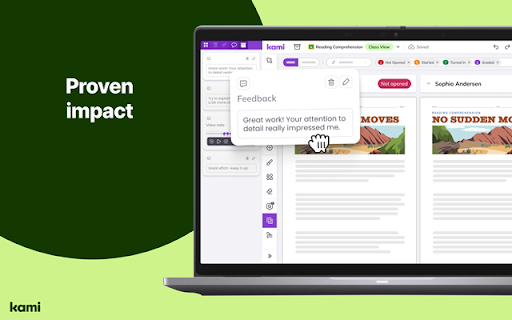
Kami for Google Chrome™ screenshot

Links

Recommended Chrome extensions

Related listings from the same category, trending peers, and the same publisher portfolio.

Browse education
AnswerAI - Homework AI Tutor & Study Helper icon

AnswerAI - Homework AI Tutor & Study Helper

AnswerAI Team

Your AI assistant ChatGPT Plugin.Answer questions and get AI answers quickly,write emails,articles,chatbot,learning assistant.

Installs

100K+

Rating

4.9

Rememberry - Translate and Memorize with Flashcards icon

Rememberry - Translate and Memorize with Flashcards

rememberry

Translate words while browsing and turn them into spaced repetition flashcards to build foreign language vocabulary.

Installs

100K+

Rating

4.6

Transcript - AI Homework Helper icon

Transcript - AI Homework Helper

Transcript

Streamline your study experience with AI: Instant answers, deep insights, and personalized learning across subjects.

Installs

100K+

Rating

3.4

Revision History: Writing Process Visibility for Google Docs & Slides icon

Revision History: Writing Process Visibility for Google Docs & Slides

Revision History

Built for teachers: See how students write, not just what they wrote. View the writing process in Google Docs & Slides.

Installs

100K+

Rating

3.7

Passei Direto – Ferramentas de Estudo icon

Passei Direto – Ferramentas de Estudo

pd.services

A extensão que te ajuda a achar as respostas para suas perguntas, utilizando a maior rede de estudantes do Brasil.

Installs

100K+

Rating

3.7

SolvelyAI - AI Homework Tutor &  Study Helper icon

SolvelyAI - AI Homework Tutor & Study Helper

cws-test-group-1

SolvelyAI is your AI Homework Helper—instant screenshot solving, step-by-step AI Answers, AI Summary, and Study Helper tools.

Installs

100K+

Rating

4.6

Readlang Web Reader icon

Readlang Web Reader

readlang

Read websites in the language you're learning, translate words you don't know, and we'll create flashcards to help you remember.

Installs

100K+

Rating

4.3

Talk & Comment - Voice notes anywhere icon

Talk & Comment - Voice notes anywhere

TalkandComment.com

Voice notes for classrooms and teams. Give feedback students actually hear.

Installs

100K+

Rating

4.1

You Shall Not Pass by TeacherMagic.org icon

You Shall Not Pass by TeacherMagic.org

JamesTyler

Blocks proxy sites, filter evasion exploits, tab spam, and Google Sites abuse on student Chromebooks. Free forever.

Installs

100K+

Rating

1.7

Dualsub - YouTube Subtitle Translator icon

Dualsub - YouTube Subtitle Translator

Dualsub Studio

Translate and display dual subtitles on YouTube and other video websites.

Installs

100K+

Rating

3.6