Dualsub - YouTube Subtitle Translator icon

Dualsub Chrome Extension Analysis

AI & Writing Assistants

Store listing title: Dualsub - YouTube Subtitle Translator

Chrome extension ID: gnlibmlfpencglodjpgnalbdebfhpmfp

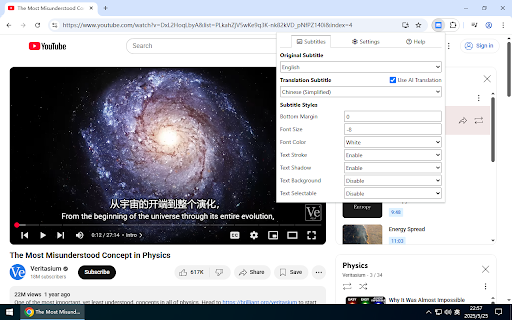
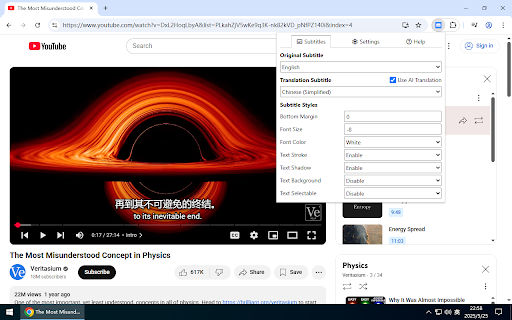
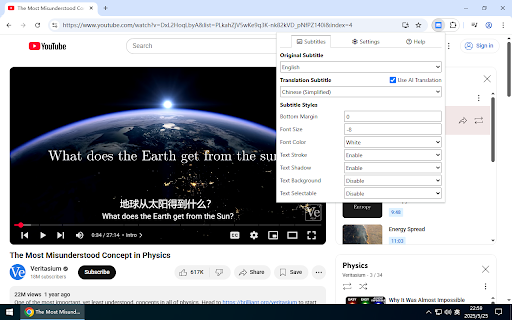
Dualsub is a Chrome extension that enables users to view dual subtitles for videos on YouTube and other streaming platforms, facilitating language learning and content comprehension by displaying original and translated subtitles simultaneously.

Developer:Dualsub Studio
Version:2.70.0
Size:27.51KiB
Last updated:

Overview

Installs

100K+

Rating

3.6

473 reviews

Languages

2 locales

Includes English, 中文(中国)

Market analysis

Review-backed positioning, friction, and market signals for this Chrome extension.

Backed by review samples

Macro category

AI & Writing Assistants

Pricing friction

High review signal

Complaint intensity

High review signal

Listing & review signals
Observed signals from store listing text and review samples.

Listing positioning

Dualsub positions itself as a lightweight, simple, and efficient Chrome extension for translating and displaying dual subtitles on YouTube and other video websites, aiming to enhance the user's video consumption experience.

Inferred product pattern

A subtitle translation extension that was initially popular for its free and broad functionality, but has transitioned to a model that aggressively paywalls core features, leading to widespread user frustration and a perceived decline in product value and usability without payment.

Review-backed pain points

Users express significant pain over the extension's shift from a robust free model to one that heavily restricts features or paywalls essential functionalities, making it feel 'useless' or 'unusable.' They also report recurring technical issues with subtitle display, platform compatibility, and the absence of automatic subtitle selection, alongside concerns regarding privacy due to external software requirements.

Observed feature gaps

Observed feature gaps include the inability to customize font size per language (a feature that was removed), limited support for video platforms (requiring external downloads for some), lack of free-form subtitle positioning, and issues with automatic subtitle language detection and selection.

Tags
Subtitle TranslatorDual SubtitlesLanguage LearningVideo PlayerYouTube Tool
Target users

- Language Learners

- Multilingual Video Viewers

- International Content Consumers

Primary use cases

- Learning new languages through video content

- Watching foreign language videos with native and translated subtitles

- Improving comprehension of video content across multiple languages

Positive themes

- Historically appreciated for being the preferred subtitle extension due to wide website support and bilingual subtitle display (before recent changes)

- Helpful for learning specific languages, such as Chinese

Negative themes

- Gradual decrease and removal of free features, including limiting usage to YouTube and removing font size customization per language

- Paywalling of previously free or basic functionalities, rendering the extension less useful without payment

- Inconsistent functionality across different browsers and video platforms (e.g., WeTV, iqiyi, issues with specific videos)

- Subtitle display issues such as overlapping lines, inability to freely move subtitles, and lack of automatic subtitle detection

- Concerns about privacy and security due to the requirement to download unverified external files for compatibility with certain streaming sites like Netflix and Disney

Observed friction

- Payment required for meaningful usage

- Free-tier complaints detected

- Performance complaints detected

- Privacy complaints detected

- There is significant pricing friction due to the removal of previously free features and the paywalling of what users consider basic, core functionalities, leading to strong frustration and claims of the product no longer being 'free' or useful.

Evidence boundary: This analysis is based on the store listing description, title, and a selection of 12 review samples, including several helpful and low-rating reviews. These reviews provide detailed feedback on feature changes, performance issues, and user sentiment. The provided review samples are predominantly critical, focusing on negative experiences related to recent feature removals and paywalling. The absence of high-rating review samples limits the ability to identify current positive themes or user satisfaction with paid features, potentially skewing the perceived sentiment.
Complaint summaries
Review-backed complaint signals grouped by operational area.

Support

While there are no direct support or refund complaints, users express frustration over features ceasing to work after updates and the requirement to download unverified external files for extended compatibility, raising security and trust issues.

Reliability

Reliability complaints include subtitle display glitches (e.g., multiple lines at once, poor spacing), subtitles stopping on next episodes or after updates on certain websites, and general reports of the extension often being 'unusable.'

Privacy

A notable privacy/security complaint highlights the requirement to download unverified external update files for compatibility with platforms like Netflix and Disney, with users expressing distrust due to the unofficial nature of these downloads.

Access & pricing

- Free entry with paid features

- No account requirement observed

- Limited free usage observed

Store listing facts

Listing assets

- Screenshots: 3

- Videos: 0

- Languages: 2

Trust signals

- Developer contact

- Official website

- Support link

Store metadata

- Version: 2.70.0

- Size: 27.51KiB

- Last updated:

Store description excerpt
Short excerpt from the public Chrome Web Store listing; full copy is available on the official store page.
Lightweight, simple, and efficient.

Listing SEO keywords

Search intent keywords
Keyword signals for evaluating how users may discover, compare, or search for this extension category.

Core discovery

youtube subtitle translatordual subtitlesbilingual subtitlesvideo translation extensionlanguage learning tool

Comparison

dualsub vs secondsubdualsub alternativebest youtube subtitle translator

Problem

youtube subtitles not workingbilingual subtitles freetranslate video subtitlesmultiple subtitles on youtube

Alternative

youtube translator extension alternativedual language subtitles alternativebilingual video player extension

Similar extensions

Jump to related discovery paths:

FAQ

What is Dualsub mainly used for?
Dualsub is a Chrome extension that enables users to view dual subtitles for videos on YouTube and other streaming platforms, facilitating language learning and content comprehension by displaying original and translated subtitles simultaneously.
What market signals stand out?
Established adoption with moderate review base. Last known update: 05/06/2026.
What should builders compare before entering this space?
Compare install concentration, rating quality, update recency, screenshots, developer portfolio, listing claims, and review-backed friction signals.
Is this page review-backed?
Backed by review samples. This page combines store metadata with selected review signals, while raw store metrics remain visible for comparison.

Screenshots

Dualsub - YouTube Subtitle Translator screenshot

Links

Recommended Chrome extensions

Related listings from the same category, trending peers, and the same publisher portfolio.

Browse education
Wildmonkey icon

Wildmonkey

Dualsub Studio

Lightweight userscript manager.

Installs

10K+

Rating

5.0

ImTranslator: Translator, Dictionary, TTS icon

ImTranslator: Translator, Dictionary, TTS

smartlink

Translator, Dictionary, Voice

Installs

900K+

Rating

4.4

Mote for Google Chrome™ icon

Mote for Google Chrome™

Mote Technologies, Inc.

Your AI-powered learning companion - Mote helps everyone to read, write & be heard across Google Workspace and the web.

Installs

800K+

Rating

4.6

Tasks for Canvas – now supporting Blackboard, D2L Brightspace icon

Tasks for Canvas – now supporting Blackboard, D2L Brightspace

BetterCampus

A better to-do list sidebar for Canvas, Blackboard, and D2L Brightspace.

Installs

800K+

Rating

4.7

ProctorExam Activity Sharing icon

ProctorExam Activity Sharing

ProctorExam BV

Lets you share your browsing activity when taking an online exam on ProctorExam - https://www.proctorexam.com

Installs

800K+

Rating

1.6

eJOY AI Dictionary icon

eJOY AI Dictionary

ejoy-english.com

Your ultimate knowledge and English learning tool to discover the world and upskill yourself. Translate video, websites and PDF.

Installs

700K+

Rating

4.8

Voice In - Speech-To-Text Dictation icon

Voice In - Speech-To-Text Dictation

Dictanote

Use dictation to type in 10k+ sites in 50+ languages. VoiceIn transcribes your speech to text in real time.

Installs

600K+

Rating

4.4

Translate for Chrome -Translator, Dictionary icon

Translate for Chrome -Translator, Dictionary

Translator App.

Translate words, phrases or text on any webpage. Full page translator and dictionary, text to speech (TTS) using Google Translate.

Installs

600K+

Rating

4.7

オクリンクプラス Webページスクリーンショット機能 icon

オクリンクプラス Webページスクリーンショット機能

ベネッセコーポレーション

オクリンクプラスのカードにWebページのスクリーンショットを挿入し、リンクを埋め込むことができます!

Installs

500K+

Rating

3.0

GPTZero: AI Detection & Writing Replay icon

GPTZero: AI Detection & Writing Replay

chrome-extension-publisher

Bring AI detection, citation checks, live essay feedback, and writing replays directly into Google Docs and your workflow.

Installs

400K+

Rating

4.7