Auto Refresh Plus icon

Auto Refresh Plus Chrome Extension Analysis

Automation & Workflow Efficiency

Chrome extension ID: ffejlioijcokmblckiijnjcmfidjppdn

Auto Refresh Plus is a Chrome extension that allows users to set specific time intervals for automatically reloading a page or tab. It eliminates the need for manual intervention when monitoring frequently changing web data.

Developer:luke
Version:3.0.4
Size:113KiB
Last updated:

Overview

Installs

100K+

Rating

4.8

1,555 reviews

Languages

55 locales

Includes Deutsch, English, English (Australia), English (United Kingdom)...

Market analysis

Review-backed positioning, friction, and market signals for this Chrome extension.

Backed by review samples

Macro category

Automation & Workflow Efficiency

Pricing friction

Moderate review signal

Complaint intensity

High review signal

Listing & review signals
Observed signals from store listing text and review samples.

Listing positioning

The product is positioned as a time-saving tool that automates the refreshing of webpages to keep users updated with dynamic content. It emphasizes a user-friendly interface and ease of use to improve overall browsing efficiency.

Inferred product pattern

A high-volume utility tool that provides a basic free automation feature while aggressively funneling users toward a paid Pro tier.

Review-backed pain points

Users report severe issues where the extension breaks Google Search results, causing links to redirect back to the search page. Others note that the timer randomly stops or fails to resume after a computer wakes from sleep.

Observed feature gaps

Users have requested the ability to select or customize user-agents and the ability to set a default refresh time value.

Tags
Auto RefreshPage ReloaderWorkflow AutomationBrowser Utility
Target users

- Content Monitors

- Data Trackers

- Web Developers

- Productivity Enthusiasts

Primary use cases

- Monitoring real-time dynamic content

- Automating page reloads for data tracking

- Maintaining active sessions on webpages

Positive themes

- Simplicity and ease of installation

- Effective core timer functionality

- Appreciation for the free version

Negative themes

- Interference with Google Search results

- Stability and reliability issues

- Aggressive Pro version promotion

- Security and privacy suspicions

Observed friction

- Free-tier complaints detected

- Performance complaints detected

- Privacy complaints detected

- Some users describe the extension as a 'money grab' due to aggressive prompts to upgrade to the Pro version.

Evidence boundary: Analysis based on the store listing and a set of representative helpful, high-rating, and low-rating reviews. The review sample is small relative to the total user count, though it highlights a recurring technical issue with Google Search.
Complaint summaries
Review-backed complaint signals grouped by operational area.

Support

No direct support interaction evidence, but users express frustration over recurring bugs that remain unresolved.

Reliability

Reports of the countdown resetting unexpectedly and failures occurring when the system enters sleep mode.

Privacy

Multiple users expressed alarm and labeled the tool as 'spyware' because it appears to manipulate Google Search result links.

Access & pricing

- Free entry with paid features

- No account requirement observed

- Limited free usage observed

Store listing facts

Listing assets

- Screenshots: 2

- Videos: 0

- Languages: 55

Trust signals

- Privacy policy

- Developer contact

- Official website

Store metadata

- Version: 3.0.4

- Size: 113KiB

- Last updated:

Store description excerpt
Short excerpt from the public Chrome Web Store listing; full copy is available on the official store page.
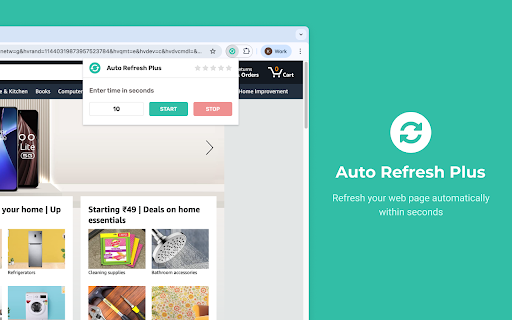
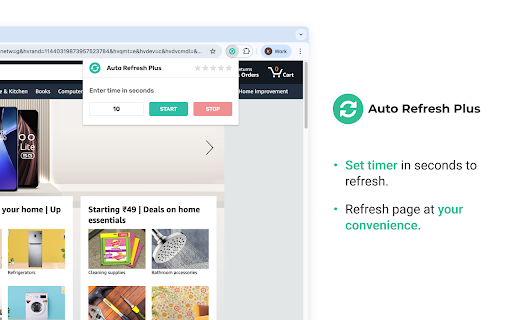
Auto Refresh Chrome Extension: This browser extension allows users to refresh a webpage automatically at specified intervals. It helps to save time and stay updated with dynamic content without manual intervention. The user can set the refresh frequency and customize the extension as per their requirements. The extension has a user-friendly interface and is easy to use. It can help improve productivity and efficiency while browsing the web. Enhance your workflow and increase productivity with this top-ranked, easy-to-use Auto Refresh Extension for Google Chrome. Improve your web browsing experience and stay up to date with dynamic content without the need for manual intervention. How it Works: 1. Open the popup and enter the time interval, at which the page has to refresh. 2. Then start the auto refresh. 3. Now the page refreshes at the entered time interval, until you stop or close the…

Listing SEO keywords

Search intent keywords
Keyword signals for evaluating how users may discover, compare, or search for this extension category.

Core discovery

chrome auto refreshautomatic page reloadwebpage timer extensionrefresh tab automatically

Comparison

best auto refresh extensionauto refresh plus vs competitors

Problem

how to auto refresh chromekeep page updated automaticallyautomatic reload browser

Alternative

auto refresh alternativepage reloader chrome

Similar extensions

Jump to related discovery paths:

FAQ

What is Auto Refresh Plus mainly used for?
Auto Refresh Plus is a Chrome extension that allows users to set specific time intervals for automatically reloading a page or tab. It eliminates the need for manual intervention when monitoring frequently changing web data.
What market signals stand out?
Established adoption with substantial review base. Last known update: 06/20/2026.
What should builders compare before entering this space?
Compare install concentration, rating quality, update recency, screenshots, developer portfolio, listing claims, and review-backed friction signals.
Is this page review-backed?
Backed by review samples. This page combines store metadata with selected review signals, while raw store metrics remain visible for comparison.

Screenshots

Auto Refresh Plus screenshot

Links

Recommended Chrome extensions

Related listings from the same category, trending peers, and the same publisher portfolio.

Browse workflow
Free Mobile Simulatore - Responsiveness testing icon

Free Mobile Simulatore - Responsiveness testing

luke

Simulate mobile, tab and pc to test responsive website for free.

Installs

153

Rating

Free Download Manager icon

Free Download Manager

Free Download Manager.ORG

Free Download Manager integration with browser

Installs

3.0M+

Rating

4.2

夸克网盘-网页嗅探 icon

夸克网盘-网页嗅探

广州市动悦信息技术有限公司

识别到网页资源时,可一键存夸克网盘

Installs

3.0M+

Rating

1.7

Mendeley Web Importer icon

Mendeley Web Importer

Mendeley

Fast, convenient import of references and PDFs to your Mendeley Reference Manager library.

Installs

3.0M+

Rating

2.3

Enable local file links icon

Enable local file links

Takashi Sugimoto (tksugimoto)

Make it possible to open by click a link to a local file that is disabled by Chrome.

Installs

3.0M+

Rating

3.9

Pop up blocker for Chrome™ - Poper Blocker icon

Pop up blocker for Chrome™ - Poper Blocker

dingosolutions

Block popups, ads, cookie requests, trackers, notifications, ads on social media & more. A clean browsing experience starts today.

Installs

2.0M+

Rating

4.8

Momentum icon

Momentum

Momentum

Transform your browser into a beautifully designed tab that helps you feel calm, keep focus, and stay energized.

Installs

2.0M+

Rating

4.5

Google Scholar PDF Reader icon

Google Scholar PDF Reader

scholar-chrome-extensions

Supercharge your paper reading: follow references, skim outline, jump to figures, cite and save.

Installs

2.0M+

Rating

4.1

Keeper® Password Manager & Digital Vault icon

Keeper® Password Manager & Digital Vault

Keeper Security

Generate strong passwords, autofill and protect your confidential info with zero-knowledge encryption.

Installs

2.0M+

Rating

4.8

AI Grammar Checker & Paraphraser – LanguageTool icon

AI Grammar Checker & Paraphraser – LanguageTool

lt-extension-publisher

Instantly Enhance Your Texts with LanguageTool’s Grammar Checker and Paraphrasing Tool

Installs

2.0M+

Rating

4.7