Figma icon

Figma Chrome Extension Analysis

Automation & Workflow Efficiency

Chrome extension ID: fkmaohpngenfoccdgceedjkfhkdcohmg

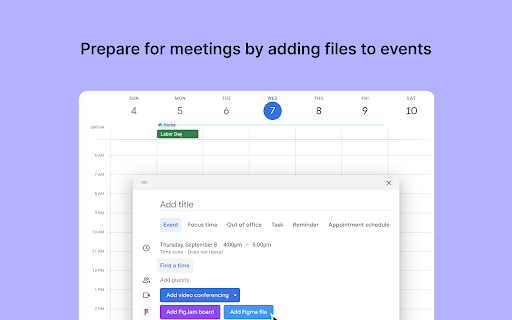
A Chrome extension that integrates Figma and FigJam with Google Calendar. It enables users to link specific design files or create new ones directly within calendar events to provide attendees with immediate access to necessary resources.

Developer:Figma
Version:1.3.15
Size:2.35MiB
Last updated:

Overview

Installs

200K+

Rating

4.1

75 reviews

Languages

1 locales

Includes English

Market analysis

Review-backed positioning, friction, and market signals for this Chrome extension.

Backed by review samples

Macro category

Automation & Workflow Efficiency

Pricing friction

Low review signal

Complaint intensity

Moderate review signal

Listing & review signals
Observed signals from store listing text and review samples.

Listing positioning

The product is positioned as a bridge between Google Calendar and Figma/FigJam. It emphasizes improving meeting preparation by allowing users to attach design files directly to calendar events for critiques and brainstorms.

Inferred product pattern

Official ecosystem utility extending a core SaaS product's functionality into a widely used third-party productivity tool.

Review-backed pain points

Some users reported that the extension fails to function after Google account authorization. Others find the utility redundant, noting that links can be manually added to event descriptions.

Observed feature gaps

Users expressed a desire for better mobile editing capabilities within the broader Figma ecosystem, and some perceive a lack of advanced functionality beyond basic linking.

Tags
Design WorkflowCalendar IntegrationCollaboration ToolFigmaProject Management
Target users

- Product Designers

- UX/UI Designers

- Project Managers

- Collaborative Design Teams

Primary use cases

- Attaching Figma files to Google Calendar events

- Preparing design resources for critiques

- Linking FigJam boards to brainstorming sessions

Positive themes

- Convenience for meeting organization

- Ease of use

- Enhanced collaborative workflow

Negative themes

- Installation and authentication failures

- Perceived lack of value compared to manual link pasting

Observed friction

- Performance complaints detected

- No pricing friction observed in provided data.

Evidence boundary: Analysis based on the official store listing and a sample of 10 user reviews. The review sample is small compared to the total user base, which may not capture all edge-case bugs.
Complaint summaries
Review-backed complaint signals grouped by operational area.

Support

No direct support complaints, though one user reported a total failure of the onboarding/auth flow.

Reliability

Reports of the extension being unusable/non-functional after installation for some users.

Privacy

No privacy complaints observed.

Access & pricing

- Free usage observed

- Account required for core usage

- Free plan or free usage claimed

Store listing facts

Listing assets

- Screenshots: 4

- Videos: 0

- Languages: 1

Trust signals

- Privacy policy

- Developer contact

- Support link

Store metadata

- Version: 1.3.15

- Size: 2.35MiB

- Last updated:

Store description excerpt
Short excerpt from the public Chrome Web Store listing; full copy is available on the official store page.
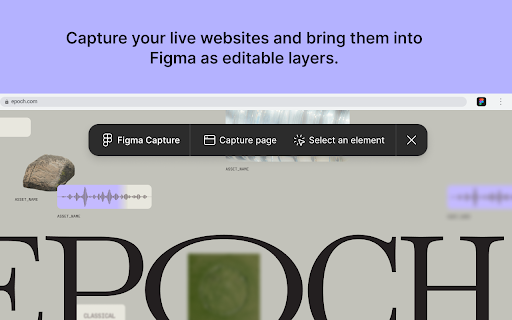
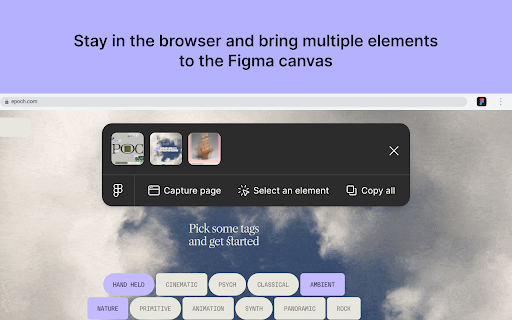
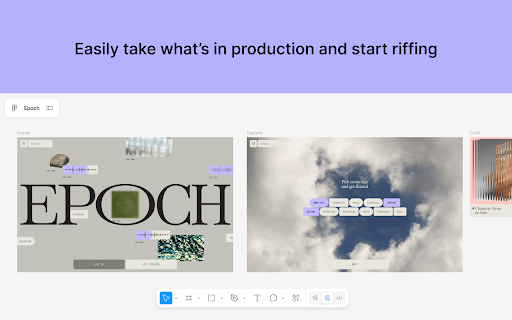
Capture your live websites and bring them into Figma as editable layers. BRING IN A LIVE PAGE OR ELEMENT Grab a full page or select the elements you need straight from your browser, no codebase, terminal, or coding agent required. START FROM WHAT’S IN PRODUCTION Pull the latest production UI, a teammate's shipped modal, or a live page onto the canvas and riff from something true instead of rebuilding by hand. SEND TO FIGMA AS LAYERS Captured elements and pages are pasted into Figma as editable layers, rather than screenshots. SHARE FILES IN YOUR CALENDAR EVENTS Quick-add Figma or FigJam files to your Google Calendar events so attendees land on the right resource. Screen capture is in beta. Learn more about how Figma helps thousands of teams build better products together at figma.com

Listing SEO keywords

Search intent keywords
Keyword signals for evaluating how users may discover, compare, or search for this extension category.

Core discovery

Figma Google Calendar integrationattach Figma files to calendarFigJam calendar extension

Comparison

Figma calendar integration vs manual links

Problem

missing design files in meetingssharing Figma links in calendar

Alternative

Figma pluginscalendar design tools

Similar extensions

Jump to related discovery paths:

FAQ

What is Figma mainly used for?
A Chrome extension that integrates Figma and FigJam with Google Calendar. It enables users to link specific design files or create new ones directly within calendar events to provide attendees with immediate access to necessary resources.
What market signals stand out?
Established adoption with limited review base. Last known update: 06/16/2026.
What should builders compare before entering this space?
Compare install concentration, rating quality, update recency, screenshots, developer portfolio, listing claims, and review-backed friction signals.
Is this page review-backed?
Backed by review samples. This page combines store metadata with selected review signals, while raw store metrics remain visible for comparison.

Screenshots

Figma screenshot
Figma screenshot
Figma screenshot
Figma screenshot

Links

Recommended Chrome extensions

Related listings from the same category, trending peers, and the same publisher portfolio.

Browse workflow