Audio Downloader Prime icon

Audio Downloader Prime Chrome Extension Analysis

Video & Image Downloaders

Chrome extension ID: flainkeonkoanoijnkojmiiihnfdhipd

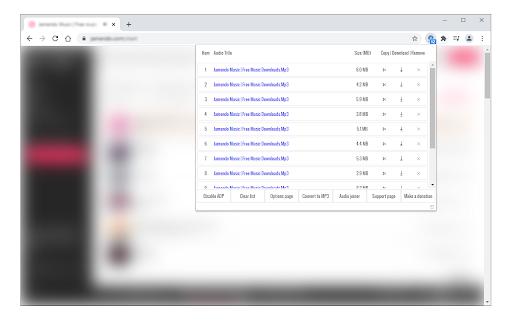
This extension allows users to detect and download audio media playing within a browser tab. It provides a popup menu to manage detected media, though it explicitly states it does not support YouTube due to platform policy restrictions.

Developer:Grephy
Version:0.2.7
Size:68.55KiB
Last updated:

Overview

Installs

200K+

Rating

3.7

449 reviews

Languages

1 locales

Includes English

Market analysis

Review-backed positioning, friction, and market signals for this Chrome extension.

Backed by review samples

Macro category

Video & Image Downloaders

Pricing friction

Low review signal

Complaint intensity

Moderate review signal

Listing & review signals
Observed signals from store listing text and review samples.

Listing positioning

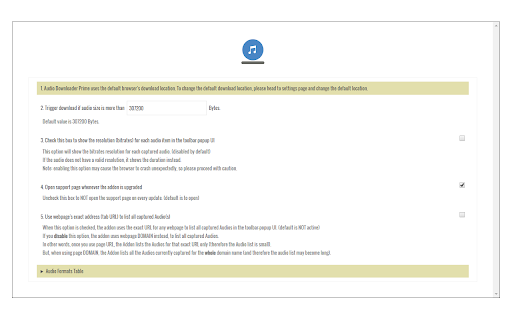
Audio Downloader Prime is positioned as a convenient browser toolbar utility for capturing and downloading audio files directly from web pages. The listing emphasizes features like customizable audio format filtering, minimum file size settings, and a quick-access interface for copying links or downloading content.

Inferred product pattern

Utility-based media downloader with limited maintenance and high site-compatibility volatility.

Review-backed pain points

Users frequently report that the tool stops detecting media after the first use, provides incomplete file downloads, or fails to initiate downloads entirely on various domains.

Observed feature gaps

Lack of reliable detection for modern dynamic web players, poor UI font readability, and reported issues with cross-site compatibility.

Tags
Audio DownloaderMedia GrabberBrowser ExtensionAudio Capture
Target users

- Casual web users

- Audio collectors

- Digital media enthusiasts

Primary use cases

- Downloading audio files from web players

- Capturing audio links for offline use

Positive themes

- Successful usage on specific platforms like Libby

- Functional as a simple utility when detection works

Negative themes

- Inconsistent detection of audio files

- Files downloading partially/corrupted

- Compatibility issues with specific sites like Spotify

- Cloudflare blocking issues during installation/usage

Observed friction

- Account blocking complaints detected

- Performance complaints detected

- No direct payment complaints; the primary friction relates to technical failure and connectivity blocks.

Evidence boundary: Evidence is derived from 15 user reviews highlighting significant reliability issues and site-specific failure points, contrasted with occasional successful use cases. Review sample size is limited and focuses heavily on technical performance failures, which may not capture the experience of silent users.
Complaint summaries
Review-backed complaint signals grouped by operational area.

Support

Users note a lack of responsiveness from the developer regarding bug reports and persistent technical issues.

Reliability

High incidence of reliability complaints, specifically regarding the extension failing to detect audio or becoming unresponsive after initial use.

Privacy

No privacy complaints observed in provided sample.

Access & pricing

- Free usage observed

- No account requirement observed

- Free plan or free usage claimed

Store listing facts

Listing assets

- Screenshots: 2

- Videos: 0

- Languages: 1

Trust signals

- Developer contact

- Official website

Store metadata

- Version: 0.2.7

- Size: 68.55KiB

- Last updated:

Store description excerpt
Short excerpt from the public Chrome Web Store listing; full copy is available on the official store page.
Audio Downloader Prime is an extension that helps you quickly download popular audio formats right from your browser's toolbar popup. Note: Audio Downloader Prime is NOT working for the YouTube website or any other YouTube videos embedded in other websites due to Google, YouTube, and Chrome Store policies and restrictions. Note: Audio Downloader Prime is NOT responsible for media content that you download with this addon. We strongly recommend that you verify the related media copyright permissions on each website before downloading any audio file(s). Key features: 1. Toolbar popup, provides an easy interface to download the audio(s) or copy the audio links to the clipboard. 2. Badge icon text shows the number of captured audio within the page. 3. You can add, delete, or disable audio formats from the Options page. 4. There is also an option to specify the minimum size for audio to trig…

Listing SEO keywords

Search intent keywords
Keyword signals for evaluating how users may discover, compare, or search for this extension category.

Core discovery

audio downloader chromecapture web audiodownload audio from websitebrowser audio grabber

Comparison

audio downloader alternativebest media downloader extension

Problem

audio downloader not workingextension doesn't detect audioaudio downloader fails to download

Alternative

web audio downloaderaudio capture extension

Similar extensions

Jump to related discovery paths:

FAQ

What is Audio Downloader Prime mainly used for?
This extension allows users to detect and download audio media playing within a browser tab. It provides a popup menu to manage detected media, though it explicitly states it does not support YouTube due to platform policy restrictions.
What market signals stand out?
Established adoption with moderate review base. Last known update: 05/07/2025.
What should builders compare before entering this space?
Compare install concentration, rating quality, update recency, screenshots, developer portfolio, listing claims, and review-backed friction signals.
Is this page review-backed?
Backed by review samples. This page combines store metadata with selected review signals, while raw store metrics remain visible for comparison.

Screenshots

Audio Downloader Prime screenshot

Links

Recommended Chrome extensions

Related listings from the same category, trending peers, and the same publisher portfolio.

Browse tools
Dark Mode icon

Dark Mode

Grephy

A global dark theme for the web.

Installs

2.0M+

Rating

3.6

Screen Recorder icon

Screen Recorder

Grephy

Record your computer's screen with just one click!

Installs

300K+

Rating

3.1

ЮБуст - VPN для YouTube. Обход блокировки Ютуб без ВПН. VPN для браузера icon

ЮБуст - VPN для YouTube. Обход блокировки Ютуб без ВПН. VPN для браузера

Uboost

Ускоритель Ютуб без ВПН, VPN для браузера Яндекс, Chrome, Opera, Edge. Обход замедления Ютуба.

Installs

2.0M+

Rating

4.2

Pie Adblock - A Powerful Free Ad Blocker icon

Pie Adblock - A Powerful Free Ad Blocker

Pie Extensions

Pie Adblock blocks ads & pop-ups, plus YouTube & Twitch video ads. You can customize your ad experience with Pie!

Installs

2.0M+

Rating

4.9

Google Dictionary (by Google) icon

Google Dictionary (by Google)

dictionary-extension-dev

View definitions easily as you browse the web.

Installs

2.0M+

Rating

4.4

AI Chat for Search icon

AI Chat for Search

AI Chat for Search Team

Display AI Chat response alongside search engine results

Installs

2.0M+

Rating

4.6

WPS浏览器助手:文档在线阅读编辑 icon

WPS浏览器助手:文档在线阅读编辑

金山PDF

PDF、Excel、Word、PPT等文档无需下载即可在线预览,还能对文档进行编辑、打印、转换等处理。

Installs

2.0M+

Rating

3.0

Planet Search icon

Planet Search

Free VPN Planet

Enchanced default search engine.

Installs

2.0M+

Rating

3.4

Lightshot (screenshot tool) icon

Lightshot (screenshot tool)

Skillbrains

Simple and convenient screenshot tool. Select an area, edit your screenshot and upload it to the server.

Installs

2.0M+

Rating

4.4

PrintFriendly: Print Clean Pages, Save as PDF & Screenshot, AI Tools icon

PrintFriendly: Print Clean Pages, Save as PDF & Screenshot, AI Tools

PrintFriendly

Print clean web pages, save as PDF, take screenshots, or use reader mode. AI summaries & ad removal. Works on ChatGPT & Gemini.

Installs

1.0M+

Rating

4.6