Flow Automation - Auto Flow on Google Flow icon

Flow Automation Chrome Extension Analysis

Automation & Workflow Efficiency

Store listing title: Flow Automation - Auto Flow on Google Flow

Chrome extension ID: fnmijgmnjpealnnadjpjilaanhhambeb

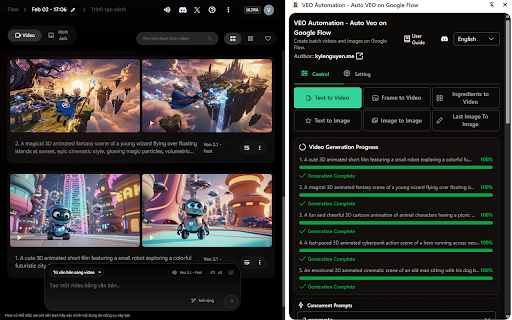
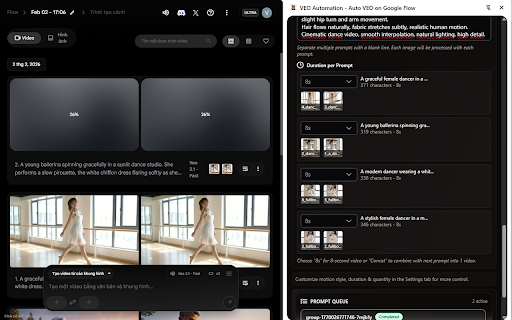
A Chrome extension that automates workflows on labs.google.com/fx/tools/flow. It allows users to queue hundreds of prompts for AI video and image generation and automatically downloads the results in various resolutions up to 4K.

Developer:Truong Nguyen
Version:3.1.7
Size:972KiB
Last updated:

Overview

Installs

100K+

Rating

4.0

175 reviews

Languages

1 locales

Includes English

Market analysis

Review-backed positioning, friction, and market signals for this Chrome extension.

Backed by review samples

Macro category

Automation & Workflow Efficiency

Pricing friction

High review signal

Complaint intensity

High review signal

Listing & review signals
Observed signals from store listing text and review samples.

Listing positioning

The product positions itself as a batch-processing engine for Google Flow, designed to eliminate manual project creation and prompt entry. It emphasizes the ability to auto-submit prompts and auto-download AI-generated videos and images at scale.

Inferred product pattern

Automation wrapper for a third-party AI tool to enable bulk processing and automated asset harvesting.

Review-backed pain points

Users are highly frustrated by the transition to a paid model, describing the developers as greedy. Some report the tool has stopped working or generates the same image repeatedly regardless of the prompt.

Observed feature gaps

Reports of promised features like MP4 uploads for lip-syncing being blocked by size limits not mentioned in advertisements.

Tags
AI AutomationBatch ProcessingGoogle FlowAI Video GeneratorAI Image Generator
Target users

- Content creators

- AI video producers

- Productivity power users

Primary use cases

- Batch generating AI videos from text/images

- Automated bulk image generation

- Scaling content production on Google Flow

Positive themes

- Initial stability and utility

Negative themes

- Sudden shift from free to paid model

- Technical failure in image generation

- Platform-level bot detection errors

Observed friction

- Payment required for meaningful usage

- Free-tier complaints detected

- Performance complaints detected

- Strong negative reaction to the removal of the free version, with users requesting a limited free tier instead of a full paywall.

Evidence boundary: Analysis based on store listing and 10 representative user reviews. Review samples are heavily weighted toward recent negative feedback regarding monetization changes.
Complaint summaries
Review-backed complaint signals grouped by operational area.

Support

No specific support interactions documented, but general dissatisfaction with developer pricing decisions.

Reliability

Users report the extension occasionally stops working or triggers 'unusual activity' errors from Google Flow after generating a certain volume of images.

Privacy

No privacy complaints observed.

Access & pricing

- Subscription model observed

- Login needed for core features

- Trial or limited free usage before paid plan

Store listing facts

Listing assets

- Screenshots: 2

- Videos: 1

- Languages: 1

Trust signals

- Privacy policy

- Developer contact

- Official website

Store metadata

- Version: 3.1.7

- Size: 972KiB

- Last updated:

Store description excerpt
Short excerpt from the public Chrome Web Store listing; full copy is available on the official store page.
Flow Automation is an Auto Veo, Auto Flow tool built to fully automate your workflow on Google Flow (labs.google.com/fx/tools/flow). No more manually creating projects or filling prompts one by one — let Veo run automatically. This extension turns Google Flow into a batch-processing engine, allowing you to auto-submit prompts, auto-generate videos and images, and auto-download results at scale. 🔥 What Flow Automation does Auto Flow prompts continuously without manual interaction Batch generate AI videos and images in parallel Automatically download videos and images in multiple resolutions Handle long prompt queues safely with concurrent processing 🚀 Key Features 🤖 Auto Video Batch Processing Queue dozens or hundreds of prompts and let VEO Automation automatically: Create new projects Fill prompts and configurations Submit generation jobs Track generation progress Move to the next pr…

Listing SEO keywords

Search intent keywords
Keyword signals for evaluating how users may discover, compare, or search for this extension category.

Core discovery

Google Flow automationAuto VEObatch AI video generationNano Banana automation

Comparison

VEO Automation vs manual Flowbest Google Flow batch tool

Problem

how to automate Google Flowbulk generate AI videosauto download AI images

Alternative

Google Flow bulk prompt toolVEO Automation alternative

Similar extensions

Jump to related discovery paths:

FAQ

What is Flow Automation mainly used for?
A Chrome extension that automates workflows on labs.google.com/fx/tools/flow. It allows users to queue hundreds of prompts for AI video and image generation and automatically downloads the results in various resolutions up to 4K.
What market signals stand out?
Established adoption with moderate review base. Last known update: 06/26/2026.
What should builders compare before entering this space?
Compare install concentration, rating quality, update recency, screenshots, developer portfolio, listing claims, and review-backed friction signals.
Is this page review-backed?
Backed by review samples. This page combines store metadata with selected review signals, while raw store metrics remain visible for comparison.

Screenshots

Flow Automation - Auto Flow on Google Flow screenshot

Links

Recommended Chrome extensions

Related listings from the same category, trending peers, and the same publisher portfolio.

Browse workflow