ScreenCatch - Snipping Tool for Screenshot (Full Page, Visible, Selection) icon

ScreenCatch Chrome Extension Analysis

Automation & Workflow Efficiency

Store listing title: ScreenCatch - Snipping Tool for Screenshot (Full Page, Visible, Selection)

Chrome extension ID: gacleogdnjbjbkmebemibjlphanihcho

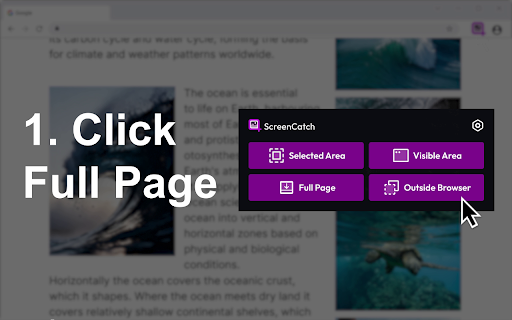
ScreenCatch is a Chrome extension that allows users to capture visible screen areas, custom selections, or entire web pages including scrolling content. It includes basic post-capture editing features such as cropping, drawing arrows, adding shapes, and inserting text notes.

Developer:Brayan Hejny
Version:0.4.0
Size:740KiB
Last updated:

Overview

Installs

10K+

Rating

4.5

8 reviews

Languages

3 locales

Includes Deutsch, English, English (United States)

Market analysis

Review-backed positioning, friction, and market signals for this Chrome extension.

No review samples found

Macro category

Automation & Workflow Efficiency

Pricing friction

Low review signal

Complaint intensity

Low review signal

Listing & review signals
Observed signals from store listing text and review samples.

Listing positioning

ScreenCatch positions itself as a versatile, all-in-one snipping tool designed to simplify browser-based screen captures. It emphasizes a clean, structured workflow that handles various capture modes, including full-page scrolling and custom selections, while offering basic annotation tools.

Inferred product pattern

Standard browser-based utility extension focused on image capture and basic annotation.

Review-backed pain points

Review-backed data is not available.

Observed feature gaps

Review-backed data is not available.

Tags
Screenshot ToolScreen CaptureProductivityWeb ClippingBrowser Extension
Target users

- Researchers

- QA Testers

- Content Curators

- General Web Users

Primary use cases

- Saving long-form articles

- Documenting UI/UX bugs

- Archiving transaction receipts

- Capturing dashboard reports

Positive themes

No positive theme data.

Negative themes

No negative theme data.

Observed friction

- No pricing information or monetization model is explicitly disclosed in the listing.

Evidence boundary: Data extracted from the public Chrome Web Store listing page; no user reviews were available for analysis. The lack of user reviews prevents verification of real-world performance, stability, or monetization practices.
Complaint summaries
Review-backed complaint signals grouped by operational area.

Support

Review-backed data is not available.

Reliability

Review-backed data is not available.

Privacy

Review-backed data is not available.

Access & pricing

- No clear monetization signal

- No account requirement observed

- No clear pricing signal

Store listing facts

Listing assets

- Screenshots: 1

- Videos: 0

- Languages: 3

Trust signals

- Privacy policy

- Developer contact

Store metadata

- Version: 0.4.0

- Size: 740KiB

- Last updated:

Store description excerpt
Short excerpt from the public Chrome Web Store listing; full copy is available on the official store page.
Capture exactly what matters on any webpage — from a full page screenshot to a quick visible grab or a precise selection. ScreenCatch is built as a practical snipping tool and screenshot app that helps you handle screen capture tasks without overcomplicating the process. Whether you're saving content, reviewing layouts, or collecting references, ScreenCatch gives you flexible ways to capture and adjust screenshots in a clean, structured workflow. It aligns with how users search today — from snipping tool download and screenshot extension chrome to go full page and chrome screenshot extension use cases. ✨ Capture Options 🖥️ Full Page Capture – save entire webpages, including long scrolling content 📄 Visible Screen – capture what’s currently displayed in your browser 🔲 Custom Selection – choose and capture only the area you need 📜 Scrolling Screenshot – handle extended pages without m…

Listing SEO keywords

Search intent keywords
Keyword signals for evaluating how users may discover, compare, or search for this extension category.

Core discovery

full page screenshot extensionchrome capture toolscrolling screenshotwebpage snipping tool

Comparison

snipping tool alternativebest screenshot chrome extension

Problem

how to capture full pagesave long web page as image

Alternative

awesome screenshot alternativesnip tool

Similar extensions

Jump to related discovery paths:

FAQ

What is ScreenCatch mainly used for?
ScreenCatch is a Chrome extension that allows users to capture visible screen areas, custom selections, or entire web pages including scrolling content. It includes basic post-capture editing features such as cropping, drawing arrows, adding shapes, and inserting text notes.
What market signals stand out?
Visible niche traction with limited review base. Last known update: 05/09/2026.
What should builders compare before entering this space?
Compare install concentration, rating quality, update recency, screenshots, developer portfolio, listing claims, and review-backed friction signals.
Is this page review-backed?
No review samples found. This page combines store metadata with selected review signals, while raw store metrics remain visible for comparison.

Screenshots

ScreenCatch - Snipping Tool for Screenshot (Full Page, Visible, Selection) screenshot

Links

Recommended Chrome extensions

Related listings from the same category, trending peers, and the same publisher portfolio.

Browse art