Image Downloader Chrome Extension Analysis
Video & Image DownloadersChrome extension ID: cnpniohnfphhjihaiiggeabnkjhpaldj
Image Downloader is a Chrome extension that allows users to extract and save images from websites. It provides tools to filter assets by resolution and dimensions to ensure only the desired images are downloaded.
Overview
Installs
2.0M+
Rating
★ 3.7
2,621 reviews
Languages
1 locales
Includes English (United States)
Market analysis
Review-backed positioning, friction, and market signals for this Chrome extension.
Macro category
Video & Image Downloaders
Pricing friction
Low review signal
Complaint intensity
High review signal
Listing positioning
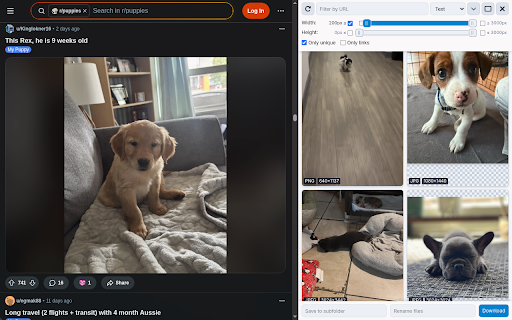
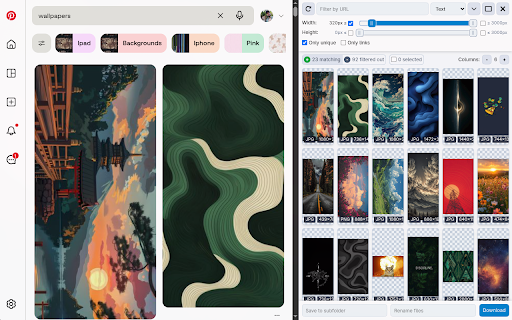
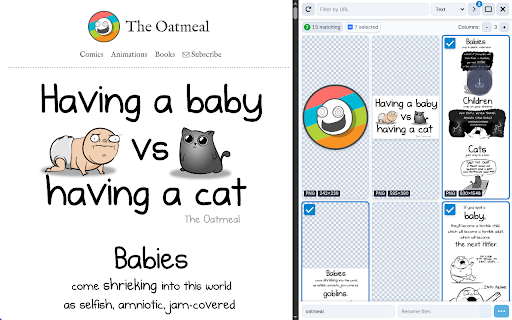
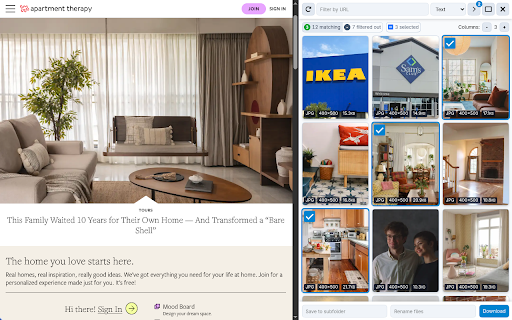
The product is positioned as a utility for browsing and downloading multiple photos from an active webpage simultaneously. It highlights efficiency through filtering options (size, dimensions, URL), duplicate removal, and organizational tools like renaming and subfolder saving.
Inferred product pattern
High-volume utility tool for bulk asset extraction with significant recent quality regression.
Review-backed pain points
Users report that recent updates have caused the extension to stop working entirely, fail to access page contents, or download images in a disordered sequence.
Observed feature gaps
Reviews indicate a loss of automatic scanning, now requiring manual refreshes to find images. The listing also notes that it cannot capture full-resolution images on dynamic sites like Instagram.
- Content creators
- Graphic designers
- Digital marketers
- Web researchers
- Bulk downloading images from a website
- Filtering images by size for quality control
- Organizing web images into local subfolders
No positive theme data.
- Regression after updates
- Functional breakage
- Degraded scanning performance
- Incorrect download ordering
- Performance complaints detected
- No pricing friction observed as no payment mentions were found.
Support
The developer specifies that they cannot reply to reviews and directs all issues to a separate support page.
Reliability
Severe reliability issues reported post-update, including the extension failing to open or displaying 'cannot access the contents of this page' errors.
Privacy
No privacy complaints observed.
- Free usage observed
- No account requirement observed
- Free plan or free usage claimed
Store listing facts
- Screenshots: 5
- Videos: 0
- Languages: 1
- Privacy policy
- Developer contact
- Version: 4.5.3
- Size: 138KiB
- Last updated:
Listing SEO keywords
Core discovery
Comparison
Problem
Alternative
Similar extensions
Jump to related discovery paths:
FAQ
Screenshots
Links
Privacy policy: https://pactinteractive.github.io/image-downloader


![Custom profile picture for Netflix™ [QVI] icon](https://extspot.com/api/v1/assets/googleusercontent/aHR0cHM6Ly9saDMuZ29vZ2xldXNlcmNvbnRlbnQuY29tL1Z3OWc3ZjFJeDgtQndyLWVOYUhQdXpsYjVRUzJxaVV5VDRGSzlxaGVnRUxlSk1hVWRMMndTcEZ2bHdycEIzUUpyb1RhYll6aWxFemtxNXZXeUV3OFlraVZadw)