
Ultimate Color Picker Chrome Extension Analysis
Developer & Designer ToolsChrome extension ID: lobiadjfmkomemokdfhiaaaidgdhcded
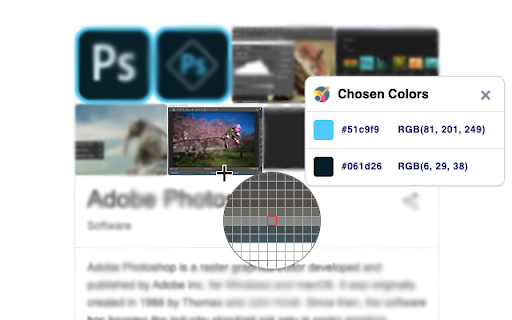
A Chrome extension that allows users to extract HEX and RGB color codes from any element on a webpage. It features a pixel-accurate zoom tool and a history buffer for previously selected colors.
Overview
Installs
80K+
Rating
★ 4.5
112 reviews
Languages
54 locales
Includes Deutsch, English, English (United Kingdom), English (United States)...
Market analysis
Review-backed positioning, friction, and market signals for this Chrome extension.
Macro category
Developer & Designer Tools
Pricing friction
Low review signal
Complaint intensity
Moderate review signal
Listing positioning
The product is positioned as a lightweight, 100% free eyedropper tool designed for web designers. It emphasizes speed via shortcuts and precision through features like zoom and color history.
Inferred product pattern
Single-purpose utility tool providing high-frequency functionality for creative professionals without a paywall.
Review-backed pain points
Users have reported issues where color codes cannot be copied to the clipboard and a specific bug where the cursor cannot reach the top-right area of the screen.
Observed feature gaps
Inconsistent clipboard integration across different operating systems (specifically Ubuntu) and some UX friction regarding the copy-paste workflow.
- Web Designers
- Frontend Developers
- Digital Artists
- Extracting color palettes from websites
- Finding exact HEX/RGB codes for UI design
- Pixel-perfect color sampling
- Simplicity and ease of use
- Precision via the zoom feature
- Useful color history buffer
- Minimalist approach compared to complex tools
- Copy-paste functionality failures
- Performance clunkiness
- OS-specific compatibility issues
- Cursor limitations in page corners
- Performance complaints detected
- No pricing friction observed; the tool is claimed to be 100% free.
Support
No specific support or account-related complaints found in the review samples.
Reliability
Some reports of the extension not functioning on Ubuntu and general 'clunkiness' in performance.
Privacy
No privacy or security complaints observed.
- Free usage observed
- No account requirement observed
- Free plan or free usage claimed
Store listing facts
- Screenshots: 1
- Videos: 0
- Languages: 54
- Privacy policy
- Developer contact
- Official website
- Version: 21
- Size: 1.64MiB
- Last updated:
Listing SEO keywords
Core discovery
Comparison
Problem
Alternative
Similar extensions
Jump to related discovery paths:
FAQ
Screenshots
Links
Website: verblike.com
Privacy policy: https://www.verblike.com/chrome-extensions-privacy-policy/