Edit with Notepad++ icon

Edit with Notepad++ Chrome Extension Analysis

Developer & Designer Tools

Chrome extension ID: gpmjpkmohjgaimfhebdjebpgdnpcadji

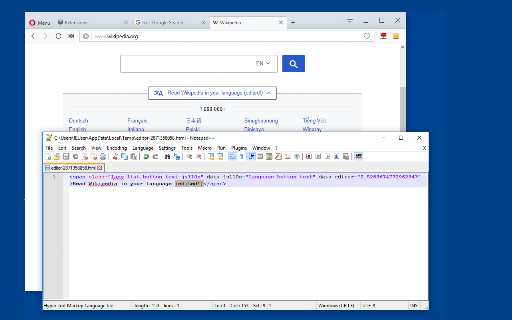
This tool allows users to edit the content of text areas, HTML nodes, and CSS stylesheets directly through Notepad++. It uses a native client to monitor local file changes and automatically updates the browser view upon saving.

Developer:joue.quroi
Version:0.2.2
Size:44.85KiB
Last updated:

Overview

Installs

10K+

Rating

3.5

24 reviews

Languages

1 locales

Includes English

Market analysis

Review-backed positioning, friction, and market signals for this Chrome extension.

Backed by review samples

Macro category

Developer & Designer Tools

Pricing friction

Low review signal

Complaint intensity

Moderate review signal

Listing & review signals
Observed signals from store listing text and review samples.

Listing positioning

The extension positions itself as a bridge between the Notepad++ text editor and the web browser. It aims to provide a workflow where developers can modify web elements like HTML, CSS, and JavaScript in real-time by saving changes in their local editor.

Inferred product pattern

A niche developer utility that uses a native messaging host to sync local desktop text editors with live web content.

Review-backed pain points

Users reported issues with the extension failing to save settings, difficulties establishing a connection with the required native client, and uncertainty about how to edit local HTML files.

Observed feature gaps

Reviewers expressed difficulty or lack of clarity regarding the process for editing local HTML files.

Tags
Notepad++ IntegrationWeb DevelopmentReal-Time EditingHTML Editor
Target users

- Web Developers

- Frontend Engineers

- Software Students

- UI/UX Designers

Primary use cases

- Real-time editing of HTML and CSS

- Modifying form elements and text areas

- Syncing local code changes to the browser

Positive themes

- Streamlined coding workflow

- Useful for programming projects

Negative themes

- Difficulty with connection/setup

- Settings not persisting

- Confusion regarding local file editing

Observed friction

- No pricing information or friction observed in the provided data.

Evidence boundary: Evidence is derived from the product description and a small sample of user reviews regarding setup, connectivity, and feature usage. The review sample is relatively small (24 comments), which may not capture the full spectrum of technical issues or user satisfaction.
Complaint summaries
Review-backed complaint signals grouped by operational area.

Support

Users expressed a need for assistance regarding connection issues and installation steps.

Reliability

Reports of settings not being saved and the extension failing to connect to the native client.

Privacy

No privacy complaints observed.

Access & pricing

- No clear monetization signal

- No account requirement observed

- No clear pricing signal

Store listing facts

Listing assets

- Screenshots: 1

- Videos: 0

- Languages: 1

Trust signals

- Developer contact

- Official website

Store metadata

- Version: 0.2.2

- Size: 44.85KiB

- Last updated:

Store description excerpt
Short excerpt from the public Chrome Web Store listing; full copy is available on the official store page.
This extension facilitates the integration of Notepad++ with your web browser. Watch the video tutorials for installation: - Windows: https://youtu.be/xX-j-HQ8WJI - Linux and Mac: https://youtu.be/8r756Z3wQ8M Features: - Modify the content of "input[type=text]," "input[type=search]," and "textarea." - Edit the innerHTML and outerHTML of node elements. - Make changes to CSS stylesheets. - Edit JavaScript source code. The extension continuously monitors local files, automatically updating node content upon detection of changes. All you need to do is save your modifications. Keep in mind that this extension relies on a native client for communication with the Notepad++ editor, and you must have the Notepad++ application installed on your operating system. Place the absolute path to the editor on the extension's options page if using the portable version. To send an HTML element to the edit…

Listing SEO keywords

Search intent keywords
Keyword signals for evaluating how users may discover, compare, or search for this extension category.

Core discovery

Notepad++ web editoredit HTML in Notepad++real-time CSS editor extensionbrowser Notepad++ sync

Comparison

Sublime Text browser integrationVS Code live edit

Problem

how to edit local HTML files in browserNotepad++ extension connection error

Alternative

Chrome DevToolsLive Server extension

Similar extensions

Jump to related discovery paths:

FAQ

What is Edit with Notepad++ mainly used for?
This tool allows users to edit the content of text areas, HTML nodes, and CSS stylesheets directly through Notepad++. It uses a native client to monitor local file changes and automatically updates the browser view upon saving.
What market signals stand out?
Visible niche traction with limited review base. Last known update: 11/29/2023.
What should builders compare before entering this space?
Compare install concentration, rating quality, update recency, screenshots, developer portfolio, listing claims, and review-backed friction signals.
Is this page review-backed?
Backed by review samples. This page combines store metadata with selected review signals, while raw store metrics remain visible for comparison.

Screenshots

Edit with Notepad++ screenshot

Links

Recommended Chrome extensions

Related listings from the same category, trending peers, and the same publisher portfolio.

Browse developer
Spoof Geolocation icon

Spoof Geolocation

joue.quroi

This extension alters browser Geolocation latitude and longitude to user-defined values

Installs

100K+

Rating

4.4

Canvas Blocker - Fingerprint Protect icon

Canvas Blocker - Fingerprint Protect

joue.quroi

Prevent HTML canvas element from generating a unique identification key to protect user's privacy

Installs

60K+

Rating

3.9

Chromebook Recovery Utility icon

Chromebook Recovery Utility

google.com

Create recovery media for your Chromebook.

Installs

2.0M+

Rating

2.6

Lighthouse icon

Lighthouse

lighthouse-extension-owners

Lighthouse is an open-source, automated tool for improving the performance, quality, and correctness of your web apps.

Installs

1.0M+

Rating

4.4

Eye Dropper icon

Eye Dropper

Eye Dropper

Pick colors from any website.

Installs

1.0M+

Rating

4.3

Stylus icon

Stylus

stylus.openstyles

Redesign the web with Stylus, a user styles manager. Stylus allows you to easily install themes and skins for many popular sites.

Installs

1.0M+

Rating

4.5

Clear Cache icon

Clear Cache

Little Void LLC (Ben Bojko)

Powerful, user-friendly browser data management, right from your toolbar.

Installs

1.0M+

Rating

4.5

SEOquake icon

SEOquake

SEOquake

SEOquake is a free plugin that provides you with key SEO metrics, along with other useful tools such as SEO Audit and many others

Installs

1.0M+

Rating

4.5

Similarweb - Website Traffic, AI Traffic & SEO Checker icon

Similarweb - Website Traffic, AI Traffic & SEO Checker

Similarweb

Instant website analysis, AI traffic insights, and SEO metrics at your fingertips.

Installs

1.0M+

Rating

4.6

Контур.Плагин icon

Контур.Плагин

kontur.extension

Расширение браузера, выполняющее криптографические операции в сервисах СКБ Контур

Installs

1.0M+

Rating

3.1