Chromebook Recovery Utility icon

Chromebook Recovery Utility Chrome Extension Analysis

Developer & Designer Tools

Chrome extension ID: pocpnlppkickgojjlmhdmidojbmbodfm

This extension is designed to help users create bootable recovery USB drives for their Chromebook devices. It automates the process of fetching the correct OS image and formatting the external storage media required for system recovery.

Developer:google.com
Version:0.2.3
Size:1.87MiB
Last updated:

Overview

Installs

2.0M+

Rating

2.6

2,072 reviews

Languages

52 locales

Includes Deutsch, English, English (United Kingdom), Filipino...

Market analysis

Review-backed positioning, friction, and market signals for this Chrome extension.

Backed by review samples

Macro category

Developer & Designer Tools

Pricing friction

Low review signal

Complaint intensity

High review signal

Listing & review signals
Observed signals from store listing text and review samples.

Listing positioning

The store listing positions this utility as the official Google-provided tool for creating recovery media for Chromebooks. It is marketed as a cross-platform solution compatible with ChromeOS, Windows, and Mac to facilitate system restoration.

Inferred product pattern

Official utility tool with legacy technical debt and poor current maintenance state.

Review-backed pain points

Users frequently report that the tool fails to initiate downloads, hangs at 0% progress, or becomes unresponsive upon clicking. Significant frustration is expressed regarding the bricking of USB drives and the inability of the extension to launch from the browser interface.

Observed feature gaps

Lack of support for Linux environments, absence of manual download links within the UI, and insufficient error messaging when the process fails to execute.

Tags
ChromebookSystem RecoveryBootable DriveChrome OS
Target users

- Chromebook users

- IT support staff

- System administrators

Primary use cases

- Creating Chromebook recovery media

- Fixing corrupted ChromeOS installations

Positive themes

- None observed in recent high-rating samples.

Negative themes

- Persistent download failures

- Extension unresponsive or failing to launch

- USB drive corruption/bricking

- Lack of clear instructions

- Limited platform compatibility

Observed friction

- Performance complaints detected

- None; the product is free.

Evidence boundary: Analysis based on 2,045 reviews highlighting systemic technical failures, unresponsiveness, and hardware-related complaints from users attempting to use the tool for OS recovery. The evidence is derived from negative user feedback, which reflects a biased sample of users experiencing technical difficulties with the extension.
Complaint summaries
Review-backed complaint signals grouped by operational area.

Support

Users report that official support resources are inadequate and the extension provides no meaningful feedback when tasks fail.

Reliability

High; users report widespread technical failures, frozen UI, and hardware-level issues including bricked USB drives.

Privacy

None observed.

Access & pricing

- Free usage observed

- No account requirement observed

- Free plan or free usage claimed

Store listing facts

Listing assets

- Screenshots: 1

- Videos: 0

- Languages: 52

Trust signals

- Developer contact

- Official website

Store metadata

- Version: 0.2.3

- Size: 1.87MiB

- Last updated:

Store description excerpt
Short excerpt from the public Chrome Web Store listing; full copy is available on the official store page.
This is a Chrome Extension for the Chromebook Recovery. Use this tool on M55+ Chromebooks, Windows, and Mac devices to create recovery media. Instructions on how to use the tool can be found here: https://support.google.com/chromebook/answer/6002417 By installing this item, you agree to the Google Terms of Service and Privacy Policy at https://www.google.com/intl/en/policies/.

Listing SEO keywords

Search intent keywords
Keyword signals for evaluating how users may discover, compare, or search for this extension category.

Core discovery

Chromebook recovery toolChromeOS recovery utilityfix chromebookcreate recovery media

Comparison

Chromebook recovery utility alternativemanual chromebook recovery

Problem

Chromebook recovery utility not workingdownload interruptedusb drive not detected

Alternative

chromeos recovery imageflash chromebook

Similar extensions

Jump to related discovery paths:

FAQ

What is Chromebook Recovery Utility mainly used for?
This extension is designed to help users create bootable recovery USB drives for their Chromebook devices. It automates the process of fetching the correct OS image and formatting the external storage media required for system recovery.
What market signals stand out?
Large installed base with substantial review base. Last known update: 02/16/2024.
What should builders compare before entering this space?
Compare install concentration, rating quality, update recency, screenshots, developer portfolio, listing claims, and review-backed friction signals.
Is this page review-backed?
Backed by review samples. This page combines store metadata with selected review signals, while raw store metrics remain visible for comparison.

Screenshots

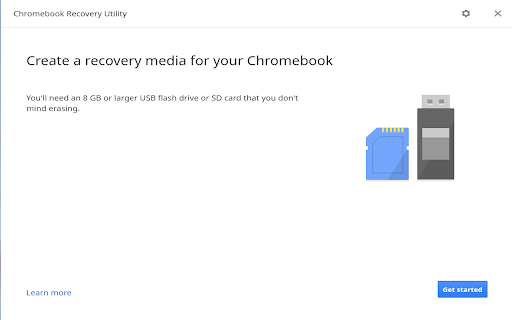
Chromebook Recovery Utility screenshot

Links

Website: google.com

Recommended Chrome extensions

Related listings from the same category, trending peers, and the same publisher portfolio.

Browse developer