Clear Cache icon

Clear Cache Chrome Extension Analysis

Automation & Workflow Efficiency

Chrome extension ID: cppjkneekbjaeellbfkmgnhonkkjfpdn

Clear Cache is a Chrome extension designed to help users manage and delete browser data such as cache, cookies, and web app data. It allows for targeted clearing of specific domains, active tabs, or scheduled automated cleaning to maintain browser performance.

Version:2.4.2-build.0
Size:690KiB
Last updated:

Overview

Installs

1.0M+

Rating

4.5

1,186 reviews

Languages

1 locales

Includes English

Market analysis

Review-backed positioning, friction, and market signals for this Chrome extension.

Backed by review samples

Macro category

Automation & Workflow Efficiency

Pricing friction

Moderate review signal

Complaint intensity

Moderate review signal

Listing & review signals
Observed signals from store listing text and review samples.

Listing positioning

The product is positioned as a powerful, privacy-focused browser data management tool that provides fine-grained control over clearing cache and cookies. It highlights a single-click user experience and offers a 'Plus' subscription for advanced automation and customization features.

Inferred product pattern

A utility-based browser extension transitioning from a completely free model to a freemium model with advanced automation features.

Review-backed pain points

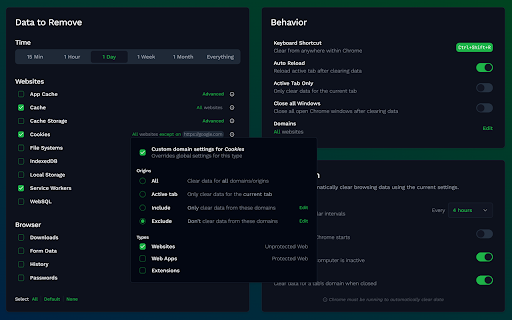
Users report that the extension often ignores domain exceptions and clears cookies regardless, and that the 'Active Tab Only' feature fails to limit clearing to the current tab. There is also significant frustration regarding the complexity of the domain filter UI.

Observed feature gaps

Lack of functionality to calculate or display current cache space usage.

Tags
Cache CleanerBrowser UtilityPrivacy ToolDeveloper Tool
Target users

- Web Developers

- Privacy-Conscious Users

- Power Users

Primary use cases

- Improving browser performance by clearing cache

- Managing cookies for specific domains

- Automating browser data cleaning via schedules

Positive themes

- Ease of use and configuration

- Effective workflow for web developers

- Reliability in professional environments

Negative themes

- Failure to respect domain exceptions

- Inaccurate 'active tab only' functionality

- Complexity of the user interface

- Dissatisfaction with the transition to a freemium model

Observed friction

- Free-tier complaints detected

- Account blocking complaints detected

- Performance complaints detected

- Privacy complaints detected

- Users expressed frustration over features that were previously free being moved behind a 'Plus' subscription paywall.

Evidence boundary: Evidence gathered from the official store listing and user reviews regarding functional reliability, UI usability, and pricing model changes. The review sample includes non-English feedback and older reviews that may not reflect the most recent software versions.
Complaint summaries
Review-backed complaint signals grouped by operational area.

Support

Some users reported issues with the email verification process, preventing them from accessing paid features.

Reliability

Users reported instances where the extension became slow/unresponsive after updates and failed to correctly apply domain-specific exclusion rules.

Privacy

One user reported an unexpected attempt by the extension to access the webcam.

Access & pricing

- Free entry with paid features

- Login needed for core features

- Limited free usage observed

Store listing facts

Listing assets

- Screenshots: 5

- Videos: 0

- Languages: 1

Trust signals

- Privacy policy

- Developer contact

- Official website

- Support link

Store metadata

- Version: 2.4.2-build.0

- Size: 690KiB

- Last updated:

Store description excerpt
Short excerpt from the public Chrome Web Store listing; full copy is available on the official store page.
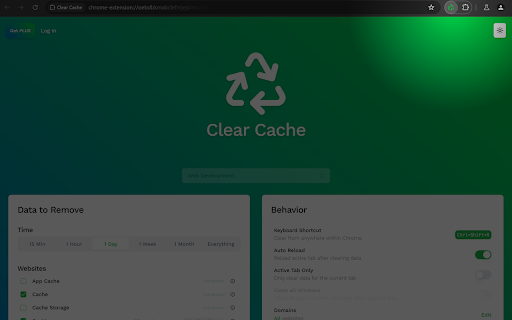
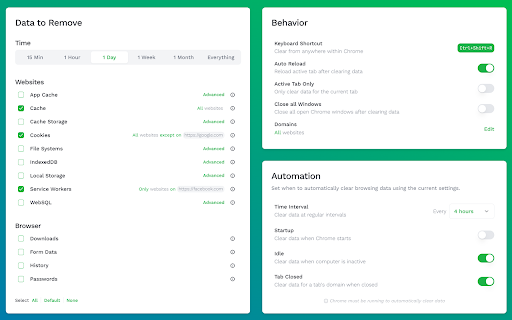
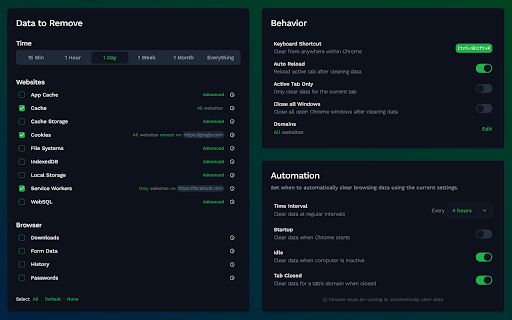
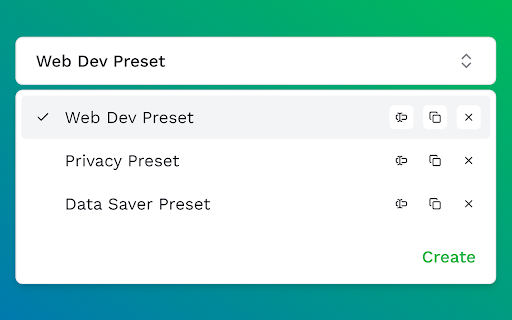
♻️ Clear your browser's cache and data with a single click ♻️ Fine-grained control over what gets cleared ♻️ Developed by an independent developer committed to privacy and performance Key Features: --------------------- ✅ One-click cache clearing ✅ Preview exactly what will be cleared ✅ Customize which domains are cleared ✅ Clear data from active tab only ✅ Customize time period to clear ✅ Sync settings across devices ✅ Schedule automatic clearing ✅ Clear web, app and extension data ✅ Import browser settings ✅ Dark/light mode Privacy Commitment: ---------------------------------- 🚫 No ads 🚫 No tracking 🚫 No access to personal data Clear Cache Plus: ---------------------------- ♻️ Upgrade for advanced features including custom presets, per-data-type domain customization, and automated scheduling. Clear Cache remains free to use with ongoing improvements. Plus subscription supports ind…

Listing SEO keywords

Search intent keywords
Keyword signals for evaluating how users may discover, compare, or search for this extension category.

Core discovery

clear browser cachedelete cookies chromebrowser data managerautomatic cache cleaner

Comparison

Cleaner extensionbrowser cache management

Problem

cache slowing browserclear cookies for specific domainbrowser performance tool

Alternative

privacy cleanercookie manager

Similar extensions

Jump to related discovery paths:

FAQ

What is Clear Cache mainly used for?
Clear Cache is a Chrome extension designed to help users manage and delete browser data such as cache, cookies, and web app data. It allows for targeted clearing of specific domains, active tabs, or scheduled automated cleaning to maintain browser performance.
What market signals stand out?
Large installed base with substantial review base. Last known update: 05/19/2026.
What should builders compare before entering this space?
Compare install concentration, rating quality, update recency, screenshots, developer portfolio, listing claims, and review-backed friction signals.
Is this page review-backed?
Backed by review samples. This page combines store metadata with selected review signals, while raw store metrics remain visible for comparison.

Screenshots

Clear Cache screenshot

Links

Recommended Chrome extensions

Related listings from the same category, trending peers, and the same publisher portfolio.

Browse developer
TikTok Pixel Helper icon

TikTok Pixel Helper

TikTok For Business

The TikTok Pixel Helper is a plug-in that monitors whether your TikTok Pixel is functioning properly.

Installs

600K+

Rating

2.6

Google Analytics Debugger icon

Google Analytics Debugger

Google Analytics

Prints useful information to the JavaScript console by enabling the debug version of the Google Analytics Javascript.

Installs

600K+

Rating

4.2

Detailed SEO Extension icon

Detailed SEO Extension

ahrefsseotoolbar

Get SEO insights at the click of a button to any website you're currently on. Built by full-time SEO's for daily analysis.

Installs

500K+

Rating

4.9

CSS Peeper icon

CSS Peeper

CSS Peeper

Inspect website styles in seconds. Supercharge your workflow, and save hours of work.

Installs

500K+

Rating

4.1

Salesforce Inspector Reloaded icon

Salesforce Inspector Reloaded

Thomas Prouvot

Productivity tools for Salesforce administrators and developers to inspect data and metadata directly from the Salesforce UI.

Installs

500K+

Rating

4.8

Axure RP Extension for Chrome icon

Axure RP Extension for Chrome

Axure Software Solutions, Inc.

An extension that allows viewing of locally published Axure RP prototypes (HTML files) from Google Chrome.

Installs

500K+

Rating

3.3

SelectorsHub icon

SelectorsHub

Sanjay Kumar | SelectorsHub Founder

Locators Plugin to Auto Generate and Verify Playwright Locators, XPath & CSS Selectors.

Installs

400K+

Rating

4.8

Angular DevTools icon

Angular DevTools

Angular

Angular DevTools extends Chrome DevTools adding Angular specific debugging and profiling capabilities.

Installs

400K+

Rating

3.7

SAML-tracer icon

SAML-tracer

SimpleSAMLphp

A debugger for viewing SAML messages

Installs

400K+

Rating

4.5

WhatRuns icon

WhatRuns

Ownedit Ltd

Discover what runs a website. Frameworks, Analytics Tools, Wordpress Plugins, Fonts - you name it.

Installs

400K+

Rating

4.2