Color Picker - Native Eyedropper icon

Color Picker Chrome Extension Analysis

Developer & Designer Tools

Store listing title: Color Picker - Native Eyedropper

Chrome extension ID: hehcmpomfkidgnjplbopmpbmkhhhhiec

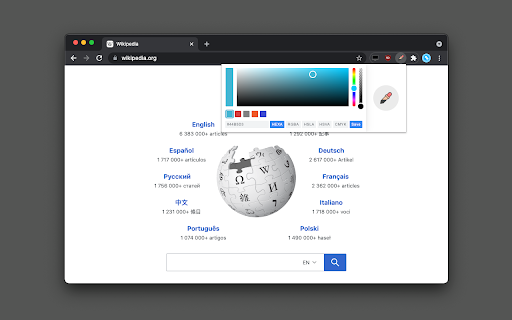
A browser extension that provides a magnifying glass eyedropper to determine pixel colors on the entire screen. It supports color selection history and allows users to edit values and copy results in HEX, RGBA, HSVA, HSLA, and CMYK formats.

Version:0.1.8
Size:116KiB
Last updated:

Overview

Installs

10K+

Rating

4.4

16 reviews

Languages

27 locales

Includes Deutsch, English, Indonesia, Nederlands...

Market analysis

Review-backed positioning, friction, and market signals for this Chrome extension.

Backed by review samples

Macro category

Developer & Designer Tools

Pricing friction

Low review signal

Complaint intensity

Moderate review signal

Listing & review signals
Observed signals from store listing text and review samples.

Listing positioning

The product positions itself as a high-precision native eyedropper tool capable of capturing colors from anywhere on the screen, not just within the browser window. It emphasizes its magnifying glass feature, support for multiple color formats, and ability to extract colors from images and video files.

Inferred product pattern

A lightweight, utility-focused design tool providing global screen access for color extraction.

Review-backed pain points

Users reported that picking a color on a clickable icon triggers the click event of that icon. Additionally, one user reported system crashes, and others noted that long color codes (like HSL) do not fit well within the UI.

Observed feature gaps

Lack of a continuous picking mode and insufficient UI scaling for certain color space representations.

Tags
Color PickerEyedropper ToolDesign UtilityPixel Color
Target users

- Graphic Designers

- Web Developers

- UI/UX Designers

- Digital Artists

Primary use cases

- Capturing colors from video frames

- Extracting colors from images in native viewers

- Picking colors outside the browser window

- Converting color formats

Positive themes

- Simplicity and intuitive interface

- Effectiveness compared to other store versions

- High utility for design work

Negative themes

- Accidental interaction with clickable elements during color picking

- System instability/crashes

- UI layout issues with long color strings

Observed friction

- Performance complaints detected

- No pricing information or friction observed in the provided data.

Evidence boundary: Data extracted from the Chrome Web Store listing and a sample of 10 user reviews. The review sample size is relatively small (16 total reviews), which may not capture the full spectrum of user experiences.
Complaint summaries
Review-backed complaint signals grouped by operational area.

Support

No support or account-related complaints observed.

Reliability

One user reported that the extension caused their computer to crash.

Privacy

No privacy or security complaints observed.

Access & pricing

- No clear monetization signal

- No account requirement observed

- No clear pricing signal

Store listing facts

Listing assets

- Screenshots: 1

- Videos: 0

- Languages: 27

Trust signals

- Developer contact

- Official website

Store metadata

- Version: 0.1.8

- Size: 116KiB

- Last updated:

Store description excerpt
Short excerpt from the public Chrome Web Store listing; full copy is available on the official store page.
You can determine a pixel's color on your screen (not just the browser window) using a native eyedropper tool equipped with a magnifying glass. You can modify the color value or the transparency inside the color picker's popup. This extension stores the last six selected colors and represents the color in HEX, RGBA, HSVA, HSLA, and CMYK formats. You can press a button to copy the vcurrent color value into the clipboard. Features: Uses the native eyedropper tool that works outside the browser Automatically copies the selected color to the clipboard Has an advanced color editing interface Get a readable color based on the selected background color Usage: Image Files: If you want to grab a color from an image, open the image either on a browser tab or use a native image viewer (e.g., Adobe Photoshop), then press the "Eyedropper" icon on the popup to activate the global color picker. Video…

Listing SEO keywords

Search intent keywords
Keyword signals for evaluating how users may discover, compare, or search for this extension category.

Core discovery

color pickereyedropper toolpixel color grabberhex color extractorrgba color tool

Comparison

native eyedropperadvanced color picker

Problem

color picker crasheyedropper click issuecolor picker UI bug

Alternative

color swatch tooldesign color grabber

Similar extensions

Jump to related discovery paths:

FAQ

What is Color Picker mainly used for?
A browser extension that provides a magnifying glass eyedropper to determine pixel colors on the entire screen. It supports color selection history and allows users to edit values and copy results in HEX, RGBA, HSVA, HSLA, and CMYK formats.
What market signals stand out?
Visible niche traction with limited review base. Last known update: 01/30/2025.
What should builders compare before entering this space?
Compare install concentration, rating quality, update recency, screenshots, developer portfolio, listing claims, and review-backed friction signals.
Is this page review-backed?
Backed by review samples. This page combines store metadata with selected review signals, while raw store metrics remain visible for comparison.

Screenshots

Color Picker - Native Eyedropper screenshot

Links

Recommended Chrome extensions

Related listings from the same category, trending peers, and the same publisher portfolio.

Browse developer