ySense Addon icon

ySense Addon Chrome Extension Analysis

Automation & Workflow Efficiency

Chrome extension ID: hjnhcgkngeeahimbfhejeaiijecekhba

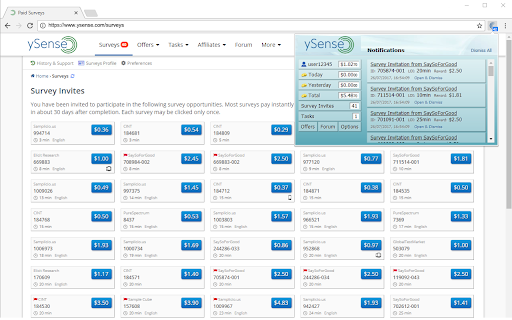
This extension functions as a dashboard and notification monitor for the ySense survey and micro-tasking platform. It displays current earnings, account balance, and alerts for new available survey opportunities directly from the browser toolbar.

Developer:Prodege, LLC
Version:4.0.2
Size:377KiB
Last updated:

Overview

Installs

60K+

Rating

4.6

690 reviews

Languages

1 locales

Includes English (United States)

Market analysis

Review-backed positioning, friction, and market signals for this Chrome extension.

Backed by review samples

Macro category

Automation & Workflow Efficiency

Pricing friction

Low review signal

Complaint intensity

High review signal

Listing & review signals
Observed signals from store listing text and review samples.

Listing positioning

The ySense Addon is positioned as a non-intrusive productivity utility for ySense platform users to track account status and earnings in real-time. It provides browser-based notifications and quick access to survey opportunities without requiring navigation to the main website.

Inferred product pattern

Platform-specific notification and status-tracking utility.

Review-backed pain points

Users frequently report login loops where the extension fails to recognize an active session, as well as frustration regarding account deactivations and survey disqualifications on the underlying ySense platform.

Observed feature gaps

Users have requested shorter update intervals (e.g., 30-60 seconds) to ensure real-time accuracy for survey availability.

Tags
Survey TrackerEarnings MonitorNotification Tool
Target users

- ySense platform users

- Survey participants

- Micro-task workers

Primary use cases

- Real-time tracking of survey availability

- Monitoring account earnings

- Browser-based alerts for new earning opportunities

Positive themes

- Utility for tracking earnings

- Convenience of quick-access to the ySense dashboard

- Effective notification system for task availability

Negative themes

- Account suspension and login issues

- Inaccurate survey qualification feedback

- Conflicts with VPN/Proxy usage

- Synchronization failures between browser and web platform

Observed friction

- Account blocking complaints detected

- Performance complaints detected

- No pricing friction; the extension is free, but users report frustration with platform-level account access and survey eligibility.

Evidence boundary: Evidence is derived from both store metadata and a sample of user reviews highlighting both functional utility and user grievances regarding account access. Review sentiments are heavily influenced by the performance of the underlying ySense platform, which may not always reflect the extension's intrinsic quality.
Complaint summaries
Review-backed complaint signals grouped by operational area.

Support

Users report dissatisfaction with customer support responsiveness regarding account bans and locking issues.

Reliability

Complaints exist regarding the extension's ability to maintain a persistent login state and accurately reflect data from the ySense platform.

Privacy

No specific privacy or data handling complaints found; the main complaints are functional and account-related.

Access & pricing

- Free usage observed

- Login needed for core features

- Free plan or free usage claimed

Store listing facts

Listing assets

- Screenshots: 2

- Videos: 0

- Languages: 1

Trust signals

- Developer contact

- Official website

- Support link

Store metadata

- Version: 4.0.2

- Size: 377KiB

- Last updated:

Store description excerpt
Short excerpt from the public Chrome Web Store listing; full copy is available on the official store page.
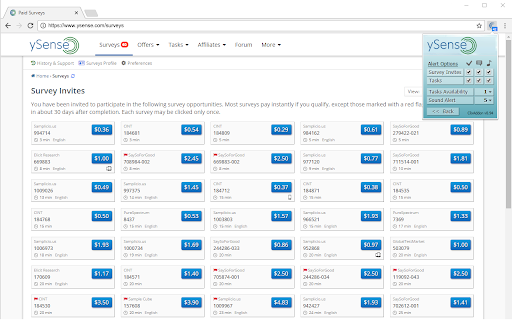
The Addon is non-intrusive and will show a number in the far right hand corner of your browser, representing the total number of offerings available to you. We hope you like it! Clicking on the Addon button will display a summary of your ySense account. This includes the number of Surveys available to you. It also gives you a quick overview of your account status, including your balance and past and current earnings, plus one-click access to most pages of the ySense site. The information displayed on the ySense Addon is updated every 5 minutes so don't be surprised if something does not match your current account information. The Addon has a series of options that can quickly be accessed by clicking on the Options button. These options give you a lot of flexibility on what you would like to be notified about, be it simply by showing a number on the ySense Addon button, by popup notifica…

Listing SEO keywords

Search intent keywords
Keyword signals for evaluating how users may discover, compare, or search for this extension category.

Core discovery

ySense browser extensionySense survey trackerySense earning monitor

Comparison

ySense versus other survey siteshow to track ySense tasks

Problem

ySense login issuesySense account blockedySense extension not working

Alternative

survey reward extensionsmicrotask earning trackers

Similar extensions

Jump to related discovery paths:

FAQ

What is ySense Addon mainly used for?
This extension functions as a dashboard and notification monitor for the ySense survey and micro-tasking platform. It displays current earnings, account balance, and alerts for new available survey opportunities directly from the browser toolbar.
What market signals stand out?
Visible niche traction with moderate review base. Last known update: 03/23/2026.
What should builders compare before entering this space?
Compare install concentration, rating quality, update recency, screenshots, developer portfolio, listing claims, and review-backed friction signals.
Is this page review-backed?
Backed by review samples. This page combines store metadata with selected review signals, while raw store metrics remain visible for comparison.

Screenshots

ySense Addon screenshot

Links

Recommended Chrome extensions

Related listings from the same category, trending peers, and the same publisher portfolio.

Browse workflow