readto icon

readto Chrome Extension Analysis

AI & Writing Assistants

Chrome extension ID: hmoifnkckggncdpoplpoiifjafffmkof

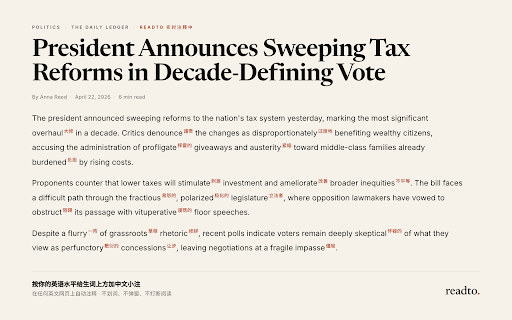
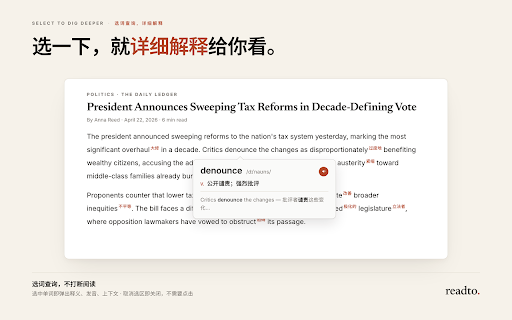
Readto is a Chrome extension that automatically adds Chinese ruby annotations to English words on web pages based on the user's proficiency level. It enables users to read English content without needing to manually look up words or leave the current page.

Developer:vthinkxie
Version:0.3.1
Size:31.11MiB
Last updated:

Overview

Installs

7K+

Rating

5.0

2 reviews

Languages

1 locales

Includes English

Market analysis

Review-backed positioning, friction, and market signals for this Chrome extension.

No review samples found

Macro category

AI & Writing Assistants

Pricing friction

Low review signal

Complaint intensity

Low review signal

Listing & review signals
Observed signals from store listing text and review samples.

Listing positioning

Readto positions itself as a seamless reading aid that minimizes interruptions for English learners. It uses CEFR levels to dynamically annotate difficult English words with Chinese translations directly above the text.

Inferred product pattern

In-page DOM manipulation for linguistic annotation.

Review-backed pain points

Review-backed data is not available.

Observed feature gaps

Review-backed data is not available.

Tags
Language LearningReading AidEnglish EducationVocabulary Builder
Target users

- English language learners

- Students

- Language hobbyists

Primary use cases

- Reading English web articles

- Watching YouTube videos with subtitles

- Building vocabulary during immersion

Positive themes

No positive theme data.

Negative themes

No negative theme data.

Observed friction

- Review-backed data is not available.

Evidence boundary: Information is extracted from the Chrome Web Store listing provided by the developer. Product lacks user reviews, therefore no sentiment or performance history is available.
Complaint summaries
Review-backed complaint signals grouped by operational area.

Support

Review-backed data is not available.

Reliability

Review-backed data is not available.

Privacy

Review-backed data is not available.

Access & pricing

- No clear monetization signal

- No account requirement observed

- No clear pricing signal

Store listing facts

Listing assets

- Screenshots: 2

- Videos: 0

- Languages: 1

Trust signals

- Privacy policy

- Developer contact

- Official website

Store metadata

- Version: 0.3.1

- Size: 31.11MiB

- Last updated:

Store description excerpt
Short excerpt from the public Chrome Web Store listing; full copy is available on the official store page.
readto:读英文网页时,少被生词打断 readto 是一个 Chrome 扩展。 它会根据你的英语水平,在英文网页里的难词上方加中文小注。 不用划词。 不用打开词典。 不用弹窗查询。 继续读就可以。 readto 会保留原始英文页面,只标注可能超出你当前 CEFR 等级的词。你大概率已经认识的常见词,不会被标出来。 读得越多,需要看的注释就应该越少。 功能亮点 ✅ 词上中文小注 ✅ 按 CEFR 水平标注 ✅ 保留英文原文 ✅ 不用查词操作 ✅ 滚动时处理 ✅ 支持多数英文网页 ✅ 支持 YouTube 字幕 如何使用 🔹 安装 readto。 🔹 选择你的 CEFR 英语等级。 🔹 打开英文网页,直接开始读。 🔹 注释太多就调高一级,太少就调低一级。

Listing SEO keywords

Search intent keywords
Keyword signals for evaluating how users may discover, compare, or search for this extension category.

Core discovery

learn English onlineEnglish vocabulary toolChrome extension for reading

Comparison

alternative to English dictionaries

Problem

how to read English websites fasterstop looking up English words

Alternative

Language Reactor alternativesvocabulary extension

Similar extensions

Jump to related discovery paths:

FAQ

What is readto mainly used for?
Readto is a Chrome extension that automatically adds Chinese ruby annotations to English words on web pages based on the user's proficiency level. It enables users to read English content without needing to manually look up words or leave the current page.
What market signals stand out?
Early or small audience with limited review base. Last known update: 05/13/2026.
What should builders compare before entering this space?
Compare install concentration, rating quality, update recency, screenshots, developer portfolio, listing claims, and review-backed friction signals.
Is this page review-backed?
No review samples found. This page combines store metadata with selected review signals, while raw store metrics remain visible for comparison.

Screenshots

readto screenshot
readto screenshot

Links

Website: readto.ai

Privacy policy: https://readto.ai/privacy

Recommended Chrome extensions

Related listings from the same category, trending peers, and the same publisher portfolio.

Browse education
Select AI Extension icon

Select AI Extension

vthinkxie

Select AI Extension

Installs

237

Rating

5.0

Rememberry - Translate and Memorize with Flashcards icon

Rememberry - Translate and Memorize with Flashcards

rememberry

Translate words while browsing and turn them into spaced repetition flashcards to build foreign language vocabulary.

Installs

100K+

Rating

4.6

Transcript - AI Homework Helper icon

Transcript - AI Homework Helper

Transcript

Streamline your study experience with AI: Instant answers, deep insights, and personalized learning across subjects.

Installs

100K+

Rating

3.4

Revision History: Writing Process Visibility for Google Docs & Slides icon

Revision History: Writing Process Visibility for Google Docs & Slides

Revision History

Built for teachers: See how students write, not just what they wrote. View the writing process in Google Docs & Slides.

Installs

100K+

Rating

3.7

Passei Direto – Ferramentas de Estudo icon

Passei Direto – Ferramentas de Estudo

pd.services

A extensão que te ajuda a achar as respostas para suas perguntas, utilizando a maior rede de estudantes do Brasil.

Installs

100K+

Rating

3.7

SolvelyAI - AI Homework Tutor &  Study Helper icon

SolvelyAI - AI Homework Tutor & Study Helper

cws-test-group-1

SolvelyAI is your AI Homework Helper—instant screenshot solving, step-by-step AI Answers, AI Summary, and Study Helper tools.

Installs

100K+

Rating

4.6

Readlang Web Reader icon

Readlang Web Reader

readlang

Read websites in the language you're learning, translate words you don't know, and we'll create flashcards to help you remember.

Installs

100K+

Rating

4.3

Talk & Comment - Voice notes anywhere icon

Talk & Comment - Voice notes anywhere

TalkandComment.com

Voice notes for classrooms and teams. Give feedback students actually hear.

Installs

100K+

Rating

4.1

You Shall Not Pass by TeacherMagic.org icon

You Shall Not Pass by TeacherMagic.org

JamesTyler

Blocks proxy sites, filter evasion exploits, tab spam, and Google Sites abuse on student Chromebooks. Free forever.

Installs

100K+

Rating

1.7

Dualsub - YouTube Subtitle Translator icon

Dualsub - YouTube Subtitle Translator

Dualsub Studio

Translate and display dual subtitles on YouTube and other video websites.

Installs

100K+

Rating

3.6