Regex Tab Manager icon

Regex Tab Manager Chrome Extension Analysis

Automation & Workflow Efficiency

Chrome extension ID: icohaaiapabbaoohdadjmfccppedkkfm

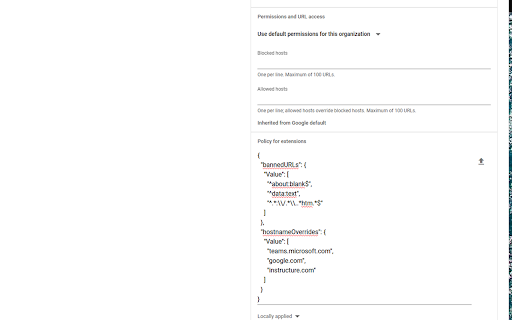
Regex Tab Manager is a tool designed for educational IT environments to restrict browser tab usage. By deploying a policy-based JSON configuration, administrators can selectively block specific URLs, about:blank cloaking, and JavaScript-based bookmarklets on managed student devices.

Version:3.0.2
Size:13.07KiB
Last updated:

Overview

Installs

10K+

Rating

1.0

3 reviews

Languages

1 locales

Includes English

Market analysis

Review-backed positioning, friction, and market signals for this Chrome extension.

Backed by review samples

Macro category

Automation & Workflow Efficiency

Pricing friction

Low review signal

Complaint intensity

High review signal

Listing & review signals
Observed signals from store listing text and review samples.

Listing positioning

This extension is positioned as a security utility for K12 Google Workspace administrators to prevent student circumvention of web filters. It uses regex pattern matching to force-close tabs and remove bookmarks associated with gaming or unauthorized browser tools.

Inferred product pattern

Enterprise-focused administrative blocking tool targeting student device management.

Review-backed pain points

Users reporting the tool are easily bypassed and that the methods used are outdated as gaming sites and circumvention tools update to evade the extension's regex rules.

Observed feature gaps

The extension lacks dynamic or heuristic-based blocking, relying strictly on static regex strings which are easily identified and circumvented by end-users.

Tags
K12 EducationBrowser SecurityRegex FilteringTab ManagementAdmin Utility
Target users

- K12 Google Workspace Administrators

- School District IT Personnel

Primary use cases

- Blocking browser circumvention tools

- Removing unauthorized bookmarklets

- Enforcing web-filtering policies via regex

Positive themes

No positive theme data.

Negative themes

- Ease of bypass

- Ineffectiveness against new circumvention methods

- Public disclosure of code leading to rapid countermeasures

Observed friction

- None identified; tool is provided as a utility for administrators.

Evidence boundary: Evidence consists of store listing technical documentation and user reviews confirming the product is being actively bypassed by students in the target demographic. Review sample size is small and primarily reflects users (students) actively trying to circumvent the product, rather than the intended administrative user base.
Complaint summaries
Review-backed complaint signals grouped by operational area.

Support

No support complaints, though users mention mass-reporting the extension.

Reliability

High; users claim the extension is fundamentally ineffective due to trivial workarounds by students.

Privacy

None; the listing explicitly claims it collects no data from student devices.

Access & pricing

- Free usage observed

- No account requirement observed

- Free plan or free usage claimed

Store listing facts

Listing assets

- Screenshots: 2

- Videos: 0

- Languages: 1

Trust signals

- Developer contact

Store metadata

- Version: 3.0.2

- Size: 13.07KiB

- Last updated:

Store description excerpt
Short excerpt from the public Chrome Web Store listing; full copy is available on the official store page.
The purpose of this application is to provide K12 Google Workspace administrators with the ability to prevent the use of browser tabs and tools normally used to circumvent web filters and classroom management tools. Administrators can use Regex pattern matching to selectively and forcibly close browser tabs of known circumvention tools, with provisions to not enforce tab closure from trusted sources. Settings are easily controlled in the extension's installation policy. Simply modify the example JSON to your needs. When the student devices perform a policy update, the extension will update its definitions. This extension collects absolutely no data from the student device. To my knowledge, this extension should be compliant with COPPA, FERPA, SOPPA, or any other law protecting against the harvesting of information of minors. As mentioned above, Regex patterns are used to close browser t…

Listing SEO keywords

Search intent keywords
Keyword signals for evaluating how users may discover, compare, or search for this extension category.

Core discovery

Chrome policy extensionK12 tab blockerGoogle Workspace admin toolsbrowser circumvention prevention

Comparison

alternative to GoGuardianSecurly alternativeclassroom management tool

Problem

bypass school filterstop students from playing gamesblock chrome tabs

Alternative

web filter bypassstudent device monitoring

Similar extensions

Jump to related discovery paths:

FAQ

What is Regex Tab Manager mainly used for?
Regex Tab Manager is a tool designed for educational IT environments to restrict browser tab usage. By deploying a policy-based JSON configuration, administrators can selectively block specific URLs, about:blank cloaking, and JavaScript-based bookmarklets on managed student devices.
What market signals stand out?
Visible niche traction with limited review base. Last known update: 05/20/2026.
What should builders compare before entering this space?
Compare install concentration, rating quality, update recency, screenshots, developer portfolio, listing claims, and review-backed friction signals.
Is this page review-backed?
Backed by review samples. This page combines store metadata with selected review signals, while raw store metrics remain visible for comparison.

Screenshots

Regex Tab Manager screenshot

Recommended Chrome extensions

Related listings from the same category, trending peers, and the same publisher portfolio.

Browse education