

Google Vids Screen Recorder Chrome Extension Analysis
Automation & Workflow EfficiencyChrome extension ID: iklnnbgdcppplombffihcijanngoeifm
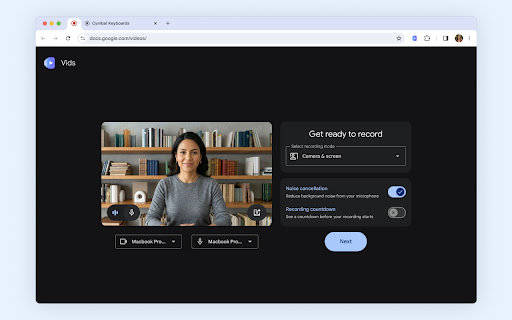
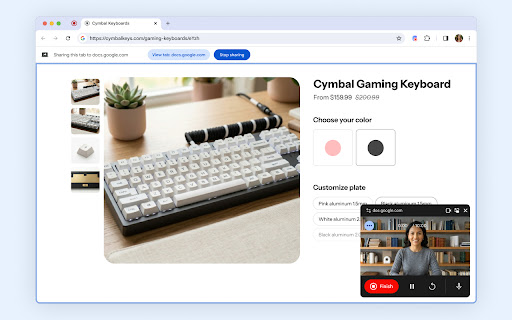
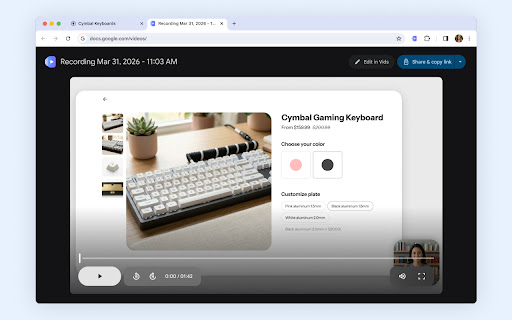
This extension enables users to record their desktop, specific browser windows, or tabs along with webcam and audio. It is designed for quick communication, tutorials, and project feedback, offering a 30-minute recording limit and direct cloud storage integration.
Overview
Installs
100K+
Rating
★ 4.5
41 reviews
Languages
31 locales
Includes Deutsch, English, English (United Kingdom), Indonesia...
Market analysis
Review-backed positioning, friction, and market signals for this Chrome extension.
Macro category
Automation & Workflow Efficiency
Pricing friction
Low review signal
Complaint intensity
Moderate review signal
Listing positioning
Google Vids Screen Recorder is positioned as a lightweight, integrated productivity tool for capturing screen and camera updates directly within the Chrome browser. It emphasizes seamless integration with the Google Workspace ecosystem, allowing users to move from recording to editing in Google Vids without switching applications.
Inferred product pattern
First-party Google browser utility serving as an acquisition bridge to the Google Vids editing platform.
Review-backed pain points
Users frequently report technical instability, specifically the extension failing to launch, audio capture issues, and screen freezing during recordings.
Observed feature gaps
Missing features include default folder selection in Google Drive, better support for multiple Google account switching, and advanced cursor visibility controls.
- Product Teams
- Educators
- Remote Workers
- Google Workspace Users
- Recording software demos
- Creating educational tutorials
- Replacing long-form emails with video updates
- Documenting bugs
- Easy to use
- Seamless integration with Google ecosystem
- Free of cost
- Clean interface
- Audio recording failures
- Inconsistent extension startup reliability
- Lack of mouse cursor visibility in recordings
- Inability to select specific Google accounts for saving files
- Performance complaints detected
- No pricing friction reported; the tool is marketed as free for Google Workspace/personal account users.
Support
Users expressed frustration over the lack of tutorials or troubleshooting documentation.
Reliability
Significant complaints regarding unreliable startup, screen freezing during recording, and audio capture failure.
Privacy
None observed.
- Free usage observed
- Account required for core usage
- Free plan or free usage claimed
Store listing facts
- Screenshots: 3
- Videos: 0
- Languages: 31
- Privacy policy
- Developer contact
- Official website
- Support link
- Version: 1.49.1
- Size: 2.73MiB
- Last updated:
Listing SEO keywords
Core discovery
Comparison
Problem
Alternative
Similar extensions
Jump to related discovery paths:
FAQ
Screenshots
Links
Website: google.com
Privacy policy: https://policies.google.com/privacy
Support links: https://support.google.com/docs/answer/14956207





![TWP - Translate [BETA] icon](https://extspot.com/api/v1/assets/googleusercontent/aHR0cHM6Ly9saDMuZ29vZ2xldXNlcmNvbnRlbnQuY29tL2FXcTd5YzZ4WWlta2tUR2czMEgxUV82ci1hLWNRcDEwZmUyOTVKSndvSkFqd01Hb2dhdS1JRWVhMkNiZmhXbEF5Ri0zdGRRcFJvVGZ3bU5OZlVNYk9qQkJxZw)