
JumpCloud Go™ Chrome Extension Analysis
Automation & Workflow EfficiencyChrome extension ID: jdoahkhfkeipblhbhppmcbdgapeoaopa
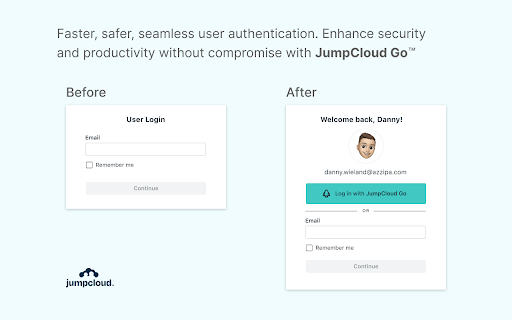
This extension facilitates seamless, biometric-backed authentication for JumpCloud-managed accounts on macOS and Windows devices. It aims to eliminate the need for repetitive manual password and MFA entry, focusing on secure, frictionless access to organizational web resources.
Overview
Installs
200K+
Rating
★ 4.8
62 reviews
Languages
1 locales
Includes English
Market analysis
Review-backed positioning, friction, and market signals for this Chrome extension.
Macro category
Automation & Workflow Efficiency
Pricing friction
Low review signal
Complaint intensity
Moderate review signal
Listing positioning
JumpCloud Go positions itself as a security and productivity utility that enables passwordless authentication for JumpCloud-managed resources. It leverages hardware-backed biometric authentication to streamline user workflows and reduce credential-based security risks like phishing.
Inferred product pattern
Enterprise-managed browser security agent for identity and access management.
Review-backed pain points
Users report critical failures in SSO functionality, memory leaks impacting system performance, and frustration with installation/registration bugs that require browser reinstallation.
Observed feature gaps
Lack of quick-access shortcuts or browser-button UI for direct application launching, leading to perceived inefficiencies compared to legacy tools like Okta.
- JumpCloud-managed enterprise users
- IT administrators managing corporate device fleets
- Passwordless login to web-based business resources
- Biometric authentication for SSO
- Reduced authentication fatigue
- Significant time savings
- Seamless passwordless login experience
- Enhanced security without workflow friction
- Improved daily productivity
- Corrupted data causing blank pages during SSO
- Reliability issues with device registration
- High resource/memory consumption by extension processes
- Account blocking complaints detected
- Performance complaints detected
- The product is part of an enterprise ecosystem; pricing friction manifests as functional accessibility issues for managed users rather than direct paywalls.
Support
Users expressed frustration with technical support guidance, specifically suggestions to reinstall browsers to fix registration failures.
Reliability
Reports of corrupted SSO data, registration failure, and high memory consumption causing system slowdowns or crashes.
Privacy
No specific privacy or data harvesting complaints observed; focus remains on functional reliability.
- Enterprise pricing observed
- Account required for core usage
- Free plan or free usage claimed
Store listing facts
- Screenshots: 1
- Videos: 0
- Languages: 1
- Privacy policy
- Developer contact
- Support link
- Version: 2.2.9
- Size: 268KiB
- Last updated:
Listing SEO keywords
Core discovery
Comparison
Problem
Alternative
Similar extensions
Jump to related discovery paths:
FAQ
Screenshots
Links
Privacy policy: https://jumpcloud.com/privacy
Support links: https://support.jumpcloud.com/