Chrome extension source viewer icon

Chrome extension source viewer Chrome Extension Analysis

Developer & Designer Tools

Chrome extension ID: jifpbeccnghkjeaalbbjmodiffmgedin

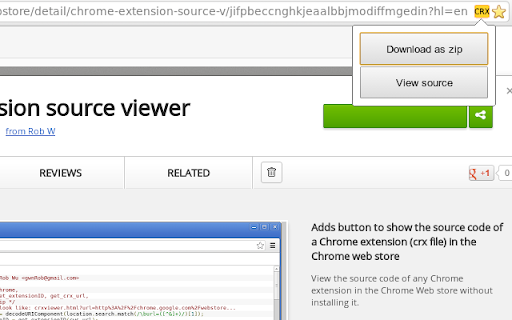
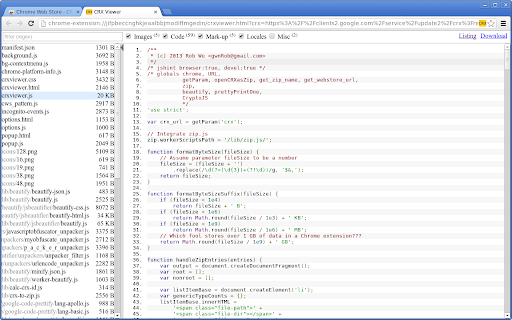
This extension allows users to view and download the underlying code of Chrome, Firefox, Opera, and Edge extensions. It provides tools for searching within file contents, calculating file hashes, and viewing embedded zip files.

Developer:Rob W
Version:1.7.0
Size:227KiB
Last updated:

Overview

Installs

100K+

Rating

4.6

435 reviews

Languages

1 locales

Includes English

Market analysis

Review-backed positioning, friction, and market signals for this Chrome extension.

Backed by review samples

Macro category

Developer & Designer Tools

Pricing friction

Low review signal

Complaint intensity

Moderate review signal

Listing & review signals
Observed signals from store listing text and review samples.

Listing positioning

The product is positioned as a technical utility for inspecting the source code of browser extensions without requiring installation. It offers advanced developer features like syntax highlighting, code beautification, and the ability to download extensions as ZIP files.

Inferred product pattern

A developer-centric utility tool for inspecting and auditing browser extension packages.

Review-backed pain points

Users report technical instability including browser crashes on Linux/Brave, broken UI elements due to web store changes, and files being downloaded without the correct .zip extension.

Observed feature gaps

Users have requested the ability to obtain raw download URLs and suggested a button-based UI to replace context menu interactions.

Tags
Source Code ViewerExtension DownloaderDeveloper ToolsCode Inspector
Target users

- Web Developers

- Security Researchers

- Browser Extension Developers

- Software Students

Primary use cases

- Inspecting extension source code

- Downloading extension files for local analysis

- Verifying extension permissions

- Learning web development through code inspection

Positive themes

- Effective syntax highlighting and beautification

- Useful for auditing extension permissions

- Comprehensive file search capabilities

Negative themes

- Compatibility issues with Brave browser

- System or browser crashes during extension removal or ZIP downloads

- UI breakage following Chrome Web Store updates

- Incorrect file naming or missing extensions during download

Observed friction

- Performance complaints detected

- No pricing friction observed; monetization model is unclear from the listing.

Evidence boundary: Analysis based on product feature descriptions and user reviews covering functional successes and technical failures. Review data includes specific edge-case complaints regarding Brave and Linux that may not reflect the experience of the majority of users.
Complaint summaries
Review-backed complaint signals grouped by operational area.

Support

No direct support complaints observed.

Reliability

Reports of browser crashes on specific operating systems and browsers, and functional breakage due to external site updates.

Privacy

No explicit privacy complaints, although one user expressed suspicion due to technical instability.

Access & pricing

- No clear monetization signal

- No account requirement observed

- No clear pricing signal

Store listing facts

Listing assets

- Screenshots: 2

- Videos: 0

- Languages: 1

Trust signals

- Privacy policy

- Developer contact

- Support link

Store metadata

- Version: 1.7.0

- Size: 227KiB

- Last updated:

Store description excerpt
Short excerpt from the public Chrome Web Store listing; full copy is available on the official store page.
View the source code of any Chrome extension in the Chrome Web store without installing it. Features: - Button at the Chrome Web store - Download extension as zip file - View source - Configurable via context menu on button: Set one-click action via "primary action on click". - View source: - File name/type filter - Search in the file content (literal or regexp) - Automatic beautification (formatting) of code - Syntax highlighting - Show hashes (md5, sha1, sha256, sha384, sha512) of individual files - Image preview - View embedded zip files - View any zip file by URL or file chooser - View source of platform-specific extensions (such as Chrome OS-only extensions, or NaCl for a different architecture). - Permalink to file and search result within a zip or extension file. - Full support for incognito mode. - Outputs public key and extension ID to the console. Optional features (see option…

Listing SEO keywords

Search intent keywords
Keyword signals for evaluating how users may discover, compare, or search for this extension category.

Core discovery

view extension source codedownload crx fileextract extension zipinspect chrome extension code

Comparison

Give Me CRX

Problem

view extension source without installingcheck extension permissions

Alternative

crx viewerextension source inspector

Similar extensions

Jump to related discovery paths:

FAQ

What is Chrome extension source viewer mainly used for?
This extension allows users to view and download the underlying code of Chrome, Firefox, Opera, and Edge extensions. It provides tools for searching within file contents, calculating file hashes, and viewing embedded zip files.
What market signals stand out?
Established adoption with moderate review base. Last known update: 12/11/2023.
What should builders compare before entering this space?
Compare install concentration, rating quality, update recency, screenshots, developer portfolio, listing claims, and review-backed friction signals.
Is this page review-backed?
Backed by review samples. This page combines store metadata with selected review signals, while raw store metrics remain visible for comparison.

Screenshots

Chrome extension source viewer screenshot

Links

Recommended Chrome extensions

Related listings from the same category, trending peers, and the same publisher portfolio.

Browse developer