Education Pro Browser Extension MV3 icon

Education Pro Browser Extension MV3 Chrome Extension Analysis

Automation & Workflow Efficiency

Chrome extension ID: jmbpophoikplmainbalhodlgkkmogkmp

This extension functions as a client-side bridge for the Impero Education Pro network management system. It allows administrators and educators to monitor and control Google Chrome usage on student devices to ensure compliance with school safety and learning objectives.

Developer:Ativion
Version:1.10.0.2
Size:56.42KiB
Last updated:

Overview

Installs

100K+

Rating

1.0

5 reviews

Languages

4 locales

Includes Deutsch, English, Nederlands, 日本語

Market analysis

Review-backed positioning, friction, and market signals for this Chrome extension.

Backed by review samples

Macro category

Automation & Workflow Efficiency

Pricing friction

Low review signal

Complaint intensity

Moderate review signal

Listing & review signals
Observed signals from store listing text and review samples.

Listing positioning

The extension is positioned as an essential component of the Impero Education Pro software suite for Windows and Mac environments. It emphasizes content authorization, student device management, and monitoring to maintain educational focus and safety.

Inferred product pattern

Enterprise-managed software bridge requiring a pre-installed local client for network communication.

Review-backed pain points

Users report significant connectivity issues between the extension and managed devices, specifically noting screen sharing failures and general lag.

Observed feature gaps

Lack of consistent stability and reliable screen sharing functionality as reported by end-users.

Tags
EducationClassroom ManagementDevice Monitoring
Target users

- K-12 Educators

- IT Administrators

- School Districts

Primary use cases

- Classroom device monitoring

- Student content filtering

- Remote screen sharing for instruction

Positive themes

No positive theme data.

Negative themes

- Connection stability issues

- Performance lag

- General dissatisfaction with software presence

Observed friction

- Performance complaints detected

- No direct pricing friction observed; the extension acts as a client for an enterprise-level software suite.

Evidence boundary: Data extracted from current Chrome Web Store listing and three user reviews reporting performance instability. The sample size of reviews is extremely limited (3 reviews), which may not represent the entire user base.
Complaint summaries
Review-backed complaint signals grouped by operational area.

Support

No specific support complaints, though users expressed frustration with the core utility's reliability.

Reliability

Users specifically mention lag and disconnected sessions, leading to an inability to perform standard screen sharing tasks.

Privacy

No direct privacy complaints found, although school-managed monitoring software naturally involves privacy-adjacent concerns.

Access & pricing

- Enterprise pricing observed

- Account required for core usage

- No clear pricing signal

Store listing facts

Listing assets

- Screenshots: 1

- Videos: 0

- Languages: 4

Trust signals

- Privacy policy

- Developer contact

Store metadata

- Version: 1.10.0.2

- Size: 56.42KiB

- Last updated:

Store description excerpt
Short excerpt from the public Chrome Web Store listing; full copy is available on the official store page.
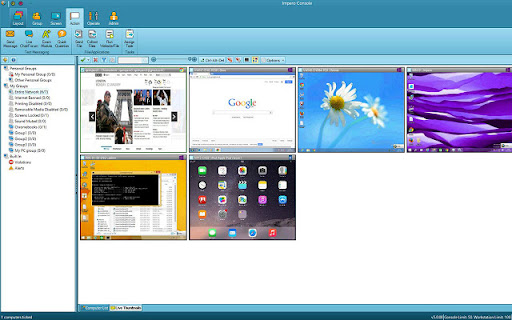
Overview: Provides content authorisation for Impero The Impero Education Pro Chrome Browser Extension enables you to manage and monitor devices running the Google Chrome Browser on your network helping to ensure that students are on task, learning and safe.

Listing SEO keywords

Search intent keywords
Keyword signals for evaluating how users may discover, compare, or search for this extension category.

Core discovery

Impero Education Proclassroom monitoring extensionChrome browser managementschool network filtering

Comparison

Impero Education Pro alternativesstudent monitoring software

Problem

extension lagscreen sharing not workingconnection issues

Alternative

GoGuardianLightspeed SystemsSecurly

Similar extensions

Jump to related discovery paths:

FAQ

What is Education Pro Browser Extension MV3 mainly used for?
This extension functions as a client-side bridge for the Impero Education Pro network management system. It allows administrators and educators to monitor and control Google Chrome usage on student devices to ensure compliance with school safety and learning objectives.
What market signals stand out?
Established adoption with limited review base. Last known update: 04/24/2026.
What should builders compare before entering this space?
Compare install concentration, rating quality, update recency, screenshots, developer portfolio, listing claims, and review-backed friction signals.
Is this page review-backed?
Backed by review samples. This page combines store metadata with selected review signals, while raw store metrics remain visible for comparison.

Screenshots

Education Pro Browser Extension MV3 screenshot

Links

Recommended Chrome extensions

Related listings from the same category, trending peers, and the same publisher portfolio.

Browse education
Education Pro Chromebook Extension MV3 icon

Education Pro Chromebook Extension MV3

Ativion

The Impero Education Pro Chromebook Extension enables you to manage and monitor Google ChromeOS devices on your network helping to…

Installs

50K+

Rating

1.0

Brisk Teaching - AI that Works Where Teachers Work icon

Brisk Teaching - AI that Works Where Teachers Work

Brisk Teaching

Brisk works inside Google Docs, Slides, and YouTube, saving teachers 10+ hours weekly on planning, feedback, and resource creation.

Installs

1.0M+

Rating

4.7

BetterCampus (prev. BetterCanvas) icon

BetterCampus (prev. BetterCanvas)

BetterCampus

Feature packed extension for Canvas.

Installs

1.0M+

Rating

4.7

LibKey Nomad icon

LibKey Nomad

Third Iron LLC

One-click access to millions of scholarly articles.

Installs

1.0M+

Rating

4.5

MyBib: Free Citation Generator icon

MyBib: Free Citation Generator

MyBib

Automatically create APA style, MLA format, and Harvard referencing style citations with our citation generator add-on for Chrome.

Installs

1.0M+

Rating

4.8

Equatio - Math made digital icon

Equatio - Math made digital

Texthelp

Easily create mathematical equations, formulas and quizzes. Intuitively type or handwrite, with no tricky math code to learn.

Installs

1.0M+

Rating

3.9

Scribbr Citation Generator icon

Scribbr Citation Generator

Scribbr

Instantly get accurate citations for any webpage in APA, MLA, Chicago, Harvard and any other style with our Citation Generator.

Installs

1.0M+

Rating

3.8

Speechify — Text to Speech icon

Speechify — Text to Speech

Speechify

Read aloud any Google Doc, PDF, webpage, or book with text to speech (TTS). Natural sounding voices in 60+ languages & 1,000 voices.

Installs

900K+

Rating

4.6

ImTranslator: Translator, Dictionary, TTS icon

ImTranslator: Translator, Dictionary, TTS

smartlink

Translator, Dictionary, Voice

Installs

900K+

Rating

4.4

Promethean® Screen Share icon

Promethean® Screen Share

classflow

Promethean® Screen Share

Installs

800K+

Rating

3.0