Tasks for Canvas – now supporting Blackboard, D2L Brightspace icon

Tasks for Canvas Chrome Extension Analysis

Automation & Workflow Efficiency

Store listing title: Tasks for Canvas – now supporting Blackboard, D2L Brightspace

Chrome extension ID: kabafodfnabokkkddjbnkgbcbmipdlmb

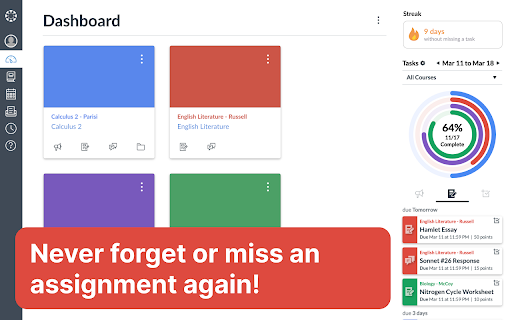
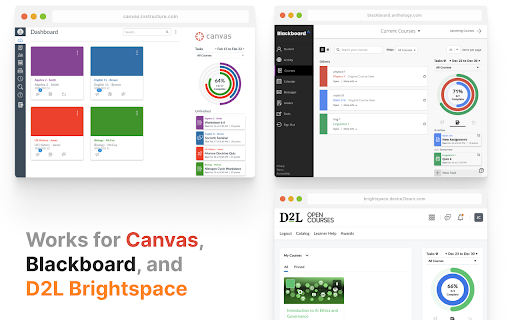
Tasks for Canvas is a browser extension that injects a task management sidebar into Canvas, Blackboard, and D2L Brightspace. It aggregates assignment data, offers custom task creation, and tracks completion progress to help students stay organized across their coursework.

Developer:BetterCampus
Version:1.6.1
Size:12.35MiB
Last updated:

Overview

Installs

800K+

Rating

4.7

680 reviews

Languages

1 locales

Includes English (United States)

Market analysis

Review-backed positioning, friction, and market signals for this Chrome extension.

Backed by review samples

Macro category

Automation & Workflow Efficiency

Pricing friction

Low review signal

Complaint intensity

High review signal

Listing & review signals
Observed signals from store listing text and review samples.

Listing positioning

The extension positions itself as an enhancement to popular Learning Management Systems (LMS) by providing a unified sidebar for assignment tracking and progress visualization. It emphasizes student motivation through features like progress rings, streak tracking, and customizable task management.

Inferred product pattern

Utility-based productivity overlay for educational web platforms.

Review-backed pain points

Users express high frustration when the 'streak' feature resets unexpectedly or fails to register completed work, leading to a loss of motivation. Additionally, the extension has reliability issues regarding cross-platform compatibility with Blackboard.

Observed feature gaps

The product lacks a mechanism to manually adjust or restore streak counts, which causes significant user frustration. There are also reported synchronization failures for non-Canvas platforms.

Tags
LMS ProductivityStudent DashboardAssignment TrackerStudy MotivationCanvas Extension
Target users

- University Students

- K-12 Students

- Academic Instructors

Primary use cases

- Tracking upcoming assignments

- Visualizing course progress via color-coded rings

- Creating custom personal study tasks

- Syncing Gradescope coursework

Positive themes

- Enhanced visual organization

- Motivation boost from streak tracking

- Useful consolidation of assignments across multiple platforms

Negative themes

- Loss of streak data due to bugs or external factors

- Lack of functionality for Blackboard/Brightspace integration

- Inability to recover lost streaks

Observed friction

- Performance complaints detected

- None; the product appears to be free with no clear monetization friction reported.

Evidence boundary: Analysis based on 679 user comments and high-rating vs. low-rating sample reviews. Review data is highly focused on a specific gamification feature (streaks), which may skew sentiment compared to the overall utility of the core task management.
Complaint summaries
Review-backed complaint signals grouped by operational area.

Support

Users report a lack of response from the developer when seeking support for technical issues or streak restoration requests.

Reliability

Significant complaints regarding streak counting logic, stability of data across browser re-installs, and persistent 'navigate to Canvas' errors on non-Canvas platforms.

Privacy

No privacy complaints observed.

Access & pricing

- Free usage observed

- No account requirement observed

- Free plan or free usage claimed

Store listing facts

Listing assets

- Screenshots: 5

- Videos: 0

- Languages: 1

Trust signals

- Privacy policy

- Developer contact

- Official website

- Support link

Store metadata

- Version: 1.6.1

- Size: 12.35MiB

- Last updated:

Store description excerpt
Short excerpt from the public Chrome Web Store listing; full copy is available on the official store page.
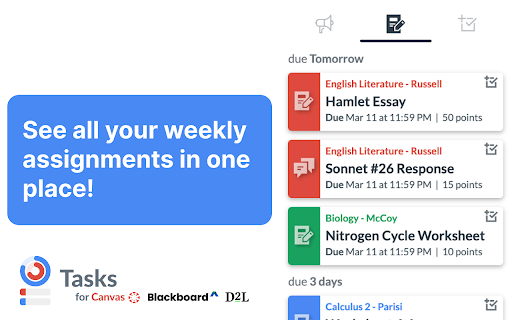
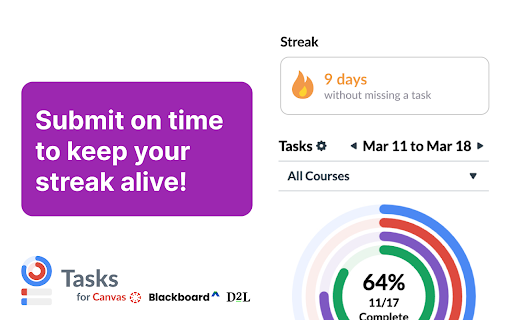
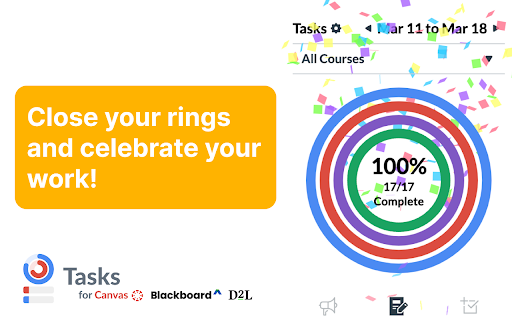
RELOAD CANVAS AFTER INSTALLING NEW: Extension now supports Blackboard and D2L Brightspace as well! NEW: Keep your streak alive by submitting assignments before their due date! NEW: Sync your Gradescope assignments directly to Tasks for Canvas! Ever had trouble finding your weekly assignments? Wish you had a nice progress bar to motivate you to complete everything? Then this extension is for you! The Tasks browser extension for Canvas™ updates the Canvas dashboard sidebar with a convenient todo list to show all of your weekly assignments and track your progress throughout the week. The sidebar includes: - A colorful chart with various rings color coded by course. As you complete your assignments throughout the week, the rings will show your progress! - A better to-do list of all active assignments that are counted in the rings. Each task item has the name, course, type, due date, point v…

Listing SEO keywords

Search intent keywords
Keyword signals for evaluating how users may discover, compare, or search for this extension category.

Core discovery

Canvas LMS extensionBlackboard task trackerstudent organization toolsBrightspace to-do list

Comparison

Canvas assignment dashboardbest student productivity extensions

Problem

Canvas streak not updatingextension not working on Blackboard

Alternative

LMS integration tools

Similar extensions

Jump to related discovery paths:

FAQ

What is Tasks for Canvas mainly used for?
Tasks for Canvas is a browser extension that injects a task management sidebar into Canvas, Blackboard, and D2L Brightspace. It aggregates assignment data, offers custom task creation, and tracks completion progress to help students stay organized across their coursework.
What market signals stand out?
Established adoption with moderate review base. Last known update: 06/01/2026.
What should builders compare before entering this space?
Compare install concentration, rating quality, update recency, screenshots, developer portfolio, listing claims, and review-backed friction signals.
Is this page review-backed?
Backed by review samples. This page combines store metadata with selected review signals, while raw store metrics remain visible for comparison.

Screenshots

Tasks for Canvas – now supporting Blackboard, D2L Brightspace screenshot

Links

Recommended Chrome extensions

Related listings from the same category, trending peers, and the same publisher portfolio.

Browse education