Testing Toolkit: 15+ Essential Manual Testing Tools icon

Testing Toolkit Chrome Extension Analysis

Developer & Designer Tools

Store listing title: Testing Toolkit: 15+ Essential Manual Testing Tools

Chrome extension ID: khkpfminnhkjeabcnhpjcfhegbbodpjk

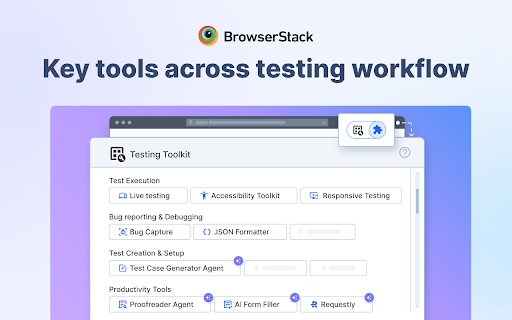
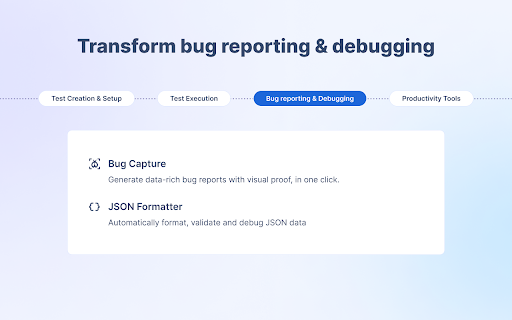
A utility suite for QA engineers and developers that provides tools for JSON formatting, cache management, responsive testing, and bug reporting. It integrates AI agents for automated test case generation and connects directly to BrowserStack for cross-browser testing.

Developer:support
Version:1.2.7
Size:6.77MiB
Last updated:

Overview

Installs

20K+

Rating

4.9

23 reviews

Languages

1 locales

Includes English (United States)

Market analysis

Review-backed positioning, friction, and market signals for this Chrome extension.

Backed by review samples

Macro category

Developer & Designer Tools

Pricing friction

Low review signal

Complaint intensity

Low review signal

Listing & review signals
Observed signals from store listing text and review samples.

Listing positioning

The product positions itself as a comprehensive all-in-one hub that consolidates 15+ essential manual testing tools into a single extension. It emphasizes the reduction of tool sprawl and the use of AI to accelerate test case creation and form filling.

Inferred product pattern

Aggregator toolkit acting as a companion and entry point for a larger commercial testing platform (BrowserStack).

Review-backed pain points

Users have expressed a desire for the extension and associated site to be available in languages other than English (e.g., Portuguese, Spanish, French).

Observed feature gaps

Lack of localization/internationalization for non-English speaking markets.

Tags
QA TestingManual TestingAI Testing ToolsDeveloper UtilityBrowserStack
Target users

- Quality Assurance Engineers

- Software Engineers in Test (SDET)

- Front-end Developers

- Product Managers

- UX/UI Designers

Primary use cases

- Cross-browser and responsive testing

- AI-driven test case generation from requirements

- Data-rich bug reporting with logs and screenshots

- API debugging and mocking

- Accessibility auditing

Positive themes

- Time-saving consolidation of multiple tools

- Seamless integration with BrowserStack

- High overall utility and ease of use

Negative themes

- Lack of multi-language support

Observed friction

- No pricing friction observed in the provided review samples.

Evidence boundary: Analysis based on the store listing and 9 review samples. The small sample of reviews provides limited visibility into the full spectrum of user frustrations.
Complaint summaries
Review-backed complaint signals grouped by operational area.

Support

No support or account-related complaints observed.

Reliability

No reliability or performance complaints observed.

Privacy

No privacy or security complaints observed.

Access & pricing

- Free entry with paid features

- Account required for core usage

- Limited free usage observed

Store listing facts

Listing assets

- Screenshots: 5

- Videos: 1

- Languages: 1

Trust signals

- Privacy policy

- Developer contact

- Official website

- Support link

Store metadata

- Version: 1.2.7

- Size: 6.77MiB

- Last updated:

Store description excerpt
Short excerpt from the public Chrome Web Store listing; full copy is available on the official store page.
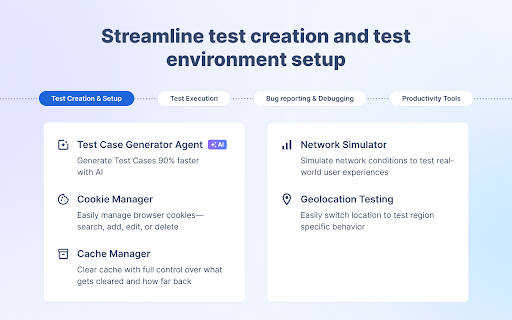
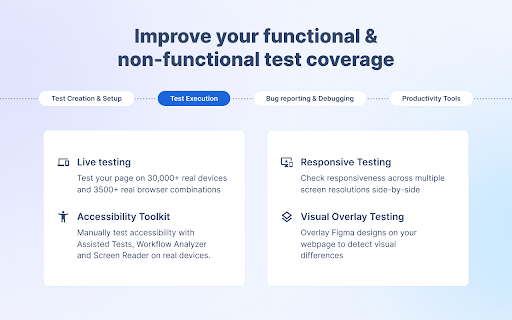
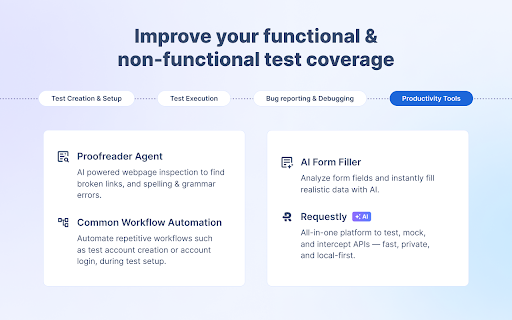
All the tools you need across the manual testing workflow— from test creation and setup to execution, bug reporting, and debugging— are now accessible with a single click. Trusted by QAs, SDETs, and FE developers, to streamline their testing workflows. ⭐️ Key Benefits: ––> Skip the hassle of juggling multiple tools & accounts — manage everything through one extension. ––> Access industry leading tools— which are trusted by millions of users globally. ––> Offload tedious manual tasks to our AI agents & tools for smarter, faster testing. =================== ⭐️ Key tools included: Best Chrome extension to streamline your manual testing workflow. Access all the essential testing tools in one click: Live Testing - Perform cross-browser testing across 3,500+ real desktop and mobile browser combinations Test Case Generator Agent - Leverage AI to achieve 90% faster test case creation. Convert a…

Listing SEO keywords

Search intent keywords
Keyword signals for evaluating how users may discover, compare, or search for this extension category.

Core discovery

manual testing toolsQA chrome extensionAI test case generatorJSON formatter extensionresponsive web testing

Comparison

Testing Toolkit vs individual QA extensionsbest manual testing toolkit

Problem

too many testing toolsslow test case creationmanual bug reporting effort

Alternative

manual testing extension alternativesQA automation tools

Similar extensions

Jump to related discovery paths:

FAQ

What is Testing Toolkit mainly used for?
A utility suite for QA engineers and developers that provides tools for JSON formatting, cache management, responsive testing, and bug reporting. It integrates AI agents for automated test case generation and connects directly to BrowserStack for cross-browser testing.
What market signals stand out?
Visible niche traction with limited review base. Last known update: 06/17/2026.
What should builders compare before entering this space?
Compare install concentration, rating quality, update recency, screenshots, developer portfolio, listing claims, and review-backed friction signals.
Is this page review-backed?
Backed by review samples. This page combines store metadata with selected review signals, while raw store metrics remain visible for comparison.

Screenshots

Testing Toolkit: 15+ Essential Manual Testing Tools screenshot

Links

Recommended Chrome extensions

Related listings from the same category, trending peers, and the same publisher portfolio.

Browse developer