Meet Attendance Tracker – for Google Meet icon

Meet Attendance Tracker Chrome Extension Analysis

Automation & Workflow Efficiency

Store listing title: Meet Attendance Tracker – for Google Meet

Chrome extension ID: ldjjokmalaidehbgbifihdfdondjgfha

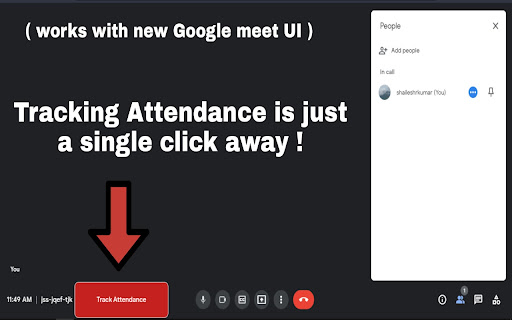
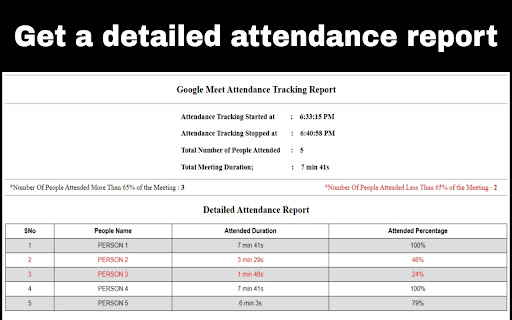
A Chrome extension that adds a 'Track Attendance' button to the Google Meet interface. It monitors participants and generates a report including join/stop times, total attendees, and flags those who attended less than 65% of the meeting.

Developer:shaileshrkumar
Version:3.0.2
Size:672KiB
Last updated:

Overview

Installs

100K+

Rating

4.2

137 reviews

Languages

1 locales

Includes English

Market analysis

Review-backed positioning, friction, and market signals for this Chrome extension.

Backed by review samples

Macro category

Automation & Workflow Efficiency

Pricing friction

Low review signal

Complaint intensity

Moderate review signal

Listing & review signals
Observed signals from store listing text and review samples.

Listing positioning

The product is positioned as the most accurate and reliable single-click attendance tracker for Google Meet. It emphasizes its utility for teachers during online classes, specifically highlighting its ability to track attendance duration and percentages.

Inferred product pattern

Single-purpose educational utility targeting a specific platform gap (attendance tracking) in Google Meet.

Review-backed pain points

Users report that the report generation process frequently hangs on a 'Please wait' screen, leading to total data loss. Additionally, the tracker only records the first join time, ignoring students who leave and rejoin.

Observed feature gaps

Missing auto-save/auto-download options, absence of reporting for invited but absent attendees, lack of multi-format exports (XLS, Word), and no automated email delivery for reports.

Tags
Attendance TrackerGoogle MeetEducation ToolTeacher UtilityMeeting Management
Target users

- Teachers

- Online Educators

- Academic Instructors

- Meeting Organizers

Primary use cases

- Tracking student attendance in virtual classrooms

- Monitoring total duration of participant presence

- Generating attendance reports for administrative compliance

Positive themes

- High utility for educators

- Preferred over other available extensions

Negative themes

- Report generation freezes

- Inaccuracy with re-joining participants

- Lack of auto-save functionality

Observed friction

- Performance complaints detected

- No pricing friction observed as the tool appears to be free.

Evidence boundary: Data extracted from the official store listing and a sample of 10 helpful reviews. The review sample size is small compared to the total user count, potentially over-representing specific bugs.
Complaint summaries
Review-backed complaint signals grouped by operational area.

Support

No direct support complaints, but multiple users are using reviews to request urgent bug fixes for data loss.

Reliability

Reports of severe reliability issues where the extension freezes during report generation or fails to mark visible participants.

Privacy

No privacy or security complaints observed.

Access & pricing

- Free usage observed

- No account requirement observed

- Free plan or free usage claimed

Store listing facts

Listing assets

- Screenshots: 3

- Videos: 0

- Languages: 1

Trust signals

- Privacy policy

- Developer contact

- Support link

Store metadata

- Version: 3.0.2

- Size: 672KiB

- Last updated:

Store description excerpt
Short excerpt from the public Chrome Web Store listing; full copy is available on the official store page.
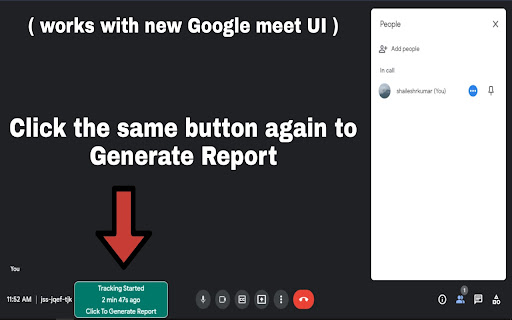
The most reliable and accurate chrome extension to track attendance in meet.google.com with just a single click ! once you have successfully installed this extension whenever you join a meeting in meet.google.com a new button named Track Attendance will be appearing in the bottom left of the google meet UI on clicking that button the attendance tracking script will start automatically and show how long the attendance is being monitored and clicking on that button again would generate the attendance report The attendance report will contain the following details : 1. Attendance tracking start time, 2. Attendance tracking stop time, 3. Total number of persons attended the meeting, 4. Total class duration , 5. Count of people who attended more than 65% duration of the class, 6. Count of people who attended less than 65% duration of the class, 7. List of all the people names with their tota…

Listing SEO keywords

Search intent keywords
Keyword signals for evaluating how users may discover, compare, or search for this extension category.

Core discovery

Google Meet attendance trackertrack attendance Google MeetGoogle Meet report generator

Comparison

best Google Meet attendance extensionGoogle Meet attendance tracker vs alternatives

Problem

how to track attendance in Google MeetGoogle Meet student attendance report

Alternative

Google Meet attendance extension alternativesautomatic attendance tracker for Meet

Similar extensions

Jump to related discovery paths:

FAQ

What is Meet Attendance Tracker mainly used for?
A Chrome extension that adds a 'Track Attendance' button to the Google Meet interface. It monitors participants and generates a report including join/stop times, total attendees, and flags those who attended less than 65% of the meeting.
What market signals stand out?
Established adoption with moderate review base. Last known update: 05/30/2026.
What should builders compare before entering this space?
Compare install concentration, rating quality, update recency, screenshots, developer portfolio, listing claims, and review-backed friction signals.
Is this page review-backed?
Backed by review samples. This page combines store metadata with selected review signals, while raw store metrics remain visible for comparison.

Screenshots

Meet Attendance Tracker – for Google Meet screenshot

Links

Recommended Chrome extensions

Related listings from the same category, trending peers, and the same publisher portfolio.

Browse workflow