Video editor VideoStudio icon

Video editor VideoStudio Chrome Extension Analysis

Developer & Designer Tools

Chrome extension ID: lpaboeaccgehipchabmnialhaihbmhji

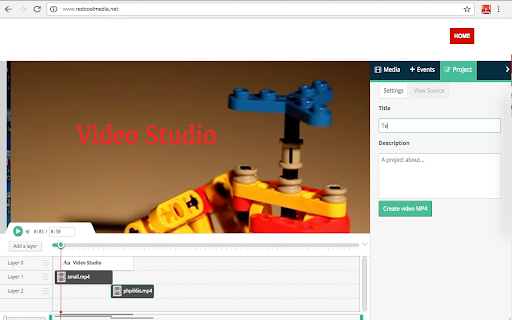
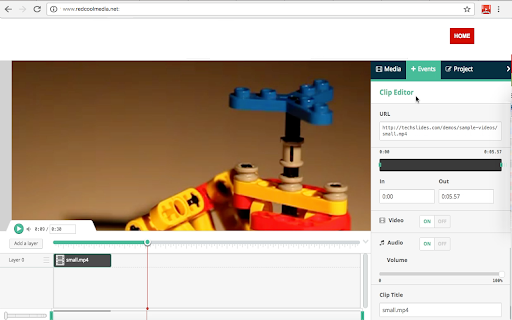
A browser-based video editing tool based on Mozilla PopcornMaker that supports MP4, MP3, GIF, PNG, JPG, and TEXT files. It features a layered timeline, clip trimming, text overlays with customizable fonts/colors, and MP4 export via FFMPEG.

Developer:RedcoolMedia
Version:1.8.7
Size:263KiB
Last updated:

Overview

Installs

20K+

Rating

2.7

215 reviews

Languages

18 locales

Includes Deutsch, English, Nederlands, Türkçe...

Market analysis

Review-backed positioning, friction, and market signals for this Chrome extension.

Backed by review samples

Macro category

Developer & Designer Tools

Pricing friction

Low review signal

Complaint intensity

High review signal

Listing & review signals
Observed signals from store listing text and review samples.

Listing positioning

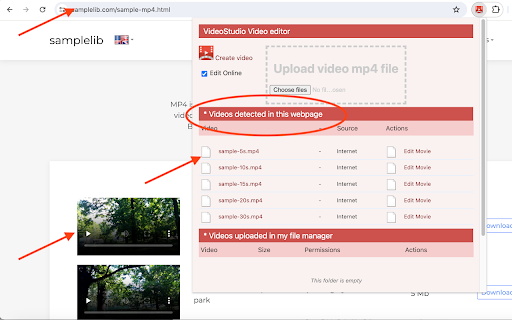
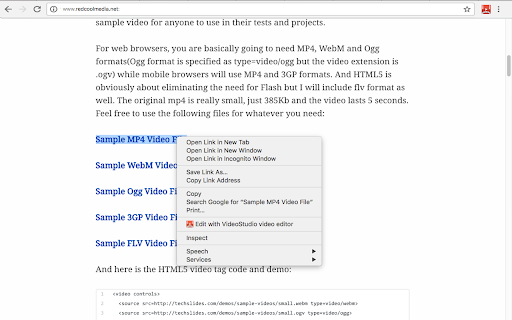
The product positions itself as a versatile online video editor that allows users to combine videos, audio, images, and text into a single composition. It emphasizes ease of use through a timeline interface and the ability to import MP4 files directly from the web or local storage.

Inferred product pattern

A browser-based multimedia wrapper that leverages FFMPEG for video processing and server-side storage for web-captured media.

Review-backed pain points

Users report severe issues including the software deleting uploaded files, an inability to save progress, 503 server errors, and a user interface that fails to scroll or display options.

Observed feature gaps

Lack of support for specific camera formats (e.g., GoPro), missing basic editing functions like splitting and stitching clips, and unreliable saving mechanisms.

Tags
Online Video EditorMP4 EditingMultimedia ToolsVideo Studio
Target users

- Casual content creators

- Web-based video editors

- Users seeking a free browser-based editing tool

Primary use cases

- Creating simple video montages from web/local files

- Adding audio tracks and text overlays to clips

- Basic trimming and layering of MP4 videos

Positive themes

No positive theme data.

Negative themes

- Critical UI Failures

- Data Loss

- Lack of Basic Functionality

- Server Instability

- File Incompatibility

Observed friction

- Performance complaints detected

- No specific pricing friction observed in the provided review samples.

Evidence boundary: Analyzed store listing and 10 helpful low-rating reviews. No high-rating reviews were provided, preventing the identification of positive user themes.
Complaint summaries
Review-backed complaint signals grouped by operational area.

Support

No direct support interactions mentioned, but users express extreme frustration over the product being unusable.

Reliability

High reliability failure rate, including 'No server available' (503) errors and reports of the tool deleting user files upon upload.

Privacy

No review-backed privacy complaints observed.

Access & pricing

- No clear monetization signal

- No clear access signal

- Free plan or free usage claimed

Store listing facts

Listing assets

- Screenshots: 4

- Videos: 1

- Languages: 18

Trust signals

- Privacy policy

- Developer contact

- Official website

Store metadata

- Version: 1.8.7

- Size: 263KiB

- Last updated:

Store description excerpt
Short excerpt from the public Chrome Web Store listing; full copy is available on the official store page.
VideoStudio is a video editor that allows you to create and edit videos using a combination of files: videos, audios, images, and texts. Moreover, it scans and collects the webpages you browse in the Internet. These webpages are uploaded to our servers in order to know if they contain MP4 video files that can be edited using our extension integrated with our online app. It is based on Mozilla PopcornMaker and it can handle MP4, MP3, GIF, PNG, JPG and TEXT files. PopcornMaker could handle sounds or videos from a number of places like videos from YouTube, Vimeo, or SoundCloud. However, VideoStudio has removed any feature related to YouTube, Vimeo, or SoundCloud in order to be compliant with YouTube, Vimeo and SoundCloud service terms. Main Features: - Add videos in your project * Add MP4 videos to your Gallery from the Internet by pasting in the link, or from your local disk. Once you hav…

Listing SEO keywords

Search intent keywords
Keyword signals for evaluating how users may discover, compare, or search for this extension category.

Core discovery

online video editorchrome mp4 editorfree browser video editing

Comparison

VideoStudio vs Wevideobest free online video editor

Problem

how to edit mp4 in chromeedit video online free

Alternative

Wevideo alternativeonline video editor extension

Similar extensions

Jump to related discovery paths:

FAQ

What is Video editor VideoStudio mainly used for?
A browser-based video editing tool based on Mozilla PopcornMaker that supports MP4, MP3, GIF, PNG, JPG, and TEXT files. It features a layered timeline, clip trimming, text overlays with customizable fonts/colors, and MP4 export via FFMPEG.
What market signals stand out?
Visible niche traction with moderate review base. Last known update: 09/03/2024.
What should builders compare before entering this space?
Compare install concentration, rating quality, update recency, screenshots, developer portfolio, listing claims, and review-backed friction signals.
Is this page review-backed?
Backed by review samples. This page combines store metadata with selected review signals, while raw store metrics remain visible for comparison.

Screenshots

Video editor VideoStudio screenshot

Links

Recommended Chrome extensions

Related listings from the same category, trending peers, and the same publisher portfolio.

Browse workflow