PDF editor PDFOffice to edit and create PDF icon

PDF editor PDFOffice to edit and create PDF Chrome Extension Analysis

Automation & Workflow Efficiency

Chrome extension ID: mffappoadhfalhjgmfaoecjbdjfdfhdj

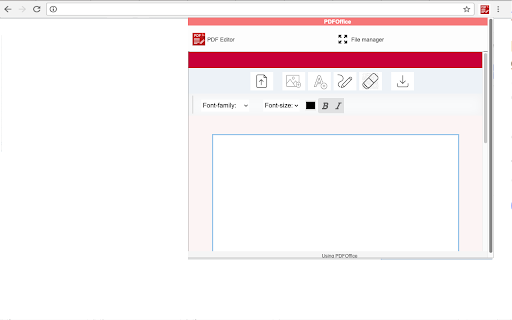
PDFOffice is a Chrome extension that integrates with a web application to provide PDF editing capabilities. Users can open existing documents, insert formatted text and images, and download the resulting files.

Developer:RedcoolMedia
Version:1.7.1
Size:375KiB
Last updated:

Overview

Installs

40K+

Rating

2.4

90 reviews

Languages

18 locales

Includes Deutsch, English, Nederlands, Türkçe...

Market analysis

Review-backed positioning, friction, and market signals for this Chrome extension.

Backed by review samples

Macro category

Automation & Workflow Efficiency

Pricing friction

Low review signal

Complaint intensity

High review signal

Listing & review signals
Observed signals from store listing text and review samples.

Listing positioning

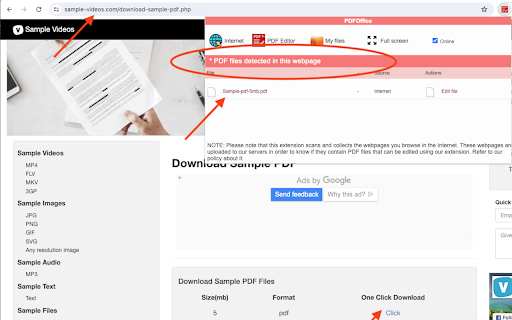
The product is positioned as a browser-based PDF editor that allows users to create and modify PDF files without leaving their web browser. It emphasizes the ability to detect PDFs on webpages and perform basic text and image insertions.

Inferred product pattern

A browser-to-web-app wrapper that attempts to provide cloud-based PDF editing functionality.

Review-backed pain points

Users frequently report that the extension opens blank pages instead of the PDF file, fails to save changes upon download, and exhibits extremely slow loading times.

Observed feature gaps

Unable to function as a default PDF viewer, inability to reliably open PDFs from URLs or local storage, and lack of consistent file saving.

Tags
PDF EditorPDF CreatorDocument EditingBrowser Utility
Target users

- Students

- Office workers

- General web users

Primary use cases

- Editing text in PDF files

- Creating new PDF documents

- Inserting images into PDFs

- Downloading edited PDF documents

Positive themes

No positive theme data.

Negative themes

- Failure to load documents

- Blank page errors

- Data privacy concerns

- Loss of edited data

- Slow performance

Observed friction

- Performance complaints detected

- Privacy complaints detected

- No pricing friction mentioned in the provided review samples.

Evidence boundary: Extracted from store listing and 10 highly critical user reviews. Provided review samples consisted exclusively of 1-star ratings, offering no insight into positive user experiences.
Complaint summaries
Review-backed complaint signals grouped by operational area.

Support

No specific support interaction complaints, though overall product failure is cited.

Reliability

Severe reliability issues reported, including files not loading, blank pages appearing upon upload, and edited files reverting to original state after download.

Privacy

There are explicit claims from users that the application mines user data by collecting search history.

Access & pricing

- No clear monetization signal

- No clear access signal

- No clear pricing signal

Store listing facts

Listing assets

- Screenshots: 4

- Videos: 0

- Languages: 18

Trust signals

- Privacy policy

- Developer contact

- Official website

Store metadata

- Version: 1.7.1

- Size: 375KiB

- Last updated:

Store description excerpt
Short excerpt from the public Chrome Web Store listing; full copy is available on the official store page.
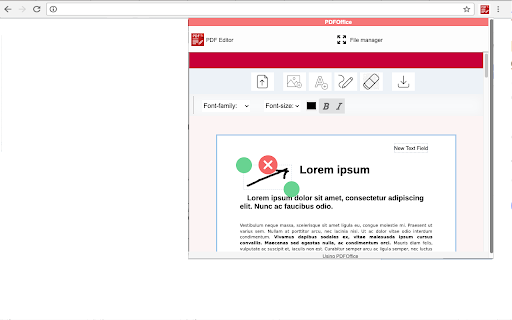
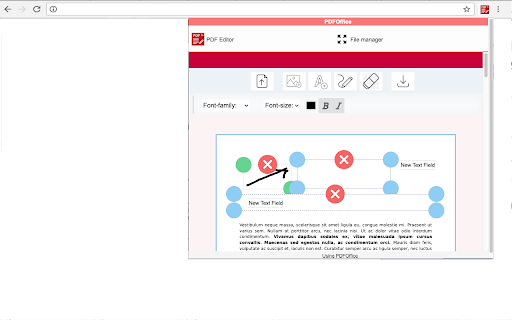
PDFOffice is a PDF Editor online from which you can perform editing operations over PDF files but using your web browser. Moreover, it scans and collects the webpages you browse in the Internet. These webpages are uploaded to our servers in order to know if they contain PDF files that can be edited using our extension integrated with our online app. Main features in editing PDF files: - Create a new document or open an existing one. - Insert texts with different font color. - Insert texts with different font size. - Use some different font style in your inserted text. - Move the inserted text in any part of the document. - Insert images - Download your modified PDF

Listing SEO keywords

Search intent keywords
Keyword signals for evaluating how users may discover, compare, or search for this extension category.

Core discovery

PDF editor extensionedit PDF in browsercreate PDF onlinebrowser PDF tool

Comparison

PDFOffice vs SmallpdfPDFOffice vs Adobe Acrobat

Problem

cannot edit PDF in ChromePDF editor blank pagehow to add text to PDF in browser

Alternative

PDFOffice alternativesfree browser PDF editor

Similar extensions

Jump to related discovery paths:

FAQ

What is PDF editor PDFOffice to edit and create PDF mainly used for?
PDFOffice is a Chrome extension that integrates with a web application to provide PDF editing capabilities. Users can open existing documents, insert formatted text and images, and download the resulting files.
What market signals stand out?
Visible niche traction with limited review base. Last known update: 09/01/2024.
What should builders compare before entering this space?
Compare install concentration, rating quality, update recency, screenshots, developer portfolio, listing claims, and review-backed friction signals.
Is this page review-backed?
Backed by review samples. This page combines store metadata with selected review signals, while raw store metrics remain visible for comparison.

Screenshots

PDF editor PDFOffice to edit and create PDF screenshot

Links

Recommended Chrome extensions

Related listings from the same category, trending peers, and the same publisher portfolio.

Browse workflow
Office online OfficeWork for XLS DOC and PPT icon

Office online OfficeWork for XLS DOC and PPT

RedcoolMedia

Create and edit DOC, XLS and PPT files with an Office Suite online

Installs

80K+

Rating

4.0

Movie maker MovieStudio video editor icon

Movie maker MovieStudio video editor

RedcoolMedia

Movie maker online to create, edit and record videos, and adding videos, audios, images and texts

Installs

70K+

Rating

3.1

Mendeley Web Importer icon

Mendeley Web Importer

Mendeley

Fast, convenient import of references and PDFs to your Mendeley Reference Manager library.

Installs

3.0M+

Rating

2.3

Enable local file links icon

Enable local file links

Takashi Sugimoto (tksugimoto)

Make it possible to open by click a link to a local file that is disabled by Chrome.

Installs

3.0M+

Rating

3.9

Pop up blocker for Chrome™ - Poper Blocker icon

Pop up blocker for Chrome™ - Poper Blocker

dingosolutions

Block popups, ads, cookie requests, trackers, notifications, ads on social media & more. A clean browsing experience starts today.

Installs

2.0M+

Rating

4.8

Momentum icon

Momentum

Momentum

Transform your browser into a beautifully designed tab that helps you feel calm, keep focus, and stay energized.

Installs

2.0M+

Rating

4.5

Google Scholar PDF Reader icon

Google Scholar PDF Reader

scholar-chrome-extensions

Supercharge your paper reading: follow references, skim outline, jump to figures, cite and save.

Installs

2.0M+

Rating

4.1

Keeper® Password Manager & Digital Vault icon

Keeper® Password Manager & Digital Vault

Keeper Security

Generate strong passwords, autofill and protect your confidential info with zero-knowledge encryption.

Installs

2.0M+

Rating

4.8

AI Grammar Checker & Paraphraser – LanguageTool icon

AI Grammar Checker & Paraphraser – LanguageTool

lt-extension-publisher

Instantly Enhance Your Texts with LanguageTool’s Grammar Checker and Paraphrasing Tool

Installs

2.0M+

Rating

4.7

Snow Web Application Metering icon

Snow Web Application Metering

snow_chrome_extensions

This extension tracks web application use for the purpose of license compliance and cost optimization. www.snowsoftware.com/browser

Installs

2.0M+

Rating

1.3