Open in Brave™ Browser icon

Open in Brave™ Browser Chrome Extension Analysis

Automation & Workflow Efficiency

Chrome extension ID: mgmnomlncpmfgelhofilonnecmbdaoia

This tool acts as a bridge between a host browser and the Brave browser. To function, it requires the installation of a native host client (Node.js script) on the user's operating system, which handles the inter-process communication necessary to trigger browser-to-browser navigation.

Developer:brian.girko
Version:0.2.1
Size:92.08KiB
Last updated:

Overview

Installs

10K+

Rating

3.1

22 reviews

Languages

1 locales

Includes English

Market analysis

Review-backed positioning, friction, and market signals for this Chrome extension.

Backed by review samples

Macro category

Automation & Workflow Efficiency

Pricing friction

Low review signal

Complaint intensity

Moderate review signal

Listing & review signals
Observed signals from store listing text and review samples.

Listing positioning

The extension positions itself as a convenience utility to streamline the opening of websites, individual links, or entire tab sets directly in the Brave browser. It aims to eliminate manual copy-pasting by providing a seamless handoff between browsers.

Inferred product pattern

External native-host dependent browser bridge.

Review-backed pain points

The requirement to download and execute external scripts (Node.js) creates high user anxiety regarding security, potential malware, and technical complexity.

Observed feature gaps

Lack of granular settings for tab management (foreground vs background) and lack of signed installers for macOS/Windows.

Tags
Browser RedirectBrave BrowserCross-Browser ToolWorkflow Automation
Target users

- Brave browser power users

- Multi-browser workflow users

Primary use cases

- Opening current tab in Brave

- Bulk opening tabs in Brave

- Redirecting link navigation to Brave

Positive themes

- Functions as intended for some users

- Automates workflow for Brave enthusiasts

Negative themes

- Security concerns regarding native client script

- Perceived as non-official/sketchy

- Inconvenient setup process

- Lack of configuration options

Observed friction

- Performance complaints detected

- Privacy complaints detected

- None reported, though installation friction is high.

Evidence boundary: Evidence is derived from user reviews highlighting deep anxiety over the mandatory native script installation and general functionality reports. Reviews are limited and show a high polarization between functionality and security skepticism, not representative of all users.
Complaint summaries
Review-backed complaint signals grouped by operational area.

Support

No specific support channel complaints, but users criticize the unofficial nature of the integration.

Reliability

Users report technical failure and general dissatisfaction with the installation of external binary files.

Privacy

Significant concern regarding the requirement to run external Node.js scripts, with users citing potential security vulnerabilities and lack of auditing.

Access & pricing

- Free usage observed

- No account requirement observed

- Free plan or free usage claimed

Store listing facts

Listing assets

- Screenshots: 1

- Videos: 1

- Languages: 1

Trust signals

- Developer contact

- Official website

Store metadata

- Version: 0.2.1

- Size: 92.08KiB

- Last updated:

Store description excerpt
Short excerpt from the public Chrome Web Store listing; full copy is available on the official store page.
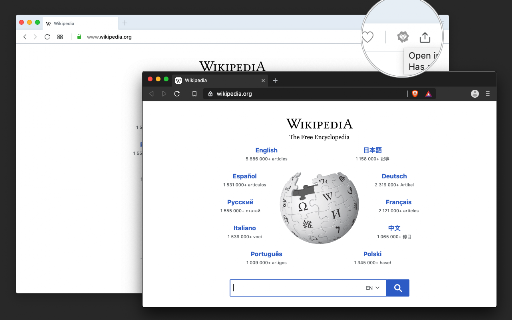
The "Open in Brave" extension simplifies opening the current tab or links within the Brave browser. With this extension, you can send links to the Brave browser without the hassle of manually copying and pasting links. Additionally, it can open all tabs in the destination browser with a single click. You can also close the tab opened in the destination browser if prefer so. If Brave is already running, the link opens in a new tab; however, if Brave is not running, a new instance is launched, then the link is directed there. Remarks: 1. To enable this extension to open links in the Brave browser, you'll need to install a native client. Installation instructions are provided upon requesting link opening. For visual guidance, there are two short video tutorials available in the screenshot section, covering installation steps for Windows, Linux, and macOS operating systems. 2. Currently, th…

Listing SEO keywords

Search intent keywords
Keyword signals for evaluating how users may discover, compare, or search for this extension category.

Core discovery

open in Brave extensionBrave browser helperswitch to Brave browseropen links in Brave

Comparison

Choosy browser alternative

Problem

extension security risknative client requirement

Alternative

browser redirectorbrowser selector

Similar extensions

Jump to related discovery paths:

FAQ

What is Open in Brave™ Browser mainly used for?
This tool acts as a bridge between a host browser and the Brave browser. To function, it requires the installation of a native host client (Node.js script) on the user's operating system, which handles the inter-process communication necessary to trigger browser-to-browser navigation.
What market signals stand out?
Visible niche traction with limited review base. Last known update: 11/14/2024.
What should builders compare before entering this space?
Compare install concentration, rating quality, update recency, screenshots, developer portfolio, listing claims, and review-backed friction signals.
Is this page review-backed?
Backed by review samples. This page combines store metadata with selected review signals, while raw store metrics remain visible for comparison.

Screenshots

Open in Brave™ Browser screenshot

Links

Website: webextension.org

Videos: Watch

Recommended Chrome extensions

Related listings from the same category, trending peers, and the same publisher portfolio.

Browse tools
Always active Window - Always Visible icon

Always active Window - Always Visible

brian.girko

Simulate all whitelisted browser windows as active by spoofing the visibility state event and more!

Installs

300K+

Rating

4.0

OCR - Image Reader icon

OCR - Image Reader

brian.girko

A powerful optical character recognition (OCR) extension to capture and convert images to text

Installs

200K+

Rating

4.1

BetterTTV icon

BetterTTV

NightDev, LLC

BetterTTV enhances Twitch and YouTube with new features, emotes, and more.

Installs

3.0M+

Rating

4.6

Ad Blocker: Stands AdBlocker icon

Ad Blocker: Stands AdBlocker

Stands

Stands AdBlocker – it's a free ad blocker for YouTube, Twitch, Pop-Ups, Video Ads, and websites. Block ads everywhere with Stands!

Installs

3.0M+

Rating

4.8

Google Input Tools icon

Google Input Tools

cloud-input-team

Input Tools lets you type in the language of your choice.

Installs

3.0M+

Rating

4.0

Microsoft Bing Search with Rewards icon

Microsoft Bing Search with Rewards

Microsoft Corporation

Use the Microsoft Rewards extension to find new ways to earn every day, easily track your points and set your default search to Bing

Installs

3.0M+

Rating

4.4

Google Scholar Button icon

Google Scholar Button

scholar-chrome-extensions

Lookup scholarly articles as you browse the web.

Installs

3.0M+

Rating

4.6

ЮБуст - VPN для YouTube. Обход блокировки Ютуб без ВПН. VPN для браузера icon

ЮБуст - VPN для YouTube. Обход блокировки Ютуб без ВПН. VPN для браузера

Uboost

Ускоритель Ютуб без ВПН, VPN для браузера Яндекс, Chrome, Opera, Edge. Обход замедления Ютуба.

Installs

2.0M+

Rating

4.2

Pie Adblock - A Powerful Free Ad Blocker icon

Pie Adblock - A Powerful Free Ad Blocker

Pie Extensions

Pie Adblock blocks ads & pop-ups, plus YouTube & Twitch video ads. You can customize your ad experience with Pie!

Installs

2.0M+

Rating

4.9

Smallpdf—Edit, Convert, Compress, & AI Summarize PDF icon

Smallpdf—Edit, Convert, Compress, & AI Summarize PDF

Smallpdf AG

Easy-to-use PDF tools to compress, convert, merge, chat to, split, e-sign, and edit PDF files in your browser.

Installs

2.0M+

Rating

4.6