Web Paint - Page Marker & Editor icon

Web Paint Chrome Extension Analysis

Automation & Workflow Efficiency

Store listing title: Web Paint - Page Marker & Editor

Chrome extension ID: mnopmeepcnldaopgndiielmfoblaennk

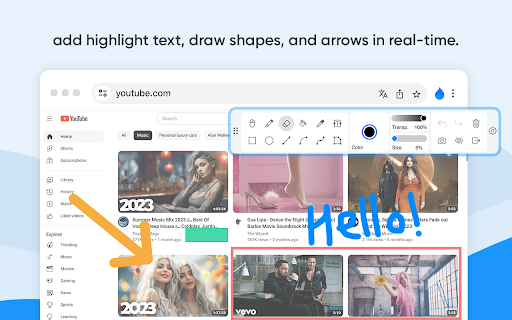
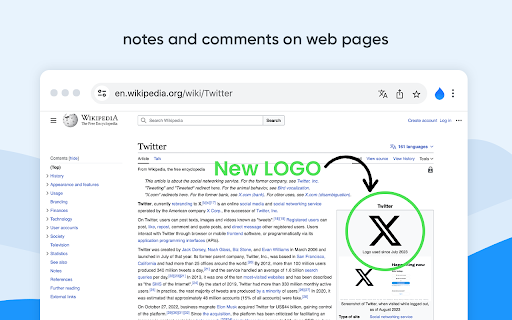
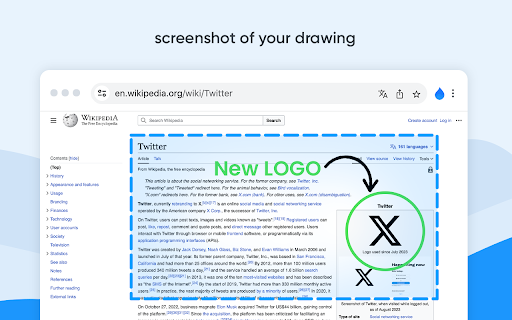
Web Paint is a Chrome extension that allows users to draw shapes, lines, and text directly onto web pages. It includes a suite of tools similar to MS Paint and supports both mouse and touchscreen inputs for web marking and screen capturing.

Developer:paint online
Version:1.0.3
Size:113KiB
Last updated:

Overview

Installs

400K+

Rating

4.5

1,605 reviews

Languages

5 locales

Includes English, English (United States), português (Portugal), русский...

Market analysis

Review-backed positioning, friction, and market signals for this Chrome extension.

Backed by review samples

Macro category

Automation & Workflow Efficiency

Pricing friction

Low review signal

Complaint intensity

High review signal

Listing & review signals
Observed signals from store listing text and review samples.

Listing positioning

The product is positioned as a versatile real-time annotation and editing tool for websites and PDFs. It emphasizes functionality for students and professionals, offering features like drawing, text addition, and full-page screenshot capturing.

Inferred product pattern

A utility-focused annotation tool featuring a highly disruptive user engagement strategy through frequent rating prompts.

Review-backed pain points

Users report highly frequent and aggressive 'rate us' popups that disrupt workflows, cause pages to scroll to the top, or reset web elements like video playback. There are also reports of an unreliable eraser tool and cumbersome UI for tool switching.

Observed feature gaps

Users requested the ability to draw filled rectangles directly and the ability to move or resize existing annotations.

Tags
Web AnnotationScreen CapturePage MarkerDigital Drawing
Target users

- Students

- Educators

- Technical Support Professionals

- Content Creators

Primary use cases

- Annotating web content

- Creating product demonstrations

- Reporting technical bugs via screenshots

- Educational drawing exercises

Positive themes

- Functional toolset for basic marking

Negative themes

- Intrusive rating prompts

- Disruptive UI bugs

- Unreliable eraser tool

- Poor UI/UX design

Observed friction

- Performance complaints detected

- No pricing friction observed as the tool is claimed to be free.

Evidence boundary: Evidence is based on the official store description and user reviews highlighting core features and major usability frustrations. Review data is heavily concentrated on the intrusive rating prompt behavior rather than a full audit of all technical features.
Complaint summaries
Review-backed complaint signals grouped by operational area.

Support

No specific support complaints, though users express extreme dissatisfaction with the automated rating request system.

Reliability

The extension causes technical disruptions including unexpected page scrolling, resetting web content, and failures in the eraser functionality.

Privacy

No privacy complaints observed.

Access & pricing

- Free usage observed

- No account requirement observed

- Free plan or free usage claimed

Store listing facts

Listing assets

- Screenshots: 3

- Videos: 0

- Languages: 5

Trust signals

- Privacy policy

- Developer contact

Store metadata

- Version: 1.0.3

- Size: 113KiB

- Last updated:

Store description excerpt
Short excerpt from the public Chrome Web Store listing; full copy is available on the official store page.
Web Paint - Page Marker & Editor enables you to make annotations and modifications on websites. This extension allows you to draw, add text, insert lines, and highlight content directly on web pages and PDFs. The tool is compatible with both mouse and touchscreen inputs, giving you the ability to create and save your edits to your device. Whether you're a student, a professional, or simply an avid web user, this extension is a valuable addition. It offers a range of advanced annotation tools, such as a pencil, highlighter, color picker, arrow, polygon, text, and emojis. Are you accustomed to highlighting important text in books or do you want to draw directly on websites in real-time from your browser? Perhaps you need to share your screen for tasks like reporting technical issues, creating product demonstrations, or crafting how-to tutorials. Here's why you should consider using our ex…

Listing SEO keywords

Search intent keywords
Keyword signals for evaluating how users may discover, compare, or search for this extension category.

Core discovery

web page annotationdraw on websitebrowser screenshot toolpage marker extensionweb highlighter

Comparison

MS Paint for browserweb markup tool

Problem

annoying rating popupweb paint eraser bugbrowser annotation bugs

Alternative

Page MarkerWeb AnnotatorScreenshot Markup

Similar extensions

Jump to related discovery paths:

FAQ

What is Web Paint mainly used for?
Web Paint is a Chrome extension that allows users to draw shapes, lines, and text directly onto web pages. It includes a suite of tools similar to MS Paint and supports both mouse and touchscreen inputs for web marking and screen capturing.
What market signals stand out?
Established adoption with substantial review base. Last known update: 01/20/2025.
What should builders compare before entering this space?
Compare install concentration, rating quality, update recency, screenshots, developer portfolio, listing claims, and review-backed friction signals.
Is this page review-backed?
Backed by review samples. This page combines store metadata with selected review signals, while raw store metrics remain visible for comparison.

Screenshots

Web Paint - Page Marker & Editor screenshot

Links

Recommended Chrome extensions

Related listings from the same category, trending peers, and the same publisher portfolio.

Browse workflow