Cursorland - Custom Cursor for Chrome icon

Cursorland Chrome Extension Analysis

Niche Lifestyle & Gaming Hacks

Store listing title: Cursorland - Custom Cursor for Chrome

Chrome extension ID: oinkhgpjmeccknjbbccabjfonamfmcbn

Cursorland is a Chrome extension that enables users to personalize their browsing experience by changing their mouse cursor. It includes a management menu for toggling visibility and adjusting cursor size, with a catalog accessible via their website.

Version:3.1
Size:321KiB
Last updated:

Overview

Installs

20K+

Rating

4.9

319 reviews

Languages

54 locales

Includes Deutsch, English, English (United Kingdom), English (United States)...

Market analysis

Review-backed positioning, friction, and market signals for this Chrome extension.

Backed by review samples

Macro category

Niche Lifestyle & Gaming Hacks

Pricing friction

Low review signal

Complaint intensity

Low review signal

Listing & review signals
Observed signals from store listing text and review samples.

Listing positioning

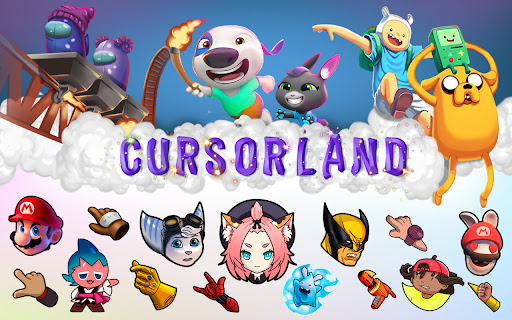
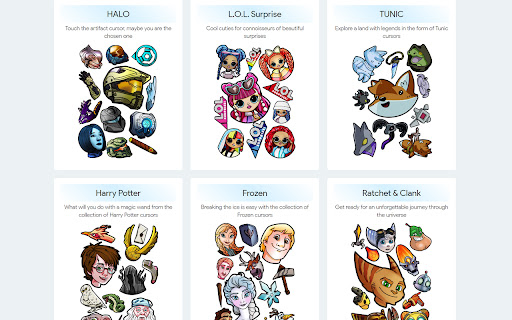
Cursorland positions itself as a user-friendly browser enhancement tool that allows users to replace the standard mouse pointer with custom designs. The listing emphasizes a large, frequently updated library of cursors featuring pop culture, gaming, and character themes.

Inferred product pattern

Consumer lifestyle content delivery extension.

Review-backed pain points

Users occasionally struggle with installation steps, desire more specific niche content (e.g., War Thunder, Stitch), or find the functionality distracting during productivity tasks.

Observed feature gaps

No native ability for users to upload or edit their own custom files directly within the extension; requests for a right-click 'download to folder' feature.

Tags
Custom CursorBrowser PersonalizationUser InterfaceDesktop Fun
Target users

- Casual browser users

- Gamers

- Anime fans

- People seeking desktop personalization

Primary use cases

- Personalizing browser UI

- Enhancing browsing experience with character-themed cursors

Positive themes

- Large selection of cursor themes

- Stable performance without browser lag

- Simple, user-friendly interface

Negative themes

- Lack of specific requested characters/themes

- Distraction during actual work

- Functional issues (cursor changing during clicks)

Observed friction

- No pricing friction identified; features are marketed as free.

Evidence boundary: Extracted from 317 public reviews and store descriptions, focusing on feature usability and theme requests. Review sample size is small relative to the 30,000 user base; representative of general feedback trends but not exhaustive.
Complaint summaries
Review-backed complaint signals grouped by operational area.

Support

No formal support complaints found; negative feedback is strictly related to content preferences or UI behavior.

Reliability

Generally reported as stable, though one user noted behavior preferences regarding pointer state during click events.

Privacy

No privacy or security-related complaints observed.

Access & pricing

- Free usage observed

- No account requirement observed

- Free plan or free usage claimed

Store listing facts

Listing assets

- Screenshots: 2

- Videos: 0

- Languages: 54

Trust signals

- Developer contact

- Official website

- Support link

Store metadata

- Version: 3.1

- Size: 321KiB

- Last updated:

Store description excerpt
Short excerpt from the public Chrome Web Store listing; full copy is available on the official store page.
Just install the extension and click the "More Cursors" button to get into the free directory. The interface of the catalog is as simple as possible - move the mouse pointer over the picture you like and see how it looks like as a cursor. Did you like the cursor? Fine! Press the "Add" button and it will appear in the Cursorland extension menu. In the menu you can change the size of the cursor, enable or disable the custom cursor. The collection catalog is constantly updated with trending topics, be sure to visit the site more often. There you will find many game cursors, anime cursors, funny cursors, cute cursors, as well as characters from your favorite cartoons and series. Please note that Google policy prohibits the use of custom cursors on Chrome Store pages as well as internal Google pages. After installing the extension, update the previously opened tab to use the custom cursor on…

Listing SEO keywords

Search intent keywords
Keyword signals for evaluating how users may discover, compare, or search for this extension category.

Core discovery

custom cursor for chromechange mouse pointer browsercute cursorsanime cursor extension

Comparison

custom cursor alternativesbest browser cursor changer

Problem

cursor not changingmouse pointer distracting

Alternative

cursor collection extensionbrowser UI customization

Similar extensions

Jump to related discovery paths:

FAQ

What is Cursorland mainly used for?
Cursorland is a Chrome extension that enables users to personalize their browsing experience by changing their mouse cursor. It includes a management menu for toggling visibility and adjusting cursor size, with a catalog accessible via their website.
What market signals stand out?
Visible niche traction with moderate review base. Last known update: 04/27/2026.
What should builders compare before entering this space?
Compare install concentration, rating quality, update recency, screenshots, developer portfolio, listing claims, and review-backed friction signals.
Is this page review-backed?
Backed by review samples. This page combines store metadata with selected review signals, while raw store metrics remain visible for comparison.

Screenshots

Cursorland - Custom Cursor for Chrome screenshot

Links

Recommended Chrome extensions

Related listings from the same category, trending peers, and the same publisher portfolio.

Browse fun
Cursor Style – Custom Mouse Cursors & Trails for Chrome™ icon

Cursor Style – Custom Mouse Cursors & Trails for Chrome™

Oleksii Semeniuk

Add cool and fun mouse cursors with animated trails. Personalize your Chrome™ experience with custom styles that match your vibe.

Installs

100K+

Rating

4.8

Skins for YouTube player icon

Skins for YouTube player

Oleksii Semeniuk

Autoskip ADs, cinema mode, permanent progress bar and many custom YouTube player themes.

Installs

40K+

Rating

4.9

Return YouTube Dislike icon

Return YouTube Dislike

selivano.d

Returns ability to see dislikes

Installs

5.0M+

Rating

4.5

Stylish - Custom themes for any website icon

Stylish - Custom themes for any website

userstyles.org

With hundreds of thousands of themes, skins & free backgrounds, you can customize any website with your own color scheme in a click.

Installs

2.0M+

Rating

4.3

РуТрекер - официальный плагин (доступ и пр.) icon

РуТрекер - официальный плагин (доступ и пр.)

RuTracker.org

Доступ к RuTracker.org, поиск и пр.

Installs

2.0M+

Rating

4.0

FrankerFaceZ icon

FrankerFaceZ

FrankerFaceZ

The Twitch enhancement suite. Get custom emotes and tons of new features you'll never want to go without.

Installs

1.0M+

Rating

4.2

My Doodle icon

My Doodle

Lovenish Goyal

Change Google Logo

Installs

1.0M+

Rating

4.1

Shimeji Browser Extension icon

Shimeji Browser Extension

Jarno Le Conté

Play with little shimejis while browsing the web.

Installs

1.0M+

Rating

4.0

Google Meet Enhanced Experience icon

Google Meet Enhanced Experience

niritshlif

Virtual Green Screens, Blur, Pixelate, 3D Filters and More!

Installs

900K+

Rating

3.4

Cute Cursors - Custom Cursor for Chrome™ icon

Cute Cursors - Custom Cursor for Chrome™

Cute Cursors

Funny custom cursors for Chrome™. Replace the default mouse cursor with a custom one from collections of cool and cute cursors.

Installs

800K+

Rating

4.6