Skins for YouTube player icon

Skins for YouTube player Chrome Extension Analysis

Niche Lifestyle & Gaming Hacks

Chrome extension ID: imomahaddnhnhfggpmpbphdiobpmahof

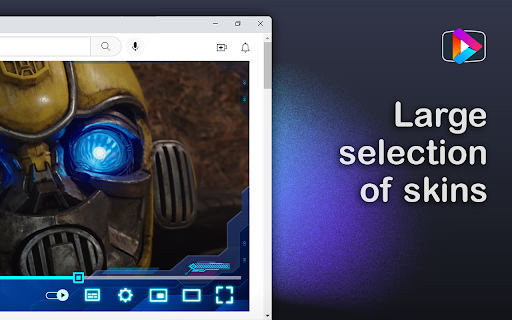
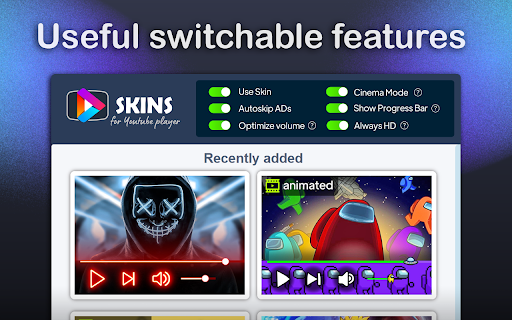
A Chrome extension that allows users to apply custom visual themes (skins) to the YouTube player. It also provides functional improvements including an automatic ad skipper, sound optimization, a cinema mode for dimming the page, and an 'Always HD' mode.

Version:2.4.1
Size:905KiB
Last updated:

Overview

Installs

40K+

Rating

4.9

659 reviews

Languages

54 locales

Includes Deutsch, English, English (United Kingdom), English (United States)...

Market analysis

Review-backed positioning, friction, and market signals for this Chrome extension.

Backed by review samples

Macro category

Niche Lifestyle & Gaming Hacks

Pricing friction

Low review signal

Complaint intensity

Moderate review signal

Listing & review signals
Observed signals from store listing text and review samples.

Listing positioning

The product is positioned as an all-in-one YouTube player enhancement tool focusing on aesthetic customization and utility. It emphasizes a large library of vector-based skins and quality-of-life features like ad skipping and HD enforcement.

Inferred product pattern

Platform UI skinning tool with bundled utility feature set.

Review-backed pain points

Users expressed frustration over the inability to create their own themes or adjust opacity. Some noted a lack of professional 'dark' themes and technical issues where skins disappear after refreshing a video.

Observed feature gaps

No user-generated content (UGC) system for creating custom skins; lack of transparency/opacity controls for themes.

Tags
YouTube ThemesCustom UIAd SkipperVideo EnhancementCinema Mode
Target users

- YouTube power users

- UI customization enthusiasts

- Users seeking basic ad-skipping utilities

Primary use cases

- Personalizing the visual appearance of the YouTube player

- Automatically skipping video ads

- Enforcing maximum video quality

- Creating a focused viewing experience via cinema mode

Positive themes

- Easy one-click theme application

- Low impact on browser performance

- Wide variety of styles available

Negative themes

- Poor taste/overabundance of anime and childish skins

- Lack of custom skin creation tools

- Technical glitches with icon visibility and page refreshes

- Broken links to the skin gallery website

Observed friction

- Performance complaints detected

- No pricing friction observed; the extension appears to be free.

Evidence boundary: Analysis based on the official store listing and a sample of helpful/low-rating reviews. Review sample is small relative to total user base; some reviews are in non-English languages.
Complaint summaries
Review-backed complaint signals grouped by operational area.

Support

No direct support complaints, though one user reported the 'More Skins' website link was broken.

Reliability

Some users reported skins failing to load after page refreshes and specific UI icons (volume/progress bar) not rendering correctly with certain skins.

Privacy

One user raised concerns regarding potential intellectual property violations in the skin assets.

Access & pricing

- Free usage observed

- No account requirement observed

- Free plan or free usage claimed

Store listing facts

Listing assets

- Screenshots: 4

- Videos: 0

- Languages: 54

Trust signals

- Developer contact

- Official website

- Support link

Store metadata

- Version: 2.4.1

- Size: 905KiB

- Last updated:

Store description excerpt
Short excerpt from the public Chrome Web Store listing; full copy is available on the official store page.
📢UPDATE: 🔊 Added a sound optimization feature that will help you adjust the volume level in some videos. 💯 Added "Always HD" mode. The extension will automatically select the highest video quality from the available options. ✅ Added automatic ad skipping. The app will instantly click the "Skip" button on the ad insert for you. 🍿 Added "Cinema" mode function. When activated, the area around the player will automatically dim after 5 seconds of user inactivity. Any movement of the mouse returns the standard view. ➖ Added a mode of permanent display of the progress bar. Now you can easily track the current video progress. All extension functions work independently of each other and are controlled by simple switches in the main menu. This extension will help you style the player menu. The interface of the site is as simple as possible - hover your mouse over the style you like and click…

Listing SEO keywords

Search intent keywords
Keyword signals for evaluating how users may discover, compare, or search for this extension category.

Core discovery

YouTube player skinsYouTube theme changercustom YouTube UIYouTube cinema mode extension

Comparison

best YouTube player themesYouTube skin extension comparison

Problem

how to customize YouTube playerautomatically skip YouTube adsYouTube player looks boring

Alternative

YouTube theme alternativescustom YouTube player skins

Similar extensions

Jump to related discovery paths:

FAQ

What is Skins for YouTube player mainly used for?
A Chrome extension that allows users to apply custom visual themes (skins) to the YouTube player. It also provides functional improvements including an automatic ad skipper, sound optimization, a cinema mode for dimming the page, and an 'Always HD' mode.
What market signals stand out?
Visible niche traction with moderate review base. Last known update: 01/03/2026.
What should builders compare before entering this space?
Compare install concentration, rating quality, update recency, screenshots, developer portfolio, listing claims, and review-backed friction signals.
Is this page review-backed?
Backed by review samples. This page combines store metadata with selected review signals, while raw store metrics remain visible for comparison.

Screenshots

Skins for YouTube player screenshot

Links

Recommended Chrome extensions

Related listings from the same category, trending peers, and the same publisher portfolio.

Browse fun