Simple mass downloader Chrome Extension Analysis
Web Scraping & Data ExtractionChrome extension ID: abdkkegmcbiomijcbdaodaflgehfffed
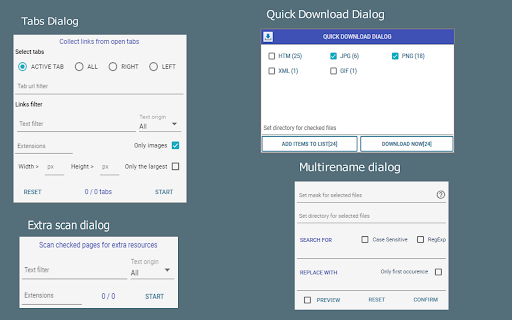
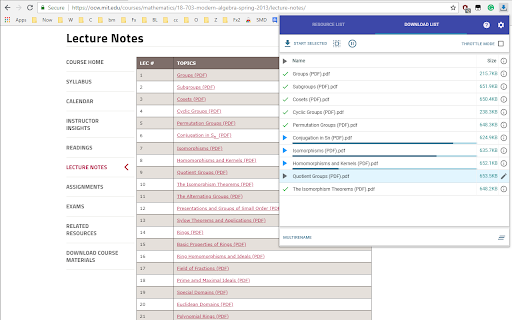
Simple Mass Downloader is a Chrome extension designed for batch downloading files from the web. It allows users to extract specific links from web pages, rename files using contextual information, and organize downloads into custom folders. The extension also offers a thumbnail grid view for images and supports pausing, resuming, and managing downloads.
Overview
Installs
100K+
Rating
★ 4.6
404 reviews
Languages
1 locales
Includes English (United States)
Market analysis
Review-backed positioning, friction, and market signals for this Chrome extension.
Macro category
Web Scraping & Data Extraction
Pricing friction
Low review signal
Complaint intensity
High review signal
Listing positioning
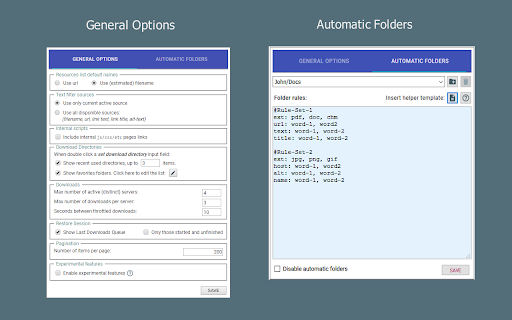
This Chrome extension positions itself as a lightweight, unobtrusive mass downloader with flexible filtering and renaming capabilities. It aims to make downloading files easier and more productive by extracting desired links, generating better file names, and organizing downloads into custom directories.
Inferred product pattern
A desktop-like download manager integrated into the browser, designed to automate and simplify bulk file acquisition from web pages through link extraction, filtering, and renaming functionalities.
Review-backed pain points
Users report that the extension fails to download desired file types, continues downloading deleted items, ignores specified download folders, and doesn't automatically retry failed downloads. The user interface is frequently described as complicated and difficult to use, with issues like popup windows not appearing and downloads getting stuck in a queue.
Observed feature gaps
The extension does not appear to handle JavaScript-heavy websites where links are generated dynamically. It also struggles with certain file types (like zip files or streaming media) and does not offer robust error handling or automatic retries for failed downloads. Users also desire better control over download cancellation and a more streamlined process when Chrome prompts for file saving.
- Users needing to download multiple files from web pages
- Web researchers and data collectors
- Individuals managing large numbers of image or document downloads
- Bulk downloading files from a list of URLs
- Extracting specific file types from a webpage
- Renaming downloaded files based on patterns
- Organizing downloads into predefined folders
- Can save time by downloading multiple files without manual clicks (though often with caveats)
- Provides features for organizing and renaming downloads.
- Fails to detect or filter desired file types (e.g., zip files, videos).
- Continues downloading items after they are deleted from the list.
- Ignores specified download folders and reverts to previous ones.
- Does not automatically retry failed downloads and lacks bulk retry functionality.
- Downloads corrupted or poor-quality files.
- Does not offer an option to cancel entire downloads, leading to per-file prompts that lock up the browser.
- Prompts the user to choose a download file for each download, even when a destination folder is specified.
- The extension's interface is described as complicated, confusing, and not intuitive.
- The extension is sometimes buggy, with the popup window not appearing or downloads getting stuck in a queue without explanation.
- Performance complaints detected
- The extension is free to use, with no apparent paid tiers or friction mentioned in the reviews.
Support
No specific complaints about support were found in the reviews. However, the complexity of the interface leads to users being unable to fix issues themselves.
Reliability
Reviews indicate significant reliability issues, including downloads failing to start, continuing after deletion, ignoring specified folders, and not retrying failed downloads. Some users also experienced poor download quality.
Privacy
No privacy complaints were observed in the provided reviews.
- No clear monetization signal
- No account requirement observed
- Free plan or free usage claimed
Store listing facts
- Screenshots: 4
- Videos: 0
- Languages: 1
- Developer contact
- Version: 0.866
- Size: 203KiB
- Last updated:
Listing SEO keywords
Core discovery
Comparison
Problem
Alternative
Similar extensions
Jump to related discovery paths:
FAQ
Screenshots