Picture in Picture - Floating player icon

Picture in Picture Chrome Extension Analysis

Automation & Workflow Efficiency

Store listing title: Picture in Picture - Floating player

Chrome extension ID: adnielbhikcbmegcfampbclagcacboff

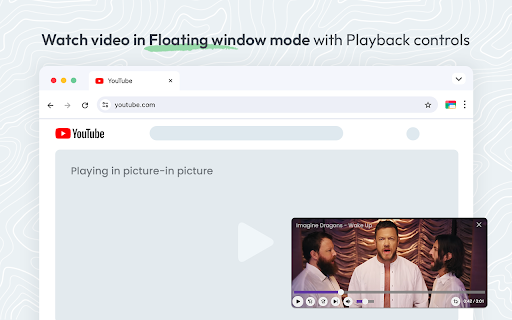
A Chrome extension that creates a floating video window on top of other browser tabs. It provides users with a set of intuitive playback controls, including volume, speed, and navigation buttons, to facilitate multitasking while watching content.

Developer:pip mode
Version:1.0.6
Size:87.29KiB
Last updated:

Overview

Installs

200K+

Rating

4.6

773 reviews

Languages

25 locales

Includes Deutsch, English, English (United States), Indonesia...

Market analysis

Review-backed positioning, friction, and market signals for this Chrome extension.

Backed by review samples

Macro category

Automation & Workflow Efficiency

Pricing friction

Low review signal

Complaint intensity

Moderate review signal

Listing & review signals
Observed signals from store listing text and review samples.

Listing positioning

The product is positioned as an enhanced version of the native Chrome Picture-in-Picture mode, offering advanced playback controls that are missing from the default browser feature. It emphasizes versatility across all websites with HTML video elements, specifically highlighting YouTube and Netflix.

Inferred product pattern

A utility wrapper that enhances the browser's native PiP API by adding a custom UI layer for extended playback functionality.

Review-backed pain points

Users expressed frustration over the window not remembering its previous size or position, requiring manual resizing every time. Some users reported the extension failing to launch on certain websites or encountering a loop asking to reload the page.

Observed feature gaps

Lack of persistent window position/size memory, absence of keyboard shortcuts for seeking, and inability to remove the floating window's title bar for a truly borderless experience.

Tags
Picture in PictureFloating Video PlayerMultitasking ToolVideo Controls
Target users

- Multitaskers

- Online Students

- Developers

- Content Consumers

Primary use cases

- Watching tutorials while coding

- Monitoring sports or news while working

- Consuming video content while browsing other websites

Positive themes

- Superior control set compared to native PiP

- Useful progress bars and subtitles

- Effective multitasking on YouTube

Negative themes

- Incompatibility with specific sites like NYT and VK

- UI clutter including white space and title bars

- Lack of memory for window size and position

Observed friction

- Performance complaints detected

- No pricing friction observed; the tool appears to be free of charge.

Evidence boundary: Data extracted from the store listing and a sample of 15 helpful and low-rating reviews. The review sample represents a small fraction of the total 750 reviews; site-specific failures may not be universal.
Complaint summaries
Review-backed complaint signals grouped by operational area.

Support

No specific support interaction complaints, though users noted unresolved bugs regarding site compatibility.

Reliability

Occasional reliability issues where the extension fails to work on specific domains or exits automatically shortly after launch.

Privacy

No privacy or security complaints observed.

Access & pricing

- Free usage observed

- No account requirement observed

- Free plan or free usage claimed

Store listing facts

Listing assets

- Screenshots: 3

- Videos: 0

- Languages: 25

Trust signals

- Privacy policy

- Developer contact

Store metadata

- Version: 1.0.6

- Size: 87.29KiB

- Last updated:

Store description excerpt
Short excerpt from the public Chrome Web Store listing; full copy is available on the official store page.
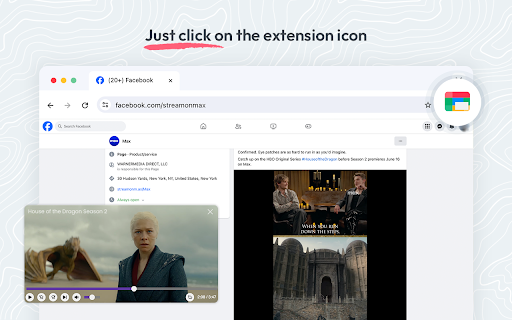
This extension brings a PiP view to all websites with an HTML video element. Press the extension icon to open the active player in the picture in picture mode. This extension automatically tries to use the active player. Now stream movies, series or sports on any tab. Install Picture in Picture chrome extension to enable the floating video. We support this feature on every streaming site. For YouTube, the extension also offers an in-player button next to the settings button to open the YouTube video in the picture-in-picture mode. You can use this extension to watch YouTube videos in a floating window that is on top of all other windows so tabs can be switched and still the player is visible. The floating window has play and pause buttons, and you can exit from the picture-in-picture mode anytime. How Extension works: 1. Find the video and run it. 2. Click the extension icon to reduce t…

Listing SEO keywords

Search intent keywords
Keyword signals for evaluating how users may discover, compare, or search for this extension category.

Core discovery

chrome picture in picturefloating video playerpip extensionyoutube pip mode

Comparison

native chrome pip vs extensionbest pip extension for chrome

Problem

watch video while browsingfloating video windowyoutube video on top of windows

Alternative

pip alternativefloating player for chrome

Similar extensions

Jump to related discovery paths:

FAQ

What is Picture in Picture mainly used for?
A Chrome extension that creates a floating video window on top of other browser tabs. It provides users with a set of intuitive playback controls, including volume, speed, and navigation buttons, to facilitate multitasking while watching content.
What market signals stand out?
Established adoption with moderate review base. Last known update: 01/20/2025.
What should builders compare before entering this space?
Compare install concentration, rating quality, update recency, screenshots, developer portfolio, listing claims, and review-backed friction signals.
Is this page review-backed?
Backed by review samples. This page combines store metadata with selected review signals, while raw store metrics remain visible for comparison.

Screenshots

Picture in Picture - Floating player screenshot

Links

Recommended Chrome extensions

Related listings from the same category, trending peers, and the same publisher portfolio.

Browse workflow
Sound Booster - increase volume up icon

Sound Booster - increase volume up

Sound-ultimate.com

Volume Booster helps boost sound video or music on any tab! Increase volume and bass booster, equalizer. Volume control.

Installs

2.0M+

Rating

4.5

Evernote Web Clipper icon

Evernote Web Clipper

Evernote

Use the Evernote extension to save things you see on the web into your Evernote account.

Installs

2.0M+

Rating

4.7

Microsoft Defender Browser Protection icon

Microsoft Defender Browser Protection

Microsoft Corporation

Protect yourself against online threats, like phishing and malicious websites, with real-time protection from Microsoft.

Installs

2.0M+

Rating

4.1

Визуальные закладки icon

Визуальные закладки

Yandex

Визуальные закладки – это страница, на которой собраны ваши любимые сайты

Installs

2.0M+

Rating

3.4

Web Signer icon

Web Signer

Softplan Websigner Developers

Extensão para assinatura digital no browser

Installs

2.0M+

Rating

2.9

Screen Recorder icon

Screen Recorder

Erich Behrens

Record a video from the camera or capture it from the screen (desktop, specific application window or browser tab)

Installs

2.0M+

Rating

3.8

Адаптер Рутокен Плагин icon

Адаптер Рутокен Плагин

АО "Актив-Софт"

Позволяет использовать Рутокен Плагин

Installs

2.0M+

Rating

2.5

Content Server Browser Web Extension icon

Content Server Browser Web Extension

OpenText Corporation

Content Server Browser Web Extension for Chrome

Installs

2.0M+

Rating

2.7

Avaya Browser Extension icon

Avaya Browser Extension

Avaya

Avaya Browser Extension lets you click-to-dial phone numbers from a web page, and have the call be created on your Avaya UC Client

Installs

1.0M+

Rating

5.0

Fortinet Privileged Access Agent icon

Fortinet Privileged Access Agent

FortiClient Chrome

Fortinet Privileged Access Agent for Google Chrome

Installs

1.0M+

Rating

1.8