

Screen Recorder Chrome Extension Analysis
Automation & Workflow EfficiencyChrome extension ID: hniebljpgcogalllopnjokppmgbhaden
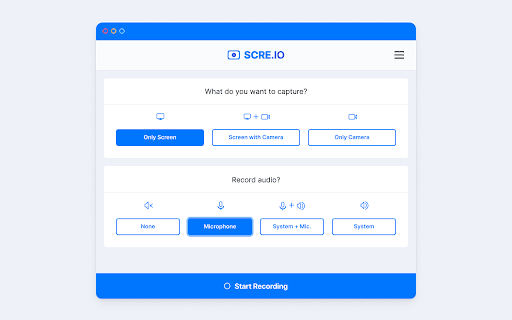
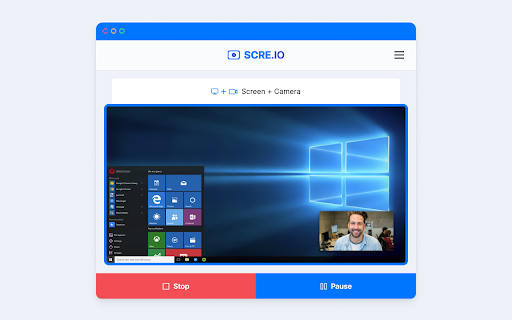
A Chrome extension that enables users to record video from their webcam or capture their screen. It supports combined microphone and system audio recording and includes an autosave feature to recover recordings after crashes.
Overview
Installs
2.0M+
Rating
★ 3.8
1,899 reviews
Languages
51 locales
Includes Deutsch, English, Filipino, Indonesia...
Market analysis
Review-backed positioning, friction, and market signals for this Chrome extension.
Macro category
Automation & Workflow Efficiency
Pricing friction
Low review signal
Complaint intensity
Moderate review signal
Listing positioning
The product is positioned as a completely free screen and camera recording tool that requires no account registration and adds no watermarks. It emphasizes versatility by allowing users to capture the entire desktop, specific application windows, or browser tabs.
Inferred product pattern
A high-reach, zero-friction utility that leverages browser recording APIs to provide a basic, free alternative to paid screen capture software.
Review-backed pain points
Users report frustration with the .webm output format being incompatible with platforms like WhatsApp. There are significant reports of the extension hanging or crashing when stopping a recording, which results in the loss of the recorded video.
Observed feature gaps
Lack of common export formats like MP4 or MOV, absence of detailed user instructions, and intermittent failure to capture system audio alongside screen recording.
- Students
- Online Educators
- Tutorial Creators
- Remote Workers
- Recording virtual classes
- Creating software walkthroughs
- Capturing browser-based presentations
- Quick video memos
- No account requirement
- Free access
- Initial ease of use
- File format incompatibility
- Stability and crashing
- Audio capture failures
- Unresponsive interface
- Performance complaints detected
- No pricing friction observed as the tool is claimed to be free with no signup required.
Support
Some users noted a complete lack of instructions on how to operate the tool.
Reliability
Reliability issues include the extension becoming unresponsive after recording stops and recordings being deleted due to crashes.
Privacy
No privacy or security complaints observed in the provided samples.
- Free usage observed
- No account requirement observed
- Free plan or free usage claimed
Store listing facts
- Screenshots: 3
- Videos: 0
- Languages: 51
- Privacy policy
- Developer contact
- Support link
- Version: 3.3.1
- Size: 262KiB
- Last updated:
Listing SEO keywords
Core discovery
Comparison
Problem
Alternative
Similar extensions
Jump to related discovery paths:
FAQ
Screenshots

Links
Privacy policy: https://scre.io/privacy-browser-extension
Support links: https://support.scre.io


