Show Password - Most Secure Password Viewer icon

Show Password Chrome Extension Analysis

Privacy, Security & Ad Blockers

Store listing title: Show Password - Most Secure Password Viewer

Chrome extension ID: agkfchaoihjmeleppjalfedmnjpefjma

A Chrome extension that enables users to reveal hidden passwords in text fields. It is designed to be lightweight and secure, adhering to Manifest V3 standards.

Developer:Extension Rocks
Version:1.3
Size:523KiB
Last updated:

Overview

Installs

9K+

Rating

4.5

20 reviews

Languages

54 locales

Includes Deutsch, English, English (United Kingdom), English (United States)...

Market analysis

Review-backed positioning, friction, and market signals for this Chrome extension.

Backed by review samples

Macro category

Privacy, Security & Ad Blockers

Pricing friction

Low review signal

Complaint intensity

Low review signal

Listing & review signals
Observed signals from store listing text and review samples.

Listing positioning

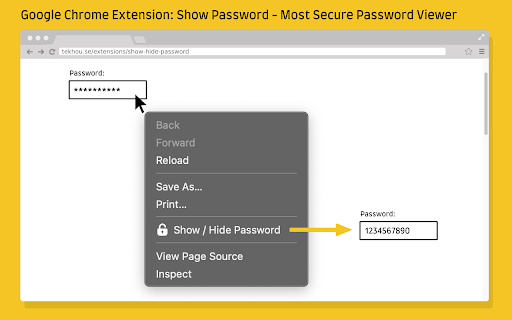
The product is positioned as a secure, privacy-first utility that allows users to toggle password visibility from dots to plain text via a right-click menu. It emphasizes a lack of tracking, no third-party scripts, and minimal permission requests.

Inferred product pattern

Single-purpose utility focusing on removing browser-level visual masking of passwords.

Review-backed pain points

One user reported that the extension does not function on iCloud.

Observed feature gaps

Lack of compatibility with certain secure platform fields (e.g., iCloud) and a requested Windows-native version.

Tags
Password ViewerPrivacy UtilityBrowser ToolAccessibility
Target users

- Non-technical users

- Users managing passwords without a dedicated manager

- Users dealing with websites that block password pasting

Primary use cases

- Revealing forgotten passwords saved in the browser

- Verifying password accuracy on sites that restrict pasting

- Helping elderly users view their credentials

Positive themes

- Ease of use

- Trustworthiness and privacy

- Utility for non-experts

- Effectiveness on paste-restricted sites

Negative themes

- Platform incompatibility

Observed friction

- No pricing friction observed; the extension appears to be free.

Evidence boundary: Data extracted from the store listing and a sample of 10 user reviews. The review sample represents only a portion of the total comment count.
Complaint summaries
Review-backed complaint signals grouped by operational area.

Support

No support or account-related complaints found in the review samples.

Reliability

Minor reliability issue reported regarding iCloud compatibility.

Privacy

No privacy complaints; users specifically praised the tool's privacy claims.

Access & pricing

- Free usage observed

- No account requirement observed

- Free plan or free usage claimed

Store listing facts

Listing assets

- Screenshots: 1

- Videos: 0

- Languages: 54

Trust signals

- Privacy policy

- Developer contact

- Official website

Store metadata

- Version: 1.3

- Size: 523KiB

- Last updated:

Store description excerpt
Short excerpt from the public Chrome Web Store listing; full copy is available on the official store page.
✅ Manifest V3 enabled Your privacy matters. We respect your own data and never ask for unnecessary permissions. No tracking code or no 3rd-party script injected. How to use: In most cases ( ~98% ), just right click on password box and choose "Show / Hide Password", the password will be revealed in plain text mode. Choose again it will be switched back to password mode. In rare cases ( ~2% ), after clicking "Show / Hide Password" menu item, the login iframe will be opened in a new tab. Then right click on password box again to view password. That's because there is an embedded <iframe> and its origin differs than its parent document. In order to get permission we need to open iframe in new tab. Still have concern about its security? Feel free to review the source code after installation: chrome-extension://agkfchaoihjmeleppjalfedmnjpefjma/background.js Have fun.

Listing SEO keywords

Search intent keywords
Keyword signals for evaluating how users may discover, compare, or search for this extension category.

Core discovery

show password chrome extensionreveal password dotschrome password viewer

Comparison

best password revealershow password vs password manager

Problem

cannot see password in chromereveal hidden passwordconvert password dots to text

Alternative

password revealer alternativeasterisk remover extension

Similar extensions

Jump to related discovery paths:

FAQ

What is Show Password mainly used for?
A Chrome extension that enables users to reveal hidden passwords in text fields. It is designed to be lightweight and secure, adhering to Manifest V3 standards.
What market signals stand out?
Early or small audience with limited review base. Last known update: 01/02/2025.
What should builders compare before entering this space?
Compare install concentration, rating quality, update recency, screenshots, developer portfolio, listing claims, and review-backed friction signals.
Is this page review-backed?
Backed by review samples. This page combines store metadata with selected review signals, while raw store metrics remain visible for comparison.

Screenshots

Show Password - Most Secure Password Viewer screenshot

Links

Recommended Chrome extensions

Related listings from the same category, trending peers, and the same publisher portfolio.

Browse tools
Pesticide - Advanced CSS Debugger icon

Pesticide - Advanced CSS Debugger

Extension Rocks

Not only inserts outlines (without background color) on all elements, but also inspects size and layout. CSS is awesome!

Installs

20K+

Rating

4.9

Swoosh Cookie and Local Storage Specialist icon

Swoosh Cookie and Local Storage Specialist

Extension Rocks

Manage Cookies, Local Storage & Session Storage in one place. Powerful, intuitive, and real-time web dev toolkit.

Installs

10K+

Rating

3.9

Ad Blocker: Stands AdBlocker icon

Ad Blocker: Stands AdBlocker

Stands

Stands AdBlocker – it's a free ad blocker for YouTube, Twitch, Pop-Ups, Video Ads, and websites. Block ads everywhere with Stands!

Installs

3.0M+

Rating

4.8

Google Input Tools icon

Google Input Tools

cloud-input-team

Input Tools lets you type in the language of your choice.

Installs

3.0M+

Rating

4.0

Smallpdf—Edit, Convert, Compress, & AI Summarize PDF icon

Smallpdf—Edit, Convert, Compress, & AI Summarize PDF

Smallpdf AG

Easy-to-use PDF tools to compress, convert, merge, chat to, split, e-sign, and edit PDF files in your browser.

Installs

3.0M+

Rating

4.6

Microsoft Bing Search with Rewards icon

Microsoft Bing Search with Rewards

Microsoft Corporation

Use the Microsoft Rewards extension to find new ways to earn every day, easily track your points and set your default search to Bing

Installs

3.0M+

Rating

4.4

Google Scholar Button icon

Google Scholar Button

scholar-chrome-extensions

Lookup scholarly articles as you browse the web.

Installs

3.0M+

Rating

4.6

ЮБуст - VPN для YouTube. Обход блокировки Ютуб без ВПН. VPN для браузера icon

ЮБуст - VPN для YouTube. Обход блокировки Ютуб без ВПН. VPN для браузера

Uboost

Ускоритель Ютуб без ВПН, VPN для браузера Яндекс, Chrome, Opera, Edge. Обход замедления Ютуба.

Installs

2.0M+

Rating

4.2

Pie Adblock - A Powerful Free Ad Blocker icon

Pie Adblock - A Powerful Free Ad Blocker

Pie Extensions

Pie Adblock blocks ads & pop-ups, plus YouTube & Twitch video ads. You can customize your ad experience with Pie!

Installs

2.0M+

Rating

4.9

Dark Mode icon

Dark Mode

Grephy

A global dark theme for the web.

Installs

2.0M+

Rating

3.6