Google Meet Attendance List Chrome Extension Analysis
Automation & Workflow EfficiencyChrome extension ID: appcnhiefcidclcdjeahgklghghihfok
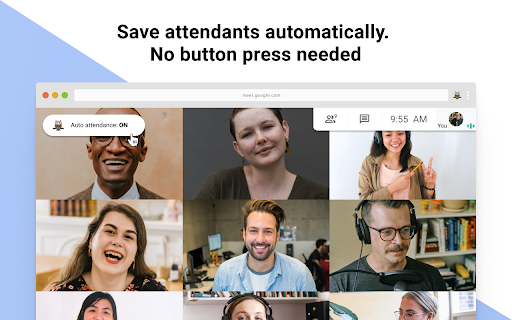
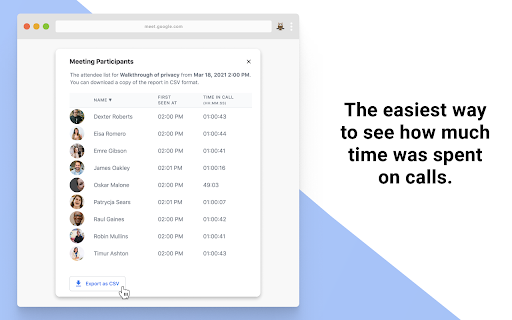
Google Meet Attendance List is a browser extension that automatically tracks participants during Google Meet calls. It provides a dashboard for meeting history and allows users to export attendance data in CSV format for use in other platforms like Google Classroom.
Overview
Installs
400K+
Rating
★ 4.7
2,319 reviews
Languages
10 locales
Includes Deutsch, English, Türkçe, español...
Market analysis
Review-backed positioning, friction, and market signals for this Chrome extension.
Macro category
Automation & Workflow Efficiency
Pricing friction
Low review signal
Complaint intensity
Moderate review signal
Listing positioning
The extension positions itself as an automated tool for capturing meeting attendance in Google Meet without manual input. It targets teachers and professionals, emphasizing local data storage and seamless integration with the Google Meet UI.
Inferred product pattern
Automated data harvesting tool integrated into a third-party web application (Google Meet) UI.
Review-backed pain points
Users frequently report technical issues where the attendance list fails to generate or the interface gets stuck on a loading screen. Some users mention intermittent reliability where the extension stops tracking if screen sharing is active.
Observed feature gaps
Reviewers note that partial participant list capture occurs occasionally and there is no native way to merge separate tracking logs into a single report if screen sharing resets the session data.
- K-12 Teachers
- University Professors
- Business Professionals
- Automated student attendance tracking
- Logging participant time-in and first-seen duration
- Generating CSV reports for administrative use
- Ease of use for tracking student logs
- Convenient automated report generation
- Local data storage privacy benefits
- Infinite loading loops on the dashboard
- Failure to capture attendance automatically
- Performance degradation and Chrome crashes
- Interrupted tracking during screen sharing
- Performance complaints detected
- No significant pricing friction identified; users specifically mention the free plan functionality as satisfactory.
Support
Users express frustration regarding persistent technical bugs, such as infinite loading screens and failure to save attendance, without clear resolution paths.
Reliability
Multiple reports of browser freezing, high CPU usage, and 'Aw, Snap!' crashes during live meetings; consistent reliability issues regarding automated tracking.
Privacy
No privacy complaints; the listing explicitly highlights that data is stored locally on the user's device.
- Free entry with paid features
- No account requirement observed
- Free plan or free usage claimed
Store listing facts
- Screenshots: 2
- Videos: 1
- Languages: 10
- Privacy policy
- Developer contact
- Official website
- Version: 5.2.2
- Size: 1.91MiB
- Last updated:
Listing SEO keywords
Core discovery
Comparison
Problem
Alternative
Similar extensions
Jump to related discovery paths:
FAQ
Screenshots