edpuzzle icon

edpuzzle Chrome Extension Analysis

Automation & Workflow Efficiency

Chrome extension ID: oligonmocnihangdjlloenpndnniikol

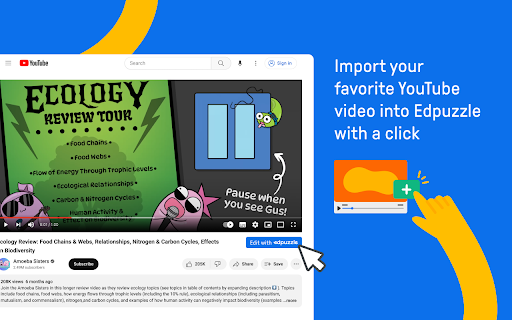
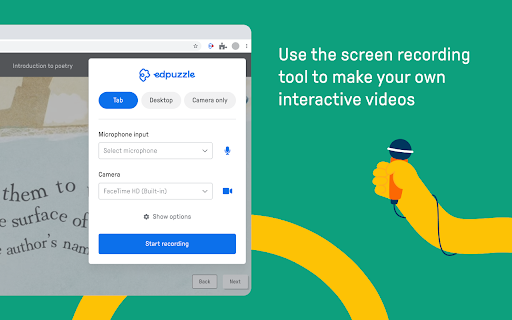
This extension allows teachers to embed interactive questions into YouTube videos and track student engagement. It also provides a screen recording suite for creating instructional videos and conducting demonstrations directly within a web browser.

Developer:Edpuzzle
Version:5.1.0
Size:1.17MiB
Last updated:

Overview

Installs

200K+

Rating

4.2

58 reviews

Languages

1 locales

Includes English

Market analysis

Review-backed positioning, friction, and market signals for this Chrome extension.

Backed by review samples

Macro category

Automation & Workflow Efficiency

Pricing friction

Low review signal

Complaint intensity

Moderate review signal

Listing & review signals
Observed signals from store listing text and review samples.

Listing positioning

Edpuzzle positions itself as an essential tool for educators to transform static YouTube content into interactive learning experiences. It highlights seamless integration with educational workflows, including AI-assisted question generation, ad-free viewing, and built-in screen recording capabilities.

Inferred product pattern

An EdTech utility that bridges public video content with proprietary Learning Management System (LMS) features.

Review-backed pain points

Users reported intermittent failures in recording tools, sync errors during quiz submissions leading to incorrect grading, and general instability on certain hardware configurations.

Observed feature gaps

Reviewers identified a need for a more intuitive user interface and expressed desire for broader platform integrations outside of current classroom workflows.

Tags
EducationVideo InteractionScreen RecorderEdTech
Target users

- K-12 Teachers

- Higher Education Instructors

- Students

Primary use cases

- Creating interactive video lessons

- Screen recording for presentations

- Automated student assessment grading

Positive themes

- Useful for bypassing organizational video blocks

- Effective AI grading for short-answer questions

- Simplifies sharing content with students

Negative themes

- App instability and crash-on-startup issues

- Technical bugs during assignment submission

- Perceived system performance degradation

Observed friction

- Performance complaints detected

- No specific pricing complaints identified; service is generally viewed as part of an institutional software suite.

Evidence boundary: Evidence is gathered from user reviews highlighting both the utility of the tool for classroom management and technical hurdles involving recording and submission stability. Review sample size is relatively small compared to the total user base, and reports of technical issues may be device or version-specific.
Complaint summaries
Review-backed complaint signals grouped by operational area.

Support

Users expressed frustration over technical bugs that interrupt lesson completion, often without mention of support resolution.

Reliability

Significant reports of the screen recording feature failing to launch and submission errors during interactive assignments.

Privacy

No active privacy concerns or complaints identified in the sample set.

Access & pricing

- Free entry with paid features

- Account required for core usage

- Limited free usage observed

Store listing facts

Listing assets

- Screenshots: 5

- Videos: 1

- Languages: 1

Trust signals

- Privacy policy

- Developer contact

- Official website

- Support link

Store metadata

- Version: 5.1.0

- Size: 1.17MiB

- Last updated:

Store description excerpt
Short excerpt from the public Chrome Web Store listing; full copy is available on the official store page.
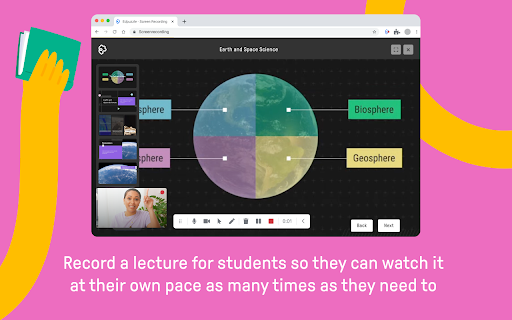
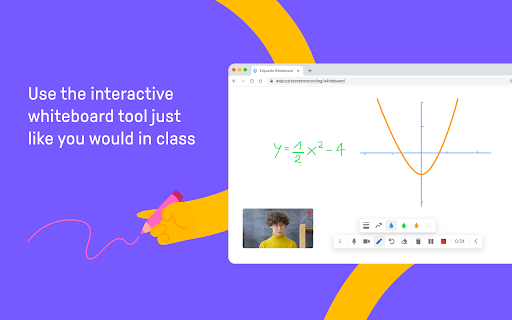
The extension lets you make any YouTube video interactive, by embedding questions (either manually or instantly with Teacher Assist AI), and safe, with no ads, no tracking, and no recommended videos. The extension also includes an amazing screen recording tool so you can create your own educational videos! Record your screen and take your students through a presentation they can watch at their own pace, walk them through a math problem using the interactive whiteboard complete with drawing tools, or use the camera to record a science experiment or any other creative classroom ideas you dream up.

Listing SEO keywords

Search intent keywords
Keyword signals for evaluating how users may discover, compare, or search for this extension category.

Core discovery

interactive video lessonsEdTech browser extensionteacher video toolsEdpuzzle screen recorder

Comparison

Edpuzzle alternativesinteractive classroom videos

Problem

Edpuzzle not workingscreen recorder crash

Alternative

PlayPositNearpod

Similar extensions

Jump to related discovery paths:

FAQ

What is edpuzzle mainly used for?
This extension allows teachers to embed interactive questions into YouTube videos and track student engagement. It also provides a screen recording suite for creating instructional videos and conducting demonstrations directly within a web browser.
What market signals stand out?
Established adoption with limited review base. Last known update: 07/17/2025.
What should builders compare before entering this space?
Compare install concentration, rating quality, update recency, screenshots, developer portfolio, listing claims, and review-backed friction signals.
Is this page review-backed?
Backed by review samples. This page combines store metadata with selected review signals, while raw store metrics remain visible for comparison.

Screenshots

edpuzzle screenshot
edpuzzle screenshot
edpuzzle screenshot
edpuzzle screenshot
edpuzzle screenshot

Links

Recommended Chrome extensions

Related listings from the same category, trending peers, and the same publisher portfolio.

Browse education
Google Translate icon

Google Translate

google-translate-chrome-extension-owners

View translations easily as you browse the web. By the Google Translate team.

Installs

31.0M+

Rating

4.2

EndNote Click icon

EndNote Click

EndNote Click

Fast, one-click access to millions of research papers.

Installs

5.0M+

Rating

4.1

Kami for Google Chrome™ icon

Kami for Google Chrome™

Kami

Kami is an interactive learning platform empowering students and enhancing the way teachers teach, feedback, and assess.

Installs

4.0M+

Rating

4.6

Language Reactor icon

Language Reactor

Dioco

Learn languages effectively by watching films and series in your target language.

Installs

2.0M+

Rating

4.2

Brisk Teaching - AI that Works Where Teachers Work icon

Brisk Teaching - AI that Works Where Teachers Work

Brisk Teaching

Brisk works inside Google Docs, Slides, and YouTube, saving teachers 10+ hours weekly on planning, feedback, and resource creation.

Installs

1.0M+

Rating

4.7

BetterCampus (prev. BetterCanvas) icon

BetterCampus (prev. BetterCanvas)

BetterCampus

Feature packed extension for Canvas.

Installs

1.0M+

Rating

4.7

LibKey Nomad icon

LibKey Nomad

Third Iron LLC

One-click access to millions of scholarly articles.

Installs

1.0M+

Rating

4.5

MyBib: Free Citation Generator icon

MyBib: Free Citation Generator

MyBib

Automatically create APA style, MLA format, and Harvard referencing style citations with our citation generator add-on for Chrome.

Installs

1.0M+

Rating

4.8

Equatio - Math made digital icon

Equatio - Math made digital

Texthelp

Easily create mathematical equations, formulas and quizzes. Intuitively type or handwrite, with no tricky math code to learn.

Installs

1.0M+

Rating

3.9

Scribbr Citation Generator icon

Scribbr Citation Generator

Scribbr

Instantly get accurate citations for any webpage in APA, MLA, Chicago, Harvard and any other style with our Citation Generator.

Installs

1.0M+

Rating

3.8