Read on reMarkable icon

Read on reMarkable Chrome Extension Analysis

Automation & Workflow Efficiency

Chrome extension ID: bfhkfdnddlhfippjbflipboognpdpoeh

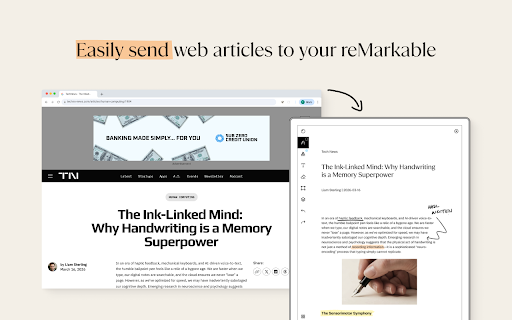
This extension enables users to push web content from their Chrome browser directly to their reMarkable paper tablet. It offers conversion modes to strip ads for distraction-free reading or to preserve original formatting, requiring a reMarkable account and, in some cases, a subscription.

Developer:reMarkable AS
Version:2.2.1
Size:17.1MiB
Last updated:

Overview

Installs

300K+

Rating

3.3

134 reviews

Languages

1 locales

Includes English

Market analysis

Review-backed positioning, friction, and market signals for this Chrome extension.

Backed by review samples

Macro category

Automation & Workflow Efficiency

Pricing friction

Low review signal

Complaint intensity

High review signal

Listing & review signals
Observed signals from store listing text and review samples.

Listing positioning

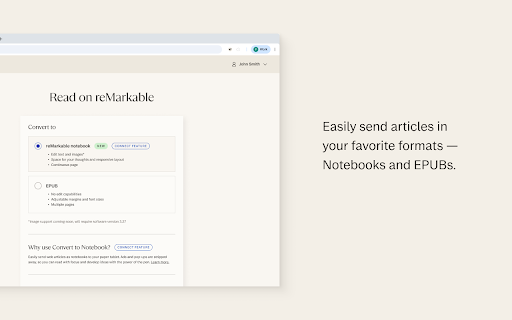
Read on reMarkable positions itself as the official bridge for sending web content to reMarkable tablets. It emphasizes a seamless reading experience by offering options to convert web articles into editable notebooks or EPUB files.

Inferred product pattern

First-party peripheral utility for hardware synchronization.

Review-backed pain points

The removal of the PDF print functionality has severely impacted user workflows, particularly for users who need to manage large documents or specific pages. Users also express strong frustration with invasive tab opening behavior upon browser startup.

Observed feature gaps

Lack of a native PDF printing alternative within the extension, forced account sync/pairing requests on every browser launch, and limited support for Linux users who rely on the browser extension as a substitute for the missing desktop app.

Tags
reMarkableE-readerDocument TransferProductivity
Target users

- reMarkable tablet owners

- Academic researchers

- Digital reading enthusiasts

Primary use cases

- Sending web articles to reMarkable

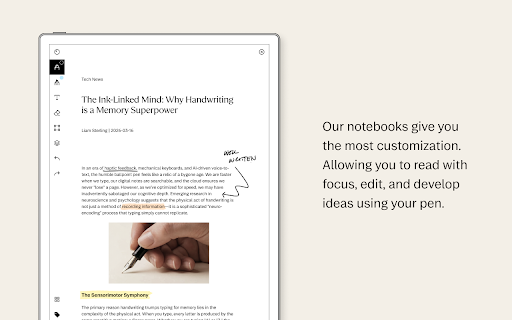
- Creating clean-format notebooks from web content

- Converting web pages to EPUB for offline reading

Positive themes

- Previously useful for daily workflows

- Convenient for moving digital content to paper tablets

Negative themes

- Removal of the 'print to PDF' feature

- Forceful login prompts and tab spawning on browser startup

- Degraded reliability after recent updates

- Privacy concerns regarding site-wide data access

Observed friction

- Performance complaints detected

- Privacy complaints detected

- While the extension is free, some advanced features like 'Convert to Notebook' require a paid 'Connect' subscription.

Evidence boundary: Evidence is drawn from 132 user reviews on the Chrome Web Store, which indicate a sharp decline in user satisfaction following a recent feature-removal update. The sample data is heavily skewed toward recent negative feedback following a software update, which may not reflect the experience of the entire user base over the long term.
Complaint summaries
Review-backed complaint signals grouped by operational area.

Support

Users report that updates have removed critical functionality without providing adequate alternatives, leading to a perception that the product has become 'useless'.

Reliability

Recent updates have resulted in widespread reports of the extension failing to function, requiring constant refreshes, or failing to pair despite troubleshooting.

Privacy

Users have expressed concern over the extension's recent request for permissions to read and change data on all websites.

Access & pricing

- Free entry with paid features

- Account required for core usage

- Free plan or free usage claimed

Store listing facts

Listing assets

- Screenshots: 5

- Videos: 0

- Languages: 1

Trust signals

- Privacy policy

- Developer contact

- Support link

Store metadata

- Version: 2.2.1

- Size: 17.1MiB

- Last updated:

Store description excerpt
Short excerpt from the public Chrome Web Store listing; full copy is available on the official store page.
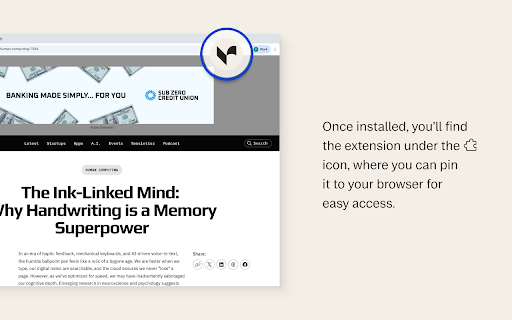
🔸It’s now easier than ever to send web articles to your paper tablet with Read on reMarkable.🔸 Choose between two different options to optimize your paper tablet experience: 🔹 Select reMarkable Notebook, and use Convert to Notebook to send web articles as notebooks to your paper tablet. Ads and pop-ups are stripped away, so you can read with focus and develop ideas with the power of the pen. 🔹 Select EPUB to keep the original content, but limit the ability to edit and arrange your content. You can also use Read on reMarkable from the print menu, by pressing command/control P or right clicking in your browser, then selecting Read on reMarkable. Good to know before installing: ▪️ If you don’t already have an account at my.remarkable.com, you’ll need to create one. ▪️Convert to Notebook requires a Connect subscription. ▪️ Once installed you’ll find the extension icon at the top right o…

Listing SEO keywords

Search intent keywords
Keyword signals for evaluating how users may discover, compare, or search for this extension category.

Core discovery

send to reMarkablereMarkable chrome extensionweb to reMarkablereMarkable sync

Comparison

reMarkable desktop app alternativesend articles to paper tablet

Problem

Read on reMarkable not workingreMarkable extension update issues

Alternative

Remarkable web clippersave to remarkable

Similar extensions

Jump to related discovery paths:

FAQ

What is Read on reMarkable mainly used for?
This extension enables users to push web content from their Chrome browser directly to their reMarkable paper tablet. It offers conversion modes to strip ads for distraction-free reading or to preserve original formatting, requiring a reMarkable account and, in some cases, a subscription.
What market signals stand out?
Established adoption with moderate review base. Last known update: 05/28/2026.
What should builders compare before entering this space?
Compare install concentration, rating quality, update recency, screenshots, developer portfolio, listing claims, and review-backed friction signals.
Is this page review-backed?
Backed by review samples. This page combines store metadata with selected review signals, while raw store metrics remain visible for comparison.

Screenshots

Read on reMarkable screenshot

Links

Recommended Chrome extensions

Related listings from the same category, trending peers, and the same publisher portfolio.

Browse workflow