Stop Motion Animator icon

Stop Motion Animator Chrome Extension Analysis

Niche Lifestyle & Gaming Hacks

Chrome extension ID: bjkfigedpppnggdamgeclieeekhbgjpc

This extension is a browser-based stop-motion tool that accesses a connected webcam to capture sequential frames. Users can assemble these frames to generate animation files that are processed and saved locally. It is designed to be highly accessible and lightweight, requiring no external software or heavy installation.

Version:3.0.0
Size:3.89MiB
Last updated:

Overview

Installs

60K+

Rating

2.7

19 reviews

Languages

39 locales

Includes Deutsch, English, Filipino, Indonesia...

Market analysis

Review-backed positioning, friction, and market signals for this Chrome extension.

Backed by review samples

Macro category

Niche Lifestyle & Gaming Hacks

Pricing friction

Low review signal

Complaint intensity

High review signal

Listing & review signals
Observed signals from store listing text and review samples.

Listing positioning

Stop Motion Animator positions itself as a simple, user-friendly extension for creating stop-motion animation sequences directly through a user's web camera. The developer highlights its applicability for beginners, kids, and school-aged students who want to build creative projects like Lego stop-motion movies. It supports saving creations locally in MP4 and WebM formats with an in-app help page to guide users.

Inferred product pattern

Hardware-interfacing media capture tool that relies on local browser APIs to compile and output video files.

Review-backed pain points

The most significant user pain point is structural instability during the save process, with users and school teachers reporting that completed stop-motion projects export as blank, unplayable files. In a classroom environment, this has led to entire student groups losing their work. Additionally, audio capture issues cause loops that are impossible to stop within the interface.

Observed feature gaps

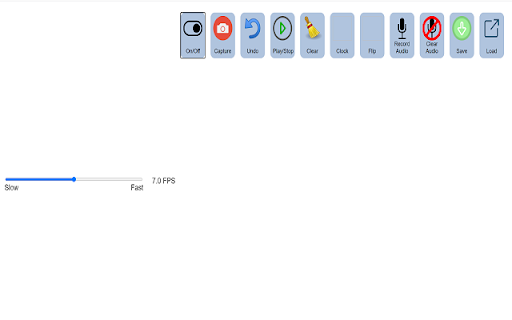
Reviews reveal a critical gap in core export validation, as the tool does not verify the integrity of the output WebM/MP4 file. There is also a complete absence of an frame-rate adjustment display (FPS configuration) and missing video preview controls before completing the export.

Tags
Stop MotionAnimation CreatorWebcam AnimatorVideo Maker
Target users

- Teachers and educators

- Elementary and middle school students

- Beginner animators

- Hobbyists and parents looking for activities for kids

Primary use cases

- Creating simple school project animations

- Making Lego stop-motion short skits

- Learning the fundamentals of animation as a beginner

Positive themes

- Ideal for beginner level and intro educational use

- Perfect for quick, low-stakes weekend activities for kids

- Completely free with straightforward basic utility when functional

Negative themes

- Exported video files saving as blank or corrupted formats

- Audio recording tools sync issues and playback loops that won't stop

- Lack of controls for basic frame rate or custom FPS settings

- Extension failing to launch when the toolbar icon is clicked

Observed friction

- Performance complaints detected

- No pricing complaints exist in the user feedback, as the tool is entirely free to use without gated paywalls or hidden costs.

Evidence boundary: Analysis is based on the official Chrome Web Store listing data, self-reported developer updates regarding output fixes, and user reviews detailing school project experiences, audio errors, and unplayable video exports. The review sample represents a small cohort of school-age users and educators, with limited recent data to verify if browser security updates have further altered webcam behaviors.
Complaint summaries
Review-backed complaint signals grouped by operational area.

Support

Users, particularly educators, express helplessness in the review section, begging the developers to fix save bugs, indicating a lack of real-time support channels.

Reliability

Reliability is highly criticized, with multiple reports of saved files being unplayable, audio sync failures during the recording countdown, and the extension failing to open upon user click.

Privacy

No privacy or security concerns were flagged in the reviewed samples.

Access & pricing

- Free usage observed

- No account requirement observed

- Free plan or free usage claimed

Store listing facts

Listing assets

- Screenshots: 2

- Videos: 0

- Languages: 39

Trust signals

- Developer contact

- Official website

Store metadata

- Version: 3.0.0

- Size: 3.89MiB

- Last updated:

Store description excerpt
Short excerpt from the public Chrome Web Store listing; full copy is available on the official store page.
This is a simple tool for creating stop motion animation sequences using your web camera. If you want to make stop motion animation videos, you should install our software. Animation sequences are saved to a video file in the webm format. Stop motion is an animated filmmaking technique in which objects are physically manipulated in small increments between individually photographed frames so that they will appear to exhibit independent motion or change when the series of frames is played back. If you are STUCK, please READ the help page inside the extension! We made a demo video on the help page which explains exactly HOW to use the software extension. Change Log 1.0.3 Fixed a bug where you could not load a previously saved video. To begin using this software, here is what you need to do. 1.0.4 Read the help page inside the extension if you are stuck with using this software. 1.0.5 Fixe…

Listing SEO keywords

Search intent keywords
Keyword signals for evaluating how users may discover, compare, or search for this extension category.

Core discovery

free stop motion software chromewebcam stop motion animatorschool animation creator extensionsimple stop motion tool online

Comparison

stop motion animator vs stop motion studio

Problem

stop motion video corruptedstop motion extension blank filestop motion tool audio won't stop

Alternative

Stop Motion StudioLego animator apponline stop motion camera

Similar extensions

Jump to related discovery paths:

FAQ

What is Stop Motion Animator mainly used for?
This extension is a browser-based stop-motion tool that accesses a connected webcam to capture sequential frames. Users can assemble these frames to generate animation files that are processed and saved locally. It is designed to be highly accessible and lightweight, requiring no external software or heavy installation.
What market signals stand out?
Visible niche traction with limited review base. Last known update: 03/12/2022.
What should builders compare before entering this space?
Compare install concentration, rating quality, update recency, screenshots, developer portfolio, listing claims, and review-backed friction signals.
Is this page review-backed?
Backed by review samples. This page combines store metadata with selected review signals, while raw store metrics remain visible for comparison.

Screenshots

Stop Motion Animator screenshot

Links

Recommended Chrome extensions

Related listings from the same category, trending peers, and the same publisher portfolio.

Browse workflow
Split Screen for Google Chrome icon

Split Screen for Google Chrome

Free Software Extensions

You can easily split and separate tabs, split interface layout, and resize tabs by columns and rows. Multi-monitor support

Installs

300K+

Rating

3.7

Auto Admit for Google Meet icon

Auto Admit for Google Meet

Free Software Extensions

Automatically admit join requests from external guests to Google Meet

Installs

100K+

Rating

4.2

夸克网盘-网页嗅探 icon

夸克网盘-网页嗅探

广州市动悦信息技术有限公司

识别到网页资源时,可一键存夸克网盘

Installs

3.0M+

Rating

1.7

Mendeley Web Importer icon

Mendeley Web Importer

Mendeley

Fast, convenient import of references and PDFs to your Mendeley Reference Manager library.

Installs

3.0M+

Rating

2.3

Enable local file links icon

Enable local file links

Takashi Sugimoto (tksugimoto)

Make it possible to open by click a link to a local file that is disabled by Chrome.

Installs

3.0M+

Rating

3.9

Pop up blocker for Chrome™ - Poper Blocker icon

Pop up blocker for Chrome™ - Poper Blocker

dingosolutions

Block popups, ads, cookie requests, trackers, notifications, ads on social media & more. A clean browsing experience starts today.

Installs

2.0M+

Rating

4.8

Momentum icon

Momentum

Momentum

Transform your browser into a beautifully designed tab that helps you feel calm, keep focus, and stay energized.

Installs

2.0M+

Rating

4.5

Google Scholar PDF Reader icon

Google Scholar PDF Reader

scholar-chrome-extensions

Supercharge your paper reading: follow references, skim outline, jump to figures, cite and save.

Installs

2.0M+

Rating

4.1

Keeper® Password Manager & Digital Vault icon

Keeper® Password Manager & Digital Vault

Keeper Security

Generate strong passwords, autofill and protect your confidential info with zero-knowledge encryption.

Installs

2.0M+

Rating

4.8

AI Grammar Checker & Paraphraser – LanguageTool icon

AI Grammar Checker & Paraphraser – LanguageTool

lt-extension-publisher

Instantly Enhance Your Texts with LanguageTool’s Grammar Checker and Paraphrasing Tool

Installs

2.0M+

Rating

4.7