Google Docs Quick Create Chrome Extension Analysis
Automation & Workflow EfficiencyChrome extension ID: bldgenmjegcnjebiongilahhcjldgmlm
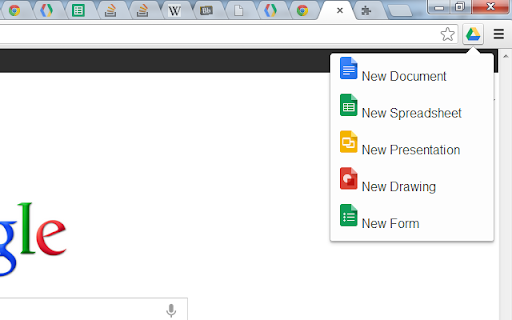
This Chrome extension adds a direct menu to the browser bar, allowing users to rapidly generate new documents for various Google Workspace applications, including Docs, Sheets, Slides, Forms, and Drawings. It integrates with existing Google Drive accounts, supporting both personal and organizational domains.
Overview
Installs
100K+
Rating
★ 4.4
325 reviews
Languages
3 locales
Includes Deutsch, English, español
Market analysis
Review-backed positioning, friction, and market signals for this Chrome extension.
Macro category
Automation & Workflow Efficiency
Pricing friction
Low review signal
Complaint intensity
High review signal
Listing positioning
The extension positions itself as a simple menu in the browser bar to quickly create new Google Docs, Spreadsheets, Presentations, Forms, and Drawings. It highlights support for Google Drive and Google Apps domains, emphasizing speed and direct access.
Inferred product pattern
A free, open-source browser extension designed to provide a rapid access point for creating new documents within Google Workspace, leveraging a user's logged-in Google accounts.
Review-backed pain points
Users experience significant frustration with the extension defaulting to the wrong Google account, especially when using separate personal and work/school profiles. Critical functional issues like page crashes, incorrect cursor placement during typing, and documents not saving or being findable also severely hinder usability.
Observed feature gaps
Reviewers note the absence of an option to select the destination folder at the time of document creation and a lack of offline document creation functionality. There's also feedback regarding the generic icon and a desire for customization.
- Individuals who frequently create new Google Workspace documents
- Professionals or students managing multiple Google accounts (e.g., personal, work, school)
- Quickly initiating new Google Docs, Sheets, or Slides without navigating to Google Drive
- Streamlining the creation of Google Forms or Drawings from any browser tab
- Convenience and speed of creating new Google Workspace documents directly from the browser bar
- The core functionality 'works as advertised' for some users
- Persistent issues with creating documents in the incorrect Google account when multiple accounts are logged in
- Technical performance problems, including page crashes and cursor input malfunctions during typing
- Documents failing to save or be discoverable after creation via the extension
- Desire for additional features like folder selection at creation or offline document capabilities
- Performance complaints detected
- Review-backed pricing friction is not available as the extension appears to be free and open-source.
Support
Review-backed support complaints are not available.
Reliability
Users report critical reliability issues, including browser page crashes, incorrect cursor placement and extra spaces appearing during typing, and newly created documents not saving or being discoverable. A major recurring problem is the extension creating documents under the wrong Google account, causing significant workflow disruption.
Privacy
Review-backed privacy complaints are not available.
- Free usage observed
- Login needed for core features
- Free plan or free usage claimed
Store listing facts
- Screenshots: 1
- Videos: 0
- Languages: 3
- Developer contact
- Version: 0.2.0
- Size: 39.51KiB
- Last updated:
Listing SEO keywords
Core discovery
Comparison
Problem
Alternative
Similar extensions
Jump to related discovery paths:
FAQ
Screenshots