Email Tracker + Pixelblock Detector & Blocker icon

Email Tracker + Pixelblock Detector & Blocker Chrome Extension Analysis

Automation & Workflow Efficiency

Chrome extension ID: bnompdfnhdbgdaoanapncknhmckenfog

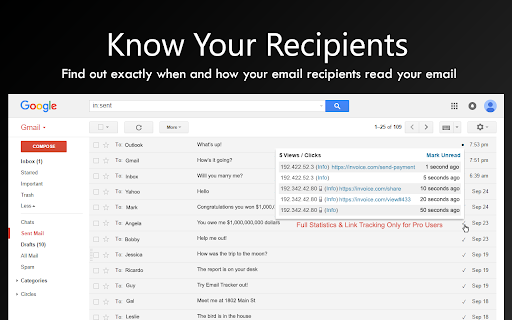
This browser extension integrates directly with web-based email clients to notify users when sent emails are opened or links are clicked. Additionally, it features a security layer that detects and disables tracking pixels embedded by third parties, protecting the user's privacy.

Developer:Email Tracker
Version:5.0.58
Size:493KiB
Last updated:

Overview

Installs

300K+

Rating

4.6

1,160 reviews

Languages

1 locales

Includes English

Market analysis

Review-backed positioning, friction, and market signals for this Chrome extension.

Backed by review samples

Macro category

Automation & Workflow Efficiency

Pricing friction

Low review signal

Complaint intensity

High review signal

Listing & review signals
Observed signals from store listing text and review samples.

Listing positioning

The extension positions itself as a dual-purpose tool that tracks outgoing email opens and clicks while simultaneously blocking incoming tracking pixels for user privacy. It emphasizes cross-platform compatibility with major email providers and advertises unlimited free tracking with a professional tier for advanced analytics.

Inferred product pattern

Email engagement tracking and privacy protection utility for web mail.

Review-backed pain points

Users report that the extension intermittently stops working, fails to trigger notifications for email opens, and specifically struggles with Yahoo Mail integration despite claims of support.

Observed feature gaps

Lack of granular recipient data in the Pro version, reported reliability issues, and persistent synchronization errors between the extension and the web mail interface.

Tags
Email TrackingPrivacy ProtectorPixel BlockerGmail ToolsSales Productivity
Target users

- Sales professionals

- Business owners

- Freelancers

- Privacy-conscious email users

Primary use cases

- Tracking email open rates

- Monitoring link engagement

- Blocking third-party email tracking pixels

- Privacy protection

Positive themes

- Reliable open notifications

- Accurate link tracking

- Useful dual functionality (tracking + blocking)

- No intrusive signature branding in the free tier

Negative themes

- System becoming non-functional over time

- Inaccurate tracking claims for specific providers (Yahoo)

- Issues with Pro version value proposition

- Technical failures after updates

Observed friction

- Refund complaints detected

- Performance complaints detected

- Users express frustration regarding the Pro version, specifically citing dissatisfaction with the value of paid features and claims of misleading feature descriptions.

Evidence boundary: Evidence is derived from 11 public reviews and the official Chrome Web Store listing; it combines high praise for core functionality with significant complaints regarding recent performance instability. Review data shows recent technical volatility; the positive sentiment reflects long-term usage, whereas the negative sentiment reflects recent service interruptions.
Complaint summaries
Review-backed complaint signals grouped by operational area.

Support

Evidence suggests inconsistent performance and frustration with lack of updates or fixes for technical breakages.

Reliability

Frequent reports of the tool failing to track emails entirely, with some users stating it has ceased functioning reliably over the past few months.

Privacy

None; users generally view the privacy-blocking features positively.

Access & pricing

- Free entry with paid features

- Login needed for core features

- Limited free usage observed

Store listing facts

Listing assets

- Screenshots: 5

- Videos: 0

- Languages: 1

Trust signals

- Privacy policy

- Developer contact

- Official website

- Support link

Store metadata

- Version: 5.0.58

- Size: 493KiB

- Last updated:

Store description excerpt
Short excerpt from the public Chrome Web Store listing; full copy is available on the official store page.
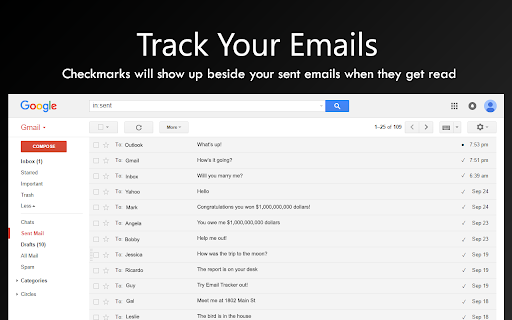
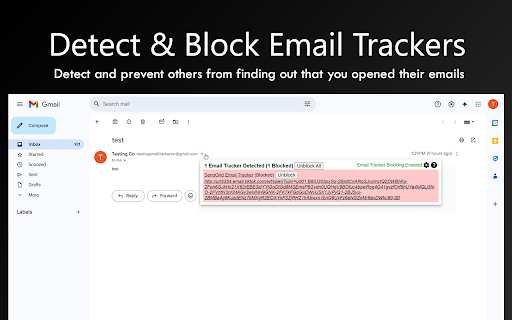
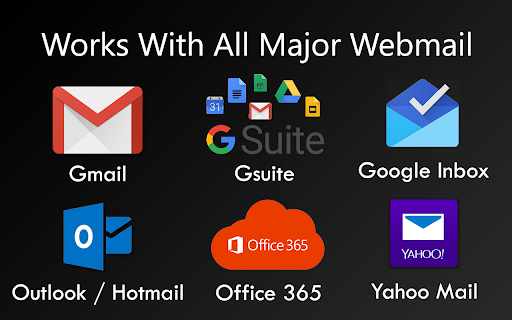
Find out if your emails were read. Simply install and any future emails are automatically tracked. A circle will appear when the tracking is enabled on the sent email and a checkmark will appear when it has been read. Works for unlimited email accounts and sent emails. Works with Gmail, Outlook / Hotmail, Office 365 Outlook, and Yahoo Mail. For compatibility with other email clients contact us at [email protected] Now with Email Tracker Detector and Blocker (PixelBlock / Ugly Email Privacy Protector). Email Tracker Blocker detects and automatically blocks other email tracking pixels. This prevents others from seeing that you opened their emails. ​Email tracker does not ever store or transfer your email contents in order to ensure your privacy. Emails sent to only yourself are not tracked. If you want to test the extension send an email to another email account. Upgrade to pro an…

Listing SEO keywords

Search intent keywords
Keyword signals for evaluating how users may discover, compare, or search for this extension category.

Core discovery

email tracker for gmailtrack email opens outlookemail pixel blockerdetect email trackingfree email tracking extension

Comparison

HubSpot email tracking alternativeMailtrack alternative

Problem

email tracker not workingemail tracking extension issueshow to block email tracking

Alternative

email read receiptsprivacy protector for email

Similar extensions

Jump to related discovery paths:

FAQ

What is Email Tracker + Pixelblock Detector & Blocker mainly used for?
This browser extension integrates directly with web-based email clients to notify users when sent emails are opened or links are clicked. Additionally, it features a security layer that detects and disables tracking pixels embedded by third parties, protecting the user's privacy.
What market signals stand out?
Established adoption with substantial review base. Last known update: 06/02/2026.
What should builders compare before entering this space?
Compare install concentration, rating quality, update recency, screenshots, developer portfolio, listing claims, and review-backed friction signals.
Is this page review-backed?
Backed by review samples. This page combines store metadata with selected review signals, while raw store metrics remain visible for comparison.

Screenshots

Email Tracker + Pixelblock Detector & Blocker screenshot

Links

Recommended Chrome extensions

Related listings from the same category, trending peers, and the same publisher portfolio.

Browse workflow