Image downloader - picture and photos saver icon

Image downloader Chrome Extension Analysis

Video & Image Downloaders

Store listing title: Image downloader - picture and photos saver

Chrome extension ID: cbnhnlbagkabdnaoedjdfpbfmkcofbcl

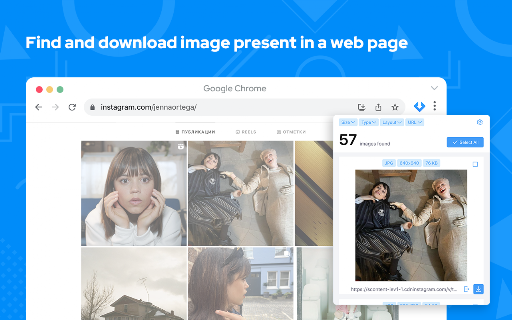
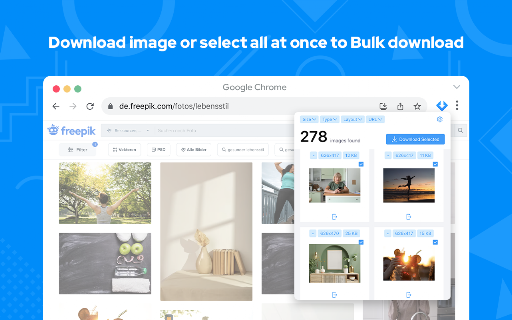
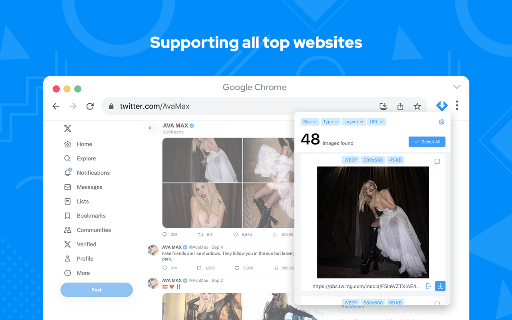
This Chrome extension allows users to easily find, browse, and download images from any website. It offers features such as bulk downloading, filtering by image size and type (PNG, JPEG, SVG, WEBP), selecting individual images, and supporting major social media platforms.

Developer:Image Saver App
Version:1.0.6
Size:126KiB
Last updated:

Overview

Installs

200K+

Rating

4.8

993 reviews

Languages

8 locales

Includes English, English (United States), español, português (Brasil)...

Market analysis

Review-backed positioning, friction, and market signals for this Chrome extension.

Backed by review samples

Macro category

Video & Image Downloaders

Pricing friction

Low review signal

Complaint intensity

Moderate review signal

Listing & review signals
Observed signals from store listing text and review samples.

Listing positioning

This Chrome extension positions itself as a simple, fast, and reliable solution for finding and downloading images from any web page. It highlights its bulk download capabilities, extensive filtering options by pixel, format, and URL, and explicit claim of being 'complete free' unlike competitors.

Inferred product pattern

A utility-focused Chrome extension that simplifies image collection from websites, primarily through bulk download capabilities, aiming for a free and easy-to-use experience.

Review-backed pain points

Users express frustration when the extension downloads low-resolution thumbnails instead of the desired full-quality images, particularly when trying to save photo albums. There are also minor UI complaints regarding the management of image selections and the process for downloading individual images on busy pages.

Observed feature gaps

A key feature gap is the inconsistent ability to download full-resolution images, especially when web pages primarily display thumbnails. Improvements to the individual image selection process and the addition of a 'clear selection' button would enhance user experience.

Tags
Image DownloaderPhoto SaverBulk DownloadWeb ImagesMedia Capture
Target users

- Content Creators

- Web Designers

- Digital Marketers

- Researchers

- Casual internet users needing to save images

Primary use cases

- Bulk downloading all images from a web page

- Filtering and selecting specific image types or sizes for download

- Saving images from websites that restrict direct downloads

- Collecting visual assets for personal or professional projects

Positive themes

- Ease of use and intuitive interface

- Fast and efficient bulk image downloading

- Reliability and consistent performance over time

- Ability to download from various websites, including those that typically restrict image saving

- Helpful filtering options and image size display for quality selection

- The product being completely free of charge

Negative themes

- Downloads thumbnails or low-quality images instead of full-resolution versions

- User interface could be improved for individual image selection, especially on image-heavy pages

- Lack of a 'clear selection' button for selected images

Observed friction

- The product is advertised as completely free, and reviews confirm this, indicating no pricing friction.

Evidence boundary: Analysis is based on the Chrome Web Store listing, including the title, short and long descriptions, and a sample of 11 user reviews (2 low-rating, 9 high-rating/helpful) available in English, Russian, Spanish, and Portuguese. The available review samples are limited in number and language diversity. There are conflicting reports on the ability to download full-quality images versus thumbnails, which would require more extensive testing or review data to fully clarify.
Complaint summaries
Review-backed complaint signals grouped by operational area.

Support

Review-backed data is not available for support or account-related complaints.

Reliability

While some users report issues with downloading full-quality images, the majority of positive reviews emphasize the extension's reliability and fast performance for bulk downloads.

Privacy

Review-backed data is not available for privacy complaints.

Access & pricing

- Free usage observed

- No account requirement observed

- Free plan or free usage claimed

Store listing facts

Listing assets

- Screenshots: 4

- Videos: 0

- Languages: 8

Trust signals

- Privacy policy

- Developer contact

Store metadata

- Version: 1.0.6

- Size: 126KiB

- Last updated:

Store description excerpt
Short excerpt from the public Chrome Web Store listing; full copy is available on the official store page.
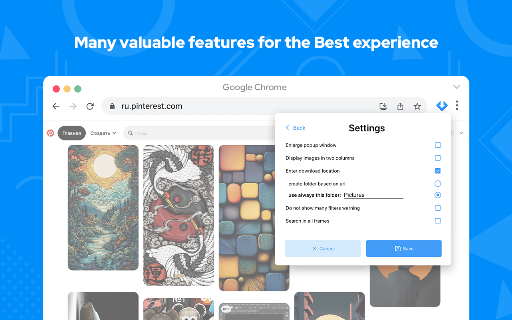
Image Downloader let's make your life easier just in one click. This extension allows you to download all the images from the web pages in simple manner. This Chrome extension does not weigh a lot and simply does its job - download images. Help us to improve our product and leave a comment or request. Image Downloader is simple, fast, reliable and easy to work with. If you want instantly download image then you definitely should install our new and amazing Chrome extension. Don't forget to share this extension with friends. With this Picture Downloader you can find, browse and download all the images present in a web page. In addition you can: ➖ filter based on pixel width and height ➖ multiple formats available including PNG, JPEG, SVG, WEBP ➖ filter based on url ➖ bulk download all images in once ➖ select what images you want to download ➖ check the size of each image ➖ copy the url o…

Listing SEO keywords

Search intent keywords
Keyword signals for evaluating how users may discover, compare, or search for this extension category.

Core discovery

image downloader chromebulk image saverdownload all images from websitephoto downloader extensionsave images from any page

Comparison

image downloader vsbest bulk image downloaderfree image downloader extension

Problem

cannot download images from websitewebsite image save blockedextract images from webpagelow quality image download

Alternative

image downloader alternativephoto saver extension like

Similar extensions

Jump to related discovery paths:

FAQ

What is Image downloader mainly used for?
This Chrome extension allows users to easily find, browse, and download images from any website. It offers features such as bulk downloading, filtering by image size and type (PNG, JPEG, SVG, WEBP), selecting individual images, and supporting major social media platforms.
What market signals stand out?
Established adoption with moderate review base. Last known update: 01/23/2025.
What should builders compare before entering this space?
Compare install concentration, rating quality, update recency, screenshots, developer portfolio, listing claims, and review-backed friction signals.
Is this page review-backed?
Backed by review samples. This page combines store metadata with selected review signals, while raw store metrics remain visible for comparison.

Screenshots

Image downloader - picture and photos saver screenshot

Links

Recommended Chrome extensions

Related listings from the same category, trending peers, and the same publisher portfolio.

Browse workflow
Pop up blocker for Chrome™ - Poper Blocker icon

Pop up blocker for Chrome™ - Poper Blocker

dingosolutions

Block popups, ads, cookie requests, trackers, notifications, ads on social media & more. A clean browsing experience starts today.

Installs

2.0M+

Rating

4.8

Momentum icon

Momentum

Momentum

Transform your browser into a beautifully designed tab that helps you feel calm, keep focus, and stay energized.

Installs

2.0M+

Rating

4.5

Google Scholar PDF Reader icon

Google Scholar PDF Reader

scholar-chrome-extensions

Supercharge your paper reading: follow references, skim outline, jump to figures, cite and save.

Installs

2.0M+

Rating

4.1

Keeper® Password Manager & Digital Vault icon

Keeper® Password Manager & Digital Vault

Keeper Security

Generate strong passwords, autofill and protect your confidential info with zero-knowledge encryption.

Installs

2.0M+

Rating

4.8

AI Grammar Checker & Paraphraser – LanguageTool icon

AI Grammar Checker & Paraphraser – LanguageTool

lt-extension-publisher

Instantly Enhance Your Texts with LanguageTool’s Grammar Checker and Paraphrasing Tool

Installs

2.0M+

Rating

4.7

Snow Web Application Metering icon

Snow Web Application Metering

snow_chrome_extensions

This extension tracks web application use for the purpose of license compliance and cost optimization. www.snowsoftware.com/browser

Installs

2.0M+

Rating

1.3

Sound Booster - increase volume up icon

Sound Booster - increase volume up

Sound-ultimate.com

Volume Booster helps boost sound video or music on any tab! Increase volume and bass booster, equalizer. Volume control.

Installs

2.0M+

Rating

4.5

Evernote Web Clipper icon

Evernote Web Clipper

Evernote

Use the Evernote extension to save things you see on the web into your Evernote account.

Installs

2.0M+

Rating

4.7

Microsoft Defender Browser Protection icon

Microsoft Defender Browser Protection

Microsoft Corporation

Protect yourself against online threats, like phishing and malicious websites, with real-time protection from Microsoft.

Installs

2.0M+

Rating

4.1

Визуальные закладки icon

Визуальные закладки

Yandex

Визуальные закладки – это страница, на которой собраны ваши любимые сайты

Installs

2.0M+

Rating

3.4