WhatRuns icon

WhatRuns Chrome Extension Analysis

Developer & Designer Tools

Chrome extension ID: cmkdbmfndkfgebldhnkbfhlneefdaaip

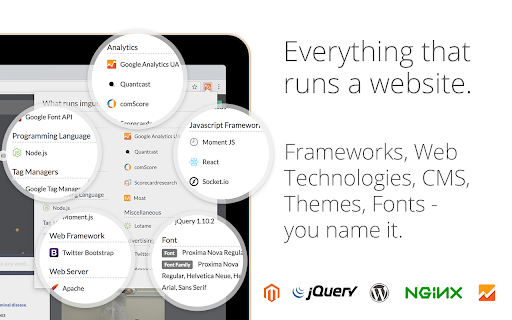
WhatRuns is a browser extension that identifies the software, frameworks, libraries, and tools powering any website. It provides users with a comprehensive view of a site's technology stack, including CMS, analytics, and font choices, designed to assist developers, designers, and curious students.

Developer:Ownedit Ltd
Version:1.10.0
Size:1.9MiB
Last updated:

Overview

Installs

400K+

Rating

4.2

825 reviews

Languages

24 locales

Includes Deutsch, English, Indonesia, Nederlands...

Market analysis

Review-backed positioning, friction, and market signals for this Chrome extension.

Backed by review samples

Macro category

Developer & Designer Tools

Pricing friction

Low review signal

Complaint intensity

High review signal

Listing & review signals
Observed signals from store listing text and review samples.

Listing positioning

WhatRuns positions itself as a lightweight, high-accuracy alternative to established tech-profiling tools. It emphasizes its ability to detect specific components like fonts, WordPress plugins, and themes while offering a notification feature for technology stack changes on followed websites.

Inferred product pattern

Technology stack identifier and competitive intelligence tool.

Review-backed pain points

Users report significant alarm regarding data harvesting practices (scraping full page HTML and potentially sensitive data) and issues where the extension reportedly breaks functionality on active websites.

Observed feature gaps

Lack of clarity regarding data privacy practices and inconsistent detection accuracy across various tech stacks compared to competitor benchmarks.

Tags
Technology ProfilerWebsite InspectorTech Stack DetectorDeveloper UtilityWebsite Analysis
Target users

- Web Developers

- Web Designers

- Digital Marketers

- Tech Students

Primary use cases

- Competitive analysis of website tech stacks

- Learning web development through technology identification

- Monitoring tech stack changes on specific websites

- Identifying themes and plugins used on WordPress sites

Positive themes

- Detailed insights into frontend technologies

- Useful for learning and curiosity

- Good UI/UX design

- Effective detection of fonts and UI elements

Negative themes

- Serious privacy concerns regarding data collection

- Inaccurate technology detection

- Potential for exposing non-public/test websites

- Interference with website code and functionality

Observed friction

- Performance complaints detected

- Privacy complaints detected

- No specific pricing complaints found; friction is primarily focused on security and reliability.

Evidence boundary: Evidence is drawn from 815 user reviews, highlighting a dichotomy between positive utility for web research and severe negative feedback regarding privacy and technical stability. Review data spans several years and includes reports of behavior that may have been addressed in later updates or remains as persistent design choices.
Complaint summaries
Review-backed complaint signals grouped by operational area.

Support

Support-related complaints are not explicitly noted, but concerns about opaque data collection practices are prominent.

Reliability

Users report the tool occasionally fails to load, requires page reloads, provides inaccurate data, and interferes with website functionality.

Privacy

Significant user reports allege the extension collects full page HTML, sensitive user data, and publishes visited URLs to a public index.

Access & pricing

- No clear monetization signal

- No account requirement observed

- Free plan or free usage claimed

Store listing facts

Listing assets

- Screenshots: 3

- Videos: 1

- Languages: 24

Trust signals

- Privacy policy

- Developer contact

- Official website

Store metadata

- Version: 1.10.0

- Size: 1.9MiB

- Last updated:

Store description excerpt
Short excerpt from the public Chrome Web Store listing; full copy is available on the official store page.
WhatRuns extension is one click away for you to find technologies used on any website you visit. From Developer Tools and Ad Networks to Wordpress Plugins and Themes, we detect even the new and upcoming tools and services. Not just that - you can follow websites so that you get notified when they use new technologies or remove existing ones. FAQ How do you know what runs a website? Every technology leaves a pattern on the websites it is being used. WhatRuns' algorithm recognizes these patterns to detect the tech stack of a particular website. What all things you identify on a website? WhatRuns detects almost everything that runs a website - frameworks, web technologies, CMSs (and its plugins), themes and fonts to name a few categories. How is WhatRuns different from extensions like Wappalyzer, BuiltWith, Datanyze and Ghostery? While all of these are good old products, WhatRuns is less h…

Listing SEO keywords

Search intent keywords
Keyword signals for evaluating how users may discover, compare, or search for this extension category.

Core discovery

WhatRuns Chrome extensionfind website technology stackdetect wordpress pluginsweb technology profiler

Comparison

WhatRuns vs Wappalyzertech stack detector alternatives

Problem

WhatRuns privacy issuesdetect website tools not working

Alternative

Wappalyzer alternativeBuiltWith alternatives

Similar extensions

Jump to related discovery paths:

FAQ

What is WhatRuns mainly used for?
WhatRuns is a browser extension that identifies the software, frameworks, libraries, and tools powering any website. It provides users with a comprehensive view of a site's technology stack, including CMS, analytics, and font choices, designed to assist developers, designers, and curious students.
What market signals stand out?
Established adoption with moderate review base. Last known update: 04/27/2026.
What should builders compare before entering this space?
Compare install concentration, rating quality, update recency, screenshots, developer portfolio, listing claims, and review-backed friction signals.
Is this page review-backed?
Backed by review samples. This page combines store metadata with selected review signals, while raw store metrics remain visible for comparison.

Screenshots

WhatRuns screenshot
WhatRuns screenshot
WhatRuns screenshot

Links

Website: whatruns.com

Privacy policy: https://www.whatruns.com/privacy

Videos: Watch

Recommended Chrome extensions

Related listings from the same category, trending peers, and the same publisher portfolio.

Browse developer